
Overview: ML on AWS
Last updated on 2026-11-02 | Edit this page
Estimated time: 15 minutes
Overview
Questions
- When is cloud compute the right tool for a researcher who already has a cluster or a workstation?
- What do SageMaker and Bedrock add on top of renting a machine?
Objectives
- Compare cloud compute with campus HPC and lab hardware on hardware generation, cost, control, job orchestration and efficiency.
- Describe what S3, a notebook instance, SageMaker jobs and Bedrock each do in this lesson.
- Say when a SageMaker job is the tool and when a Bedrock call is.
Most researchers already have somewhere to run ML, a campus HPC cluster, a departmental GPU server, or their own workstation. The cloud is another option, with its own trade-offs in cost, performance, flexibility and control. This episode compares the options, then introduces the four AWS pieces the lesson is built from, S3, a notebook instance, SageMaker jobs and Bedrock.
Cloud vs. the cluster down the hall
Cloud computing means renting compute as needed instead of buying and maintaining it. Whether that is the better choice depends on the workload and on what you already have.
Hardware and cost. A campus cluster or lab server is used for five or more years, so its GPUs are whatever was current when it was bought. Cloud providers offer each new generation soon after release, Blackwell B200 and GB200 today, with Vera Rubin announced for cloud deployment in 2026. The gains between generations are large. NVIDIA’s B200 has more than twice the memory and about seven times the bf16 arithmetic of the A100 on about two and a half times the power, so far more work per watt on paper, with the real speedup depending on the workload (NVIDIA data sheets). The financial trade-off comes down to utilization. Owned hardware costs the same busy or idle, so it is the cheaper option when it stays busy. Rented hardware is billed per second and only while a job runs, so it is the cheaper option for occasional or bursty work, and renting GPUs around the clock soon costs more than owning them.
Control and data. Local hardware gives you control over the software stack, the network and where the data sits, with no quotas and no transfer charges. In the cloud you work within account permissions and service quotas, data moved in or out crosses the network and may be charged, and sensitive data needs a governance check before it leaves campus. Cost needs attention too. An idle rented GPU costs the same as a busy one, so every job in this lesson has a runtime cap, and every resource is stopped when the work is done.
Job orchestration. On a cluster the researcher does the plumbing. You write the batch scripts, load the right modules or build the environment, wait in the queue, and stitch preprocessing, training, evaluation and tuning together as separate submissions, with a scheduler that knows nothing about any of them. A managed service does that part. In SageMaker a job is a script, a container with the framework installed, an instance type and the data’s location, launched from Python. The service starts the machine, runs the script, saves the outputs and shuts the machine down, and a hyperparameter tuning job launches and tracks dozens of training jobs on its own. For a researcher without a sysadmin, that is often the strongest reason to use the cloud, and it is what most of this lesson is about.
-
Energy efficiency. The comparison depends on the hardware and on how well it is shared. Two things matter most.
Data center overhead. Not all of the electricity entering a data center reaches its computers. Some goes to cooling and power distribution. Large facilities run by AWS and by national HPC centers report about 15% on top of what the computing hardware draws, against 60 to 80% for typical enterprise and departmental server rooms (Uptime Institute, 2025). Cooling matters more as GPUs draw more power. The newest systems, such as NVIDIA’s 72-GPU GB200 racks, need liquid cooling, which removes heat with less energy than air but needs plumbing most campus data centers do not have, and the large cloud and HPC facilities are the ones that can afford to install it. These figures describe the building, not the GPUs in it.
Hardware utilization. A GPU does no useful work while idle. A lab’s own GPUs sit unused between experiments. A campus cluster does better, because it pools demand across every group at the institution, and the national pools, such as CHTC‘s OSPool and the National Research Platform, do better still, because they pool it across institutions, often at no direct cost to the researcher. Cloud providers pool demand across a larger customer base and across time zones, so a GPU one group releases is running someone else’s job minutes later. Providers do not publish enough utilization data for a direct comparison. The research pools get much of the same sharing benefit. What they do not have is the providers’ hardware budget, so they adopt each new GPU generation more slowly.
There is no option that is better in every case. Campus and national research computing is often the most economical place to start, above all where it is free to the researcher. The cloud becomes the right tool when a project needs newer hardware, extra capacity for a while, or the orchestration that a managed service does for you and a cluster leaves to you.
S3, the notebook instance, SageMaker and Bedrock
AWS offers many services. This workshop uses four pieces that work together.
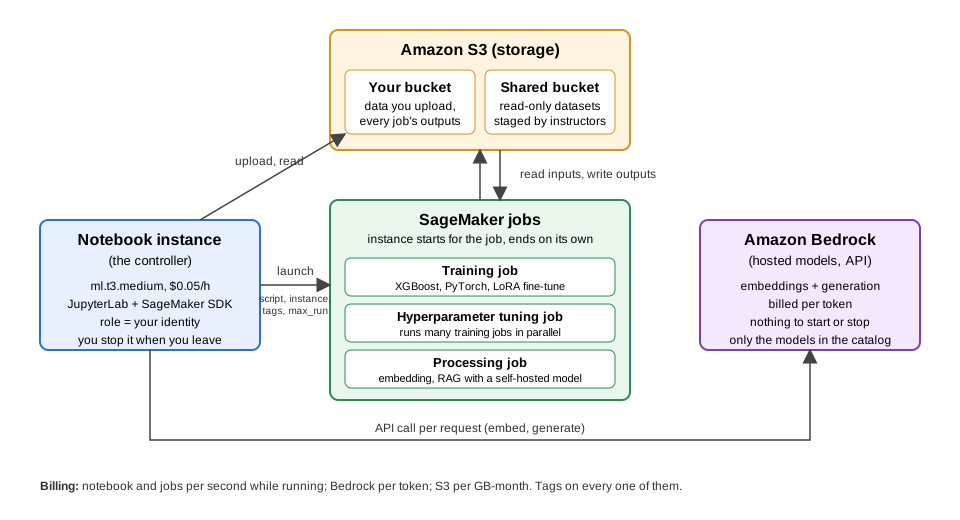
The workflow is the diagram. Datasets and results live in S3. We work from a small JupyterLab notebook instance. SageMaker launches the compute-heavy jobs on separate machines. For tasks a model AWS already hosts can do, we call Bedrock instead.
The difference between SageMaker and Bedrock is control against convenience. SageMaker runs your own code on compute you choose. Bedrock runs models AWS hosts, with no infrastructure of yours underneath.
How the episodes use them
Through the workshop, code is written in JupyterLab, datasets and results go to S3, training and other heavy jobs go to SageMaker, and Bedrock is called when a hosted model is enough. None of this needs the notebook instance. Everything here can be done from Python on your own computer or from the AWS command line, and the optional The Same Jobs from the Terminal episode shows how.
- The cloud offers the current GPU generation on demand, billed per second while a job runs. Campus and national research computing is often cheaper for sustained work, and free to many researchers.
- Cost and energy efficiency depend on the hardware generation, how busy it is kept, and the data center’s overhead.
- S3 stores the datasets and results. A small SageMaker notebook instance is the workspace.
- SageMaker runs training, tuning, processing and inference jobs on instances that exist only for the job.
- Bedrock gives API access to hosted models, with no GPU instance to manage.