
Overview of RAG Workflows on AWS
Last updated on 2026-10-21 | Edit this page
Estimated time: 15 minutes
Retrieval-Augmented Generation (RAG) on AWS
Retrieval-Augmented Generation (RAG) is a pattern where you retrieve relevant context from your data and then generate an answer using that context. Unlike model training, a standard RAG workflow does not fine‑tune or train a model — it combines retrieval + inference only.
This episode introduces the major ways to build RAG systems on AWS, explains why Amazon Bedrock should be your default, and prepares us for later episodes where we experiment with each approach.
Overview
Questions
- What is Retrieval‑Augmented Generation (RAG)?
- What are the main architectural options for running RAG on AWS?
- Why is Bedrock the recommended default, and when should you reach for SageMaker instead?
- How do the billing models differ, and what does it cost if you forget to shut something down?
Objectives
- Understand that RAG does not require training or fine‑tuning a model.
- Recognize the major architectural patterns for RAG systems on AWS.
- Explain why pay‑per‑token Bedrock inference is the safe default for most research RAG work.
- Identify the specific situations where self‑managed GPU compute (Processing Jobs, notebook GPUs, or endpoints) is actually worth it.
- Understand the core cost and control trade‑offs that drive which approach to use.
What is RAG?
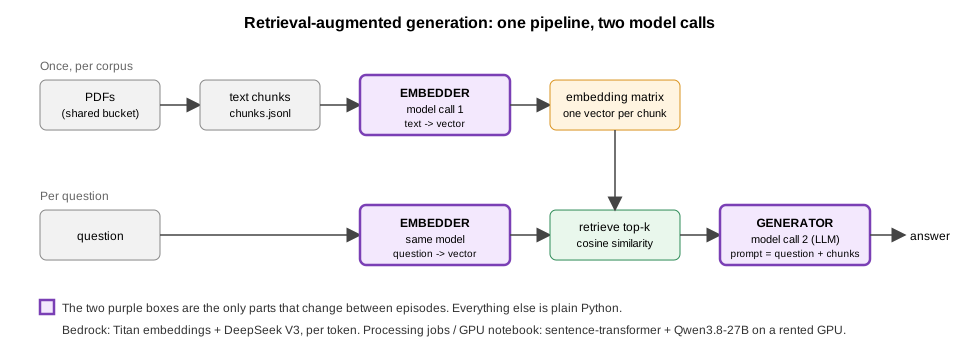
RAG combines two steps:
- Retrieve: Search your document store (vector DB or FAISS index) to find relevant text.
- Generate: Provide those retrieved chunks to a large language model (LLM) to answer a question.
No model weights are updated. No backprop. No training job.
RAG is an inference‑only pattern that layers retrieval logic around an
LLM.
This matters for how you should think about compute. The only things a RAG pipeline needs from a model are two stateless calls:
- “Turn this text into an embedding vector.”
- “Given this prompt (question + retrieved chunks), generate an answer.”
Neither of those requires you to own a GPU. They are exactly the kind of calls that a managed inference API is built to serve.
Start Here: Bedrock Is the Default
For standard RAG inference, use Amazon Bedrock. Bedrock exposes embedding and generation models (Amazon Titan, Anthropic Claude, DeepSeek, Meta Llama, and others) as pay‑per‑token APIs. Your retrieval code — chunking, indexing, similarity search, reranking, evaluation — stays entirely under your control and can run on a cheap CPU notebook or your laptop. Only the two model calls above are sent to Bedrock.
The reason this is the default comes down to how you are billed:
| Bedrock (managed API) | SageMaker GPU instance / endpoint | |
|---|---|---|
| Billing unit | Per token processed | Per hour the instance exists |
| Cost while idle |
$0 — nothing is running between calls |
Full hourly rate, 24/7, whether or not you use it |
| What you must remember to do | Know the per-token price before a big batch; route calls through a tagged profile | Stop or delete the instance every time you finish |
| Model updates | Managed by AWS / the provider | Your problem (containers, CUDA, VRAM) |
| Model choice | Curated catalog (incl. proprietary models) | Any open‑weight model you can load |
A GPU instance is a rental that keeps the meter running until you turn it off. Forgetting to do so is the single most common way research teams burn through cloud budgets. Bedrock has no equivalent failure mode: if you stop calling it, you stop paying.
What forgetting actually costs
To make this concrete, here is what a GPU notebook instance costs if it is left running after you close your laptop (on‑demand prices at time of writing; see the instances page):
| Instance | GPU |
$/hour |
Forgotten overnight (12 h) | Forgotten over a weekend (64 h) | Forgotten for a month (730 h) |
|---|---|---|---|---|---|
| ml.g4dn.xlarge | 1 × T4 (16 GB) | $0.74 |
~$9
|
~$47
|
~$540
|
| ml.g5.xlarge | 1 × A10G (24 GB) | $1.41 |
~$17
|
~$90
|
~$1,030
|
| ml.g5.2xlarge | 1 × A10G (24 GB) | $1.52 |
~$18
|
~$97
|
~$1,110
|
| ml.g6e.xlarge | 1 × L40S (48 GB) | $2.61 |
~$31
|
~$167
|
~$1,905
|
| ml.p4d.24xlarge | 8 × A100 (40 GB) | $25.25 |
~$303
|
~$1,616
|
~$18,430
|
Compare that to running the entire WattBot pipeline
from this lesson on Bedrock. Using DeepSeek V3 (check the Bedrock pricing page
for current per‑token prices) and Titan Text Embeddings V2
($0.02 per million tokens):
| Step | Rough volume | Cost |
|---|---|---|
| Embed ~9,000 chunks (~3M tokens) | 3M input tokens | ~$0.06
|
| Answer and explain the 245 training questions (two calls each, ~1.5K‑token prompts) with DeepSeek V3 | 650K in / 40K out | ~$0.50
|
| Total | about $0.55 |
A single forgotten weekend on the cheapest GPU instance
costs more than fifty full runs of the pipeline on Bedrock; a forgotten
weekend on the ml.g6e.xlarge the optional GPU-notebook
episode uses costs more than a hundred. That asymmetry is why Bedrock is
the default, not just an alternative.
Bedrock trade-offs to know about
Bedrock is not free of downsides; it’s just that none of them are “you forgot and it kept charging you.”
- Less control over architecture. You can only call models in the Bedrock catalog. If your research depends on a specific open‑weight model, a custom fine‑tune, or hacking on the model internals, you’ll need to host it yourself.
- Per‑token cost can exceed GPU cost for very large offline batches. If you are embedding tens of millions of chunks with a small open model, a short‑lived GPU job may be cheaper per unit of work. Do the arithmetic before assuming either way.
- Model access and region availability. Some models must be enabled in the console first, and the catalog varies by region. Plan for this before a workshop or deadline.
- Quotas. On‑demand throughput is rate‑limited per model and per account. For large batch workloads, use the Bedrock batch inference API or request a quota increase rather than hammering the on‑demand endpoint.
- Data handling. Bedrock does not use your prompts to train models and keeps data in‑region, but you should still check your institution’s policy before sending sensitive documents to any hosted API.
- Cost tracking needs one extra step. On‑demand Bedrock calls carry no tags. To attribute spend to a project you route calls through a tagged application inference profile (see “Tagging” below and the Bedrock episode). It is a one‑time setup, but skipping it leaves the usage anonymous on the bill.
Approaches to Running RAG on AWS
With that framing, here are the main patterns, ordered from “reach for this first” to “only when you really need it.”
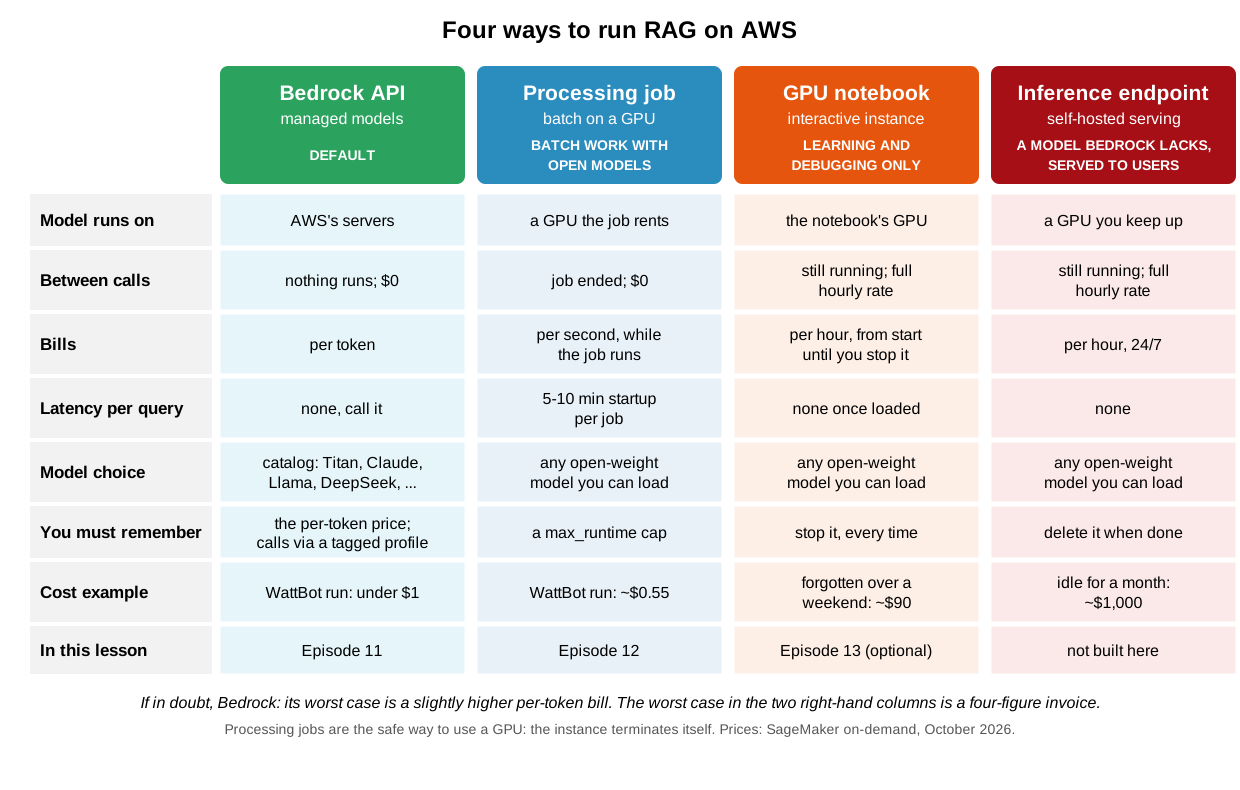
1. Amazon Bedrock — managed embedding and generation APIs (default)
Call embedding and generation models via API from your RAG pipeline. You still own and manage retrieval logic (chunking, indexing, reranking, evaluation), but you outsource the heavy model lifecycle work entirely. You pay per token, nothing runs between calls, and there is nothing to shut down. Bedrock also gives RAG systems access to proprietary models (e.g., Claude) that would otherwise need to be purchased and integrated separately.
Use it for: essentially any RAG system where a model in the Bedrock catalog is acceptable — prototyping, research tools, course projects, and production chatbots alike.
2. SageMaker Processing Jobs — short-lived batch GPU compute
For large corpora, or when you need a specific open‑weight model that Bedrock doesn’t offer, treat parts of the RAG pipeline — especially embedding and batch generation — as offline batch jobs rather than a live model. You run a short‑lived Hugging Face Processing job that spins up a GPU instance, loads your model, processes all the chunked text in one shot, saves the results to S3, and then terminates itself. Because the GPU only exists while the job runs, you get self‑managed models without the forgot‑to‑shut‑it‑down risk. This is the safest way to use a GPU on SageMaker.
The trade‑off is latency: starting a Processing job takes several minutes, so this pattern is for “compute once, use many times” workloads, not per‑query retrieval. Launching a job per user question would be far too slow.
Use it for: embedding very large corpora with an open model, periodic batch regeneration, or research that requires a model you can’t get through Bedrock.
3. A single GPU-backed notebook instance — for learning and debugging
For small‑ to medium‑sized models (< 70 B), you can pick a GPU instance (e.g., ml.g5.xlarge), load your embedding and generation models directly in the notebook, and run RAG end‑to‑end there. The architecture is the simplest to understand, and it’s genuinely the best way to learn what happens inside a RAG pipeline, because every step is a line of Python you can inspect.
But it is the most expensive way to run RAG and the easiest one to get wrong. The GPU bills by the hour from the moment the instance starts until you stop it, including the long stretches while you download PDFs, chunk text, read results, or go to lunch. It is also the route most likely to be forgotten, because a notebook instance looks like a workspace rather than a running job. If you use this approach:
- Treat it as a learning exercise, not a deployment pattern.
- Stop the instance the moment you are done, and verify the status on the Notebook instances page.
- Set up an AWS Budget alert and consider a lifecycle configuration that auto‑stops idle notebooks.
- For larger models the hourly rate (e.g.,
$25/hour for a p4d.24xlarge) becomes a limiting factor very quickly.
Use it for: walking through RAG internals step by step, debugging a model locally before packaging it as a job, or short experiments where you will be at the keyboard the whole time.
4. Long-lived SageMaker inference endpoints — self-hosted interactive serving
For applications that need low‑latency, interactive RAG (APIs, chatbots, dashboards) and that must use a model you host yourself, you can deploy your own embedding and generation models as SageMaker inference endpoints and call them from your retrieval service. This gives you full control over the model, scaling policies, and autoscaling.
It is also the most expensive option when traffic is low or bursty, because you are paying for capacity that stays online even when nobody is querying the system — the same always‑on problem as a notebook GPU, but now intentionally and indefinitely. Before choosing this route, ask whether Bedrock already serves an acceptable model: it provides exactly this interactive, low‑latency experience with none of the idle cost. Endpoints are the right answer only when the model itself is the reason Bedrock won’t work.
Use it for: production systems with steady traffic that require a custom or open‑weight model. We do not build one hands‑on in this lesson.
Tagging: Every Billable Resource Needs Its Own Tags
Cost tracking in this workshop relies on three tags —
Name, Project, Purpose — so that
Cost Explorer can break the shared bill down by challenge. The part that
trips people up is that tags never propagate. Tagging
your notebook instance tags the notebook instance and nothing else.
Every other resource you create is a separate line item that is
anonymous unless you tag it yourself at creation time.
| Resource | What it bills | How it gets tagged |
|---|---|---|
| Notebook instance | Hourly, while running | Tags you set in the console when creating it |
| S3 bucket | Storage + requests | Tags you set in the console when creating it |
| Training / tuning job | Hourly, while the job runs |
tags= argument on the estimator or tuner, every
job
|
| Processing job | Hourly, while the job runs |
tags= argument on the processor, every
job
|
| Inference endpoint | Hourly, while deployed |
tags= argument on deploy()
|
| Bedrock on‑demand call | Per token |
Cannot be tagged directly. Create an
application inference profile with tags and pass its ARN as
modelId instead of the model ID |
Three things follow from this:
-
Each job gets its own tags. A SageMaker job
launched from a tagged notebook does not inherit the notebook’s tags.
Pass
tags=job_tagson every estimator, tuner, and processor, exactly as the training, tuning, and Processing‑job episodes do. VaryPurposeper job so the bill tells you what the money went to. -
Bedrock is tagged through a profile, not a call.
invoke_modelandconversehave no tags parameter. An application inference profile is a free, model‑specific wrapper that carries tags; usage routed through it is attributed to those tags. One profile per base model (so one for the embedding model and one for the generation model). Note that Bedrock’s tag format is lowercasekey/value, while SageMaker’s isKey/Value; the tag names stay the same. -
Only the three approved keys count.
Name,ProjectandPurpose, spelled exactly; any other key is ignored by the bill, for the reason the S3 episode gives.
When Do You Use Which Approach?
| Your situation | Recommended route |
|---|---|
| You need to embed and query a document collection and a catalog model (Titan, Claude, Llama, …) is fine | Bedrock |
| You want an interactive chatbot or API over your documents | Bedrock |
| You need a specific open‑weight model and the work is batch (embedding a corpus, bulk generation) | Processing Jobs |
| You are learning how RAG works, or debugging a model step by step | Notebook GPU — and stop it when you leave |
| You need interactive serving of a model Bedrock doesn’t offer, with steady traffic | Inference endpoint |
If you are unsure, pick Bedrock. The worst case is a slightly higher per‑token bill; the worst case with the other routes is a four‑figure surprise on next month’s invoice.
How the hands-on episodes are ordered
The next two episodes walk through RAG on Bedrock
first, then on Processing Jobs. The Bedrock episode is
the one to start from: it builds the whole WattBot pipeline, including
chunking the corpus, from a cheap CPU notebook with nothing left running
afterward. The Processing Jobs episode reruns the same pipeline on a
self-hosted open-weight model that Bedrock does not carry, as jobs that
end on their own, so you can see what Bedrock abstracts away and what it
costs to do yourself. An optional self-study episode after them runs the
same self-hosted pipeline interactively on a GPU notebook instance.
Those first two are the defaults. The GPU-notebook episode is
for the case where you need to poke at a self-hosted model
interactively, and only if you will remember to stop the
instance. All three RAG episodes share one module of pipeline
code (scripts/wattbot_rag.py in the lesson repository).
When you build your own RAG system afterward, start from the Bedrock episode.
- RAG is an inference‑only workflow: no training or fine‑tuning required, so you do not need to own a GPU to run one.
- Amazon Bedrock is the default for RAG inference: you pay per token, nothing runs between calls, and there is nothing to forget to shut down.
- Self‑managed GPU compute (Processing Jobs, notebook GPUs, inference endpoints) is justified when you need a model Bedrock doesn’t offer or when very large batch volumes make per‑token pricing uncompetitive — not as a starting point.
- Among the GPU options, Processing Jobs are the safest because the instance terminates itself; notebook GPUs and endpoints bill by the hour until you stop them.
- A forgotten GPU instance costs tens of dollars overnight and hundreds to thousands over a month; a full WattBot run on Bedrock costs well under a dollar.
- Tags never propagate: tag every job at launch, and route Bedrock calls through a tagged application inference profile, or the spend is untraceable.
- The hands‑on episodes start with Bedrock, then show the same pipeline on Processing Jobs; the notebook-GPU version is optional self-study.