
Fine-tuning a Vision-Language Model with Training Jobs
Last updated on 2026-10-21 | Edit this page
Estimated time: 180 minutes
Overview
Questions
- When is fine-tuning worth it?
- Why does fine-tuning cost anywhere from a dollar to tens of thousands, and how do I estimate where my run falls before I launch it?
- How do I run a GPU fine-tune as a SageMaker training job so the meter stops the moment it finishes?
- How do I measure whether the fine-tune helped?
Objectives
- Explain what drives the cost of a fine-tuning run (model size ×
tokens × epochs × number of attempts) and why the same four habits apply
at
$1and at$10,000: a time cap, a small first run, and an estimate written down before launch. - Launch a LoRA fine-tune of a 3B vision-language model (CHURRO-3B) as
a
HuggingFacetraining job on a single 24 GB GPU, with tags, a unique job name and amax_runcap. - Read a job’s billable time and compare it to the estimate.
- Compare the base model and the fine-tuned model on held-out pages using the competition’s own character error rate (CER).
- Know how to scale the same job up to the full dataset (homework) and to multi-GPU instances for larger models.
Open the notebook from:
/ML_with_AWS_SageMaker/notebooks/09_Finetuning-BadgerScribe.ipynb.
Select the conda_pytorch kernel.
Why fine-tune an LLM
The training episodes so far trained small models from scratch. This episode fine-tunes a large language model with LoRA, the cheap form of fine-tuning explained below: a vision-language model with billions of parameters, pretrained on more data and compute than any lab could repeat. That is what makes it a different kind of job, in what it can do and in what it costs.
General-purpose models are trained on the average of the internet, and research problems are rarely average. A 19th-century German hand, a lab’s own annotation conventions, species names, a regional dialect, the layout of a specific archive: the largest commercial model has seen little of it, and no prompt can make up for that.
Done on the right data, a small fine-tuned model beats a much larger general one. The model we LoRA fine-tune in this episode is itself the example: CHURRO, a 3-billion-parameter vision-language model, was fully fine-tuned from Qwen2.5-VL-3B on about 100,000 pages of historical documents, and its authors report that it exceeds the accuracy of Gemini 2.5 Pro on historical text recognition at 15.5x lower cost (paper). A model that size also runs on one GPU you control, which matters when the data cannot leave your institution, when results have to be reproducible with fixed weights, and when the job is a million pages rather than a demo. CHURRO is not a one-off: the same pattern shows up wherever a research task has its own data.
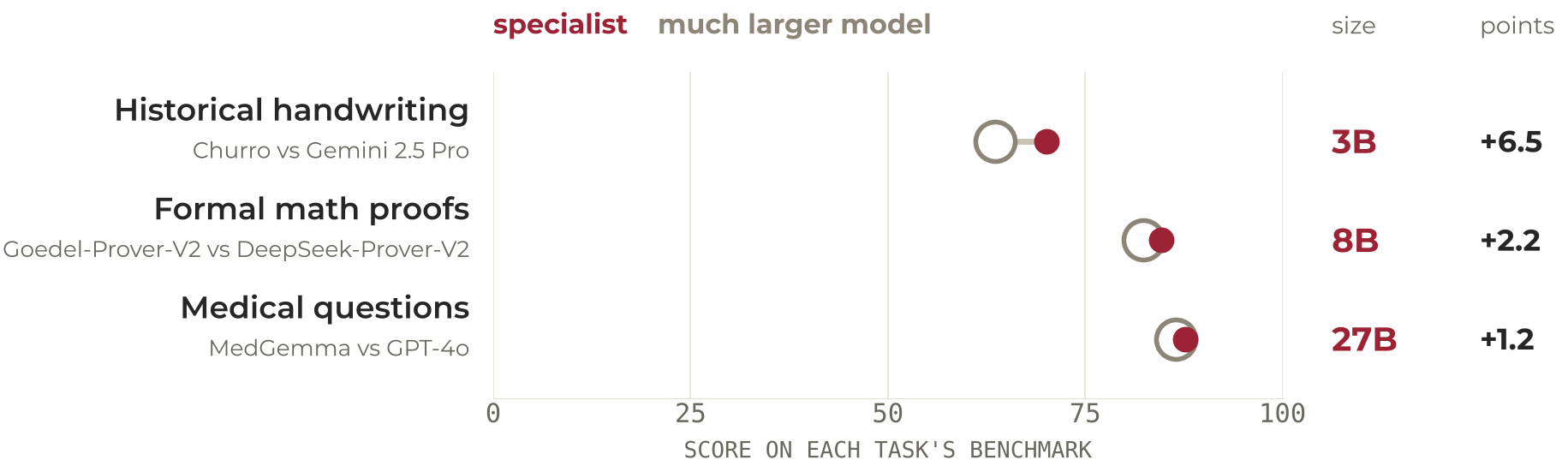
Sources: CHURRO, EMNLP 2025; Goedel-Prover-V2, ICLR 2026; MedGemma technical report, 2025. Scores are as reported by each model’s authors.
The trick
Fine-tuning is ordinary training that starts from a trained model instead of random weights. You show the model your examples, it computes how wrong its output was, and gradient descent nudges the weights toward your data. Because the model already knows how to read, write and look at images, it needs hundreds of examples to learn your task where training from scratch would need millions. Everything it learned before stays in the weights; you are adjusting them, not replacing them.
Full fine-tuning is expensive
Training every weight means storing four numbers per weight instead
of one. There is the weight itself, and its gradient, which says which
way to nudge it this step. Then there is what the optimizer remembers:
Adam, the optimizer everyone uses, keeps for every weight a running
average of its recent gradients and a running average of their squares,
so that it can give each weight its own step size. And the weight has to
be kept in 32-bit as well as 16-bit, because each step’s nudge is far
smaller than a 16-bit number can hold; applied to a 16-bit weight it
would round away to nothing. Two bytes for the working weight, two for
the gradient, four for the 32-bit weight and eight for Adam’s two
averages: 16 bytes per parameter, against 2 for inference. A 3B model
that runs in 6 GB needs 48 GB to fully fine-tune; a 7B model needs 112
GB, which is already a multi-GPU instance at $25 an
hour or more, and the bill scales with every epoch and every
retry.
Do not fully fine-tune anything in this workshop (that is,
update all the weights), and do not LoRA fine-tune a model larger than
7B on the class account. A 7B LoRA needs about 22 GB, which is
the most the 24 GB GPU the class uses will hold; anything larger needs
the 48 GB instance, and above about 13B no instance the account allows
holds the model at all. On a few hundred examples a 7B LoRA run is still
a few dollars, so retries are cheap. A full fine-tune of a 7B model
needs 112 GB, more than any instance the class account allows, and would
be a few hundred dollars per run on one that did; a 70B
model is $6,000 to $12,000 per
run, and a hyperparameter sweep multiplies that by ten. Those
runs exist in this episode only as estimates, so that you can recognise
one before you launch it.
LoRA
LoRA (low-rank adaptation) freezes the pretrained
weights and trains a few million extra parameters in small matrices
bolted onto the attention and MLP layers. For each large weight matrix
W (d × d), it adds two thin ones, B (d × r)
and A (r × d), with a rank r of 8 to 64; the
layer computes W·x + B·A·x, and only A and
B get gradients.
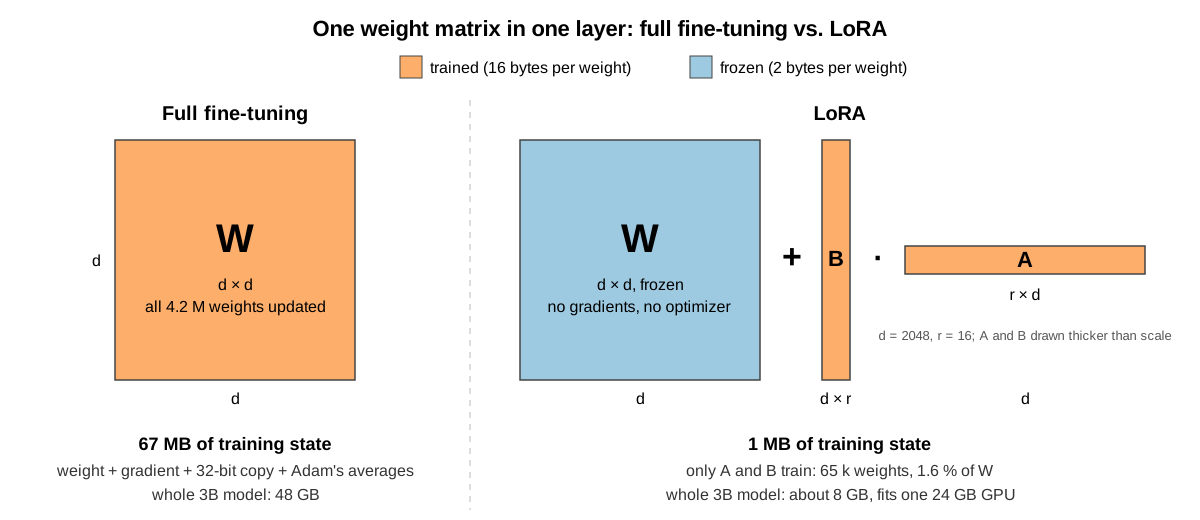
The frozen weights can stay in 16-bit, since nothing updates them, and the gradients and optimizer state only exist for the adapter. The adapter is about 100 MB, trains on a single 24 GB GPU for a 3B model, and recovers most of the gain of a full fine-tune for a task like this: the model still learns your hands and your conventions, it just learns them through the adapter. This episode uses LoRA.
Scale, and how easy it is to get wrong
What makes fine-tuning an LLM different is scale. The training
episodes ran for minutes on a $0.12-an-hour CPU; a full
fine-tune runs for hours or days on a GPU, a LoRA fine-tune for minutes
to hours, and every setting multiplies the bill: model size, epochs,
image resolution, instance type, and whether anyone is watching when the
job should have ended. Any one of them off by 10x is a 10x bill, and the
first run is never the last. Fine-tuning is one of the most
common surprise costs we see hurt people, and it is the reason
this episode spends as long on estimating and capping a run as on
running it. We measure the gain ourselves: the episode ends by scoring
the base model and the LoRA fine-tuned model on the same held-out
pages.
The task: Badger Scribe
Badger Scribe is a Kaggle challenge built from UW Digital Collections material: 19th-century surveyors’ field notebooks, craftsmen’s account books, and German immigrant letters in Kurrent script. Given a page image, produce a verbatim transcription. The score is character error rate (CER): edits per reference character, lower is better.
This lesson uses the German letters, the Anna Seifert correspondence
held by the Max Kade Institute: 191 letters and postcards written
between 1932 and 1942 by one woman to her son in Kurrent (the old German
handwriting taught in schools until the 1940s, whose letterforms look
nothing like today’s cursive: an e is two short strokes, an
s can take three shapes, and most Germans alive today
cannot read it), transcribed by the Institute’s Kurrent Transcription
Group. It is the part of the competition data where every label was
produced by a person, and it is most of the hidden test set.
| split | pages | documents | label source |
|---|---|---|---|
| train | 295 | 4 letter bundles | all human-transcribed, ~620 characters per page |
| test | 141 | 5 other letter bundles | labels held by Kaggle |
Small is the point. 295 labelled pages is a realistic amount of data for a library or a lab to have, and it is enough to move a model that was pre-trained on the right kind of material. Kurrent is also a genuinely different script, not a style of the one the model already reads, so this is a case where the model has to learn something new.
We LoRA fine-tune CHURRO-3B. It already reads old handwriting across 46 language clusters; we are teaching it these hands and these transcription conventions.
Step 0: Estimate the cost before you launch anything
Before launching a fine-tune, write down what it should cost. If the bill is 3x your number, something is wrong, and you want to know on the first run, not the fiftieth.
What fine-tuning costs, from one dollar to ten thousand
The cost of a run is GPU-hours × the hourly rate, and GPU-hours scale
with model size × tokens seen × epochs, multiplied by
how many runs you do before one works. Our class run
sits at the very bottom of that curve. The rows below use current
SageMaker on-demand prices in us-east-1 (AWS price list,
October 2026):
| Run | GPUs | Instances rented (price per instance-hour) | Hours | GPU-hours | Cost = instance-hours × price |
|---|---|---|---|---|---|
| This episode: 3B LoRA, all 251 Kurrent training pages, 2 passes, 0.7M tokens seen | 1 × A10G | 1 × ml.g5.xlarge ($1.41) |
0.53 | 0.53 | $0.75 |
| Homework: the same pages, 4 passes, 40 pages scored, 1.4M tokens | 1 × A10G | 1 × ml.g5.xlarge ($1.41) |
1.1 | 1.1 | ~$1.50
|
| Badger Scribe teams: 3B LoRA, the whole train set (619 pages, all three categories), 2 passes, 1.8M tokens | 1 × A10G | 1 × ml.g5.xlarge ($1.41) |
0.85 | 0.85 | ~$1.20
|
| 7B full fine-tune, 50k documents, 300M tokens (the challenge below) | 8 × A100 | 1 × ml.p4d.24xlarge ($25.25) |
5.5 | 44 | ~$140 |
| 70B LoRA, one day | 8 × A100 | 1 × ml.p4d.24xlarge ($25.25) |
24 | 192 | ~$600 |
| CHURRO-3B’s own training: full fine-tune, 100k pages | 32 × H100 | 4 × ml.p5.48xlarge ($63.30) |
25 | 800 | ~$6,300 |
| 70B full fine-tune, two days | 32 × H100 | 4 × ml.p5.48xlarge ($63.30) |
48 | 1,536 | ~$12,000 |
| Any row above × a 10-run hyperparameter sweep | × 10 |
Tokens seen is examples × tokens per example × passes over the data,
and it is what the time rule below multiplies by model size. The number
of passes is a choice, and the class run’s two passes are a budget
choice for a 40-minute job, not a recommendation: large
instruction-tuning corpora are usually passed over one to three times,
but a few hundred examples usually take three to five. Each extra pass
adds one more unit of the same row, so a ten-pass run over the whole
train set is about $10, and the sweep row still applies on
top. Step 2 shows how the per-epoch curve decides it.
The class row is measured (2026-10-21: 31.7 billed minutes,
$0.75); the homework and teams rows are that run’s seconds
per page applied to more passes and pages. The teams row is the
competition’s full training set; the shared bucket holds only the German
letters, so a team trains on everything from the competition’s own data
download.
GPUs come in fixed boxes: an ml.g5.xlarge is one A10G,
an ml.p4d.24xlarge is eight A100s, an
ml.p5.48xlarge is eight H100s, and you rent whole boxes. So
“32 H100s for 25 hours” is four ml.p5.48xlarge for 25
hours: 100 instance-hours at $63.30 is $6,330.
GPU-hours (GPUs × hours) is what the time estimate below produces;
divide by the GPUs per box to get instance-hours, and multiply by the
box’s price to get the bill.
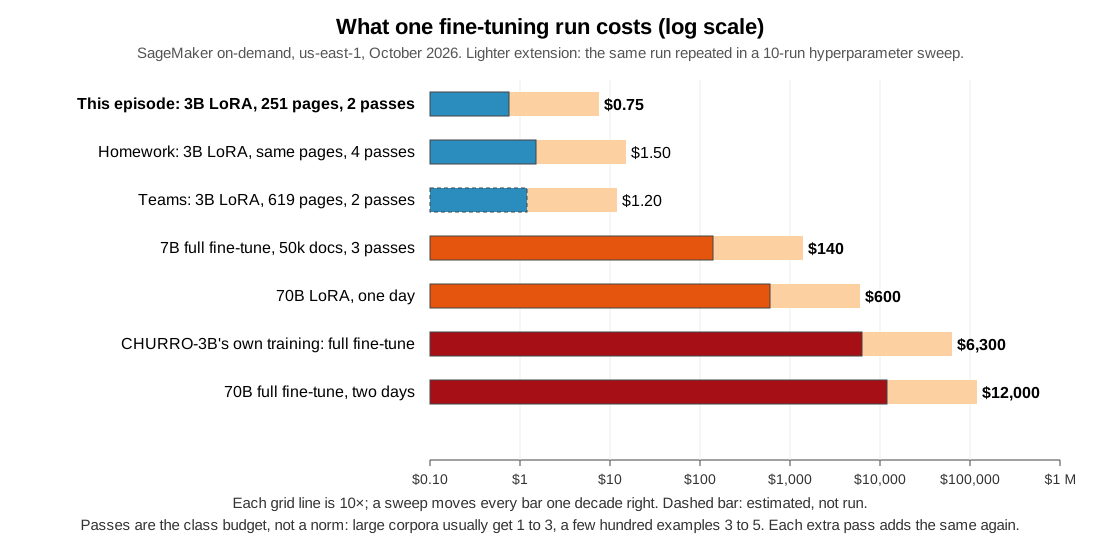
Two rows to note. The CHURRO row is the model you are about to LoRA
fine-tune: Stanford spent on the order of 800 H100-hours making it, and
you get the benefit for a dollar because you are adapting it,
not retraining it. Starting from a model that already knows most of the
task is the largest cost saving available, and it is decided before any
GPU is involved. The sweep row: a first run is rarely the last, so a
“$140 full fine-tune” is usually a $700 to
$1,400 project. That is the number that surprises research
groups. (The 7B row is worked out in the challenge below; the 70B rows
are rule-of-thumb magnitudes; the CHURRO figures come from a published
review of the paper.)
The habits in this episode are cheap practice at a dollar a run.
At $140 a run they are the difference between a
project and a budget incident; at $6,000 a run, one
forgotten max_run or one wrong instance type is a grant
line.
Back of the envelope: will it fit, and how long will it take?
Two rules of thumb answer most of the question before you touch a
console. They are good to within a factor of two, which is what you need
to tell a $5 run from a $500 one.
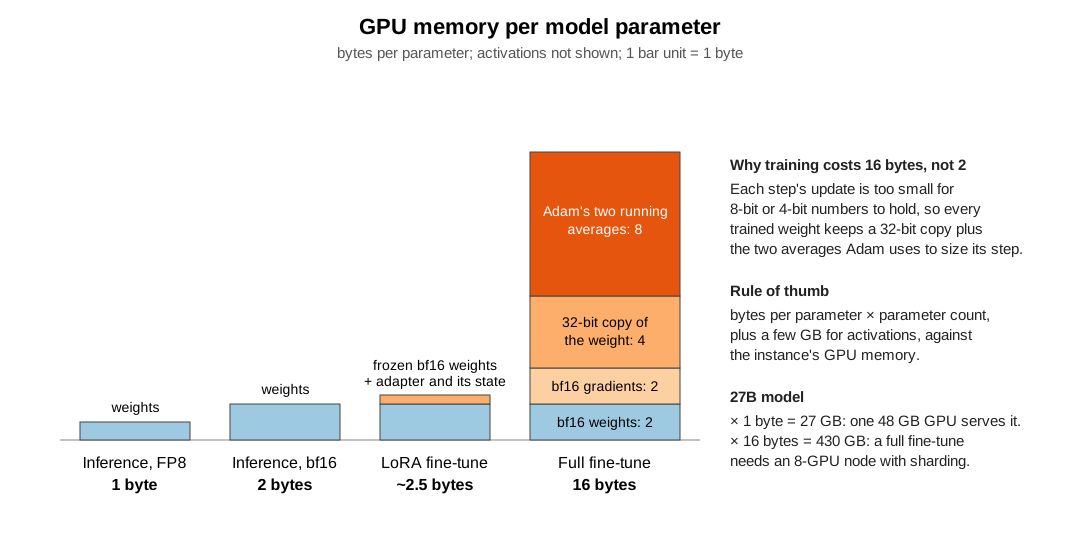
1. Memory: will it fit on the GPU? Count bytes per parameter for what you are doing, multiply by the parameter count, then add a few GB for activations (more for long sequences and big batches).
| What you are doing | Bytes per parameter | Why | 3B | 7B | 27B | 70B |
|---|---|---|---|---|---|---|
| Inference, 4-bit weights | 0.5 | weights only | 1.5 GB | 3.5 GB | 14 GB | 35 GB |
| Inference, FP8 | 1 | weights only | 3 GB | 7 GB | 27 GB | 70 GB |
| Inference, bf16 | 2 | weights only | 6 GB | 14 GB | 54 GB | 140 GB |
| LoRA fine-tune | ~2.5 | frozen bf16 weights + a small adapter with its gradients and optimizer + activations | 8 GB | 18 GB | 68 GB | 175 GB |
| Full fine-tune, mixed precision | 16 | 16-bit weights 2 + gradients 2 + 32-bit copy of the weights 4 + Adam’s two running averages 8 | 48 GB | 112 GB | 430 GB | 1.1 TB |
Note the jump from the inference rows to the training rows. Training
cannot run on quantized weights the way inference can: each step’s
update is too small for 8-bit or 4-bit numbers to hold, so every trained
weight keeps a 32-bit copy plus Adam’s two averages, 16 bytes against 2.
That is why a 7B model you can run on a 24 GB GPU needs
112 GB plus activations to fully fine-tune, which means several
GPUs with the model sharded across them, at $25 to
$63 an hour. LoRA sidesteps it by freezing the
model and training a few million adapter parameters, which is why this
episode fits on one 24 GB card.
2. Time: how many GPU-hours? Training a token costs three matrix products per layer, each one multiply and one add per weight. Full fine-tuning does all three; LoRA skips the weight update for the frozen base.
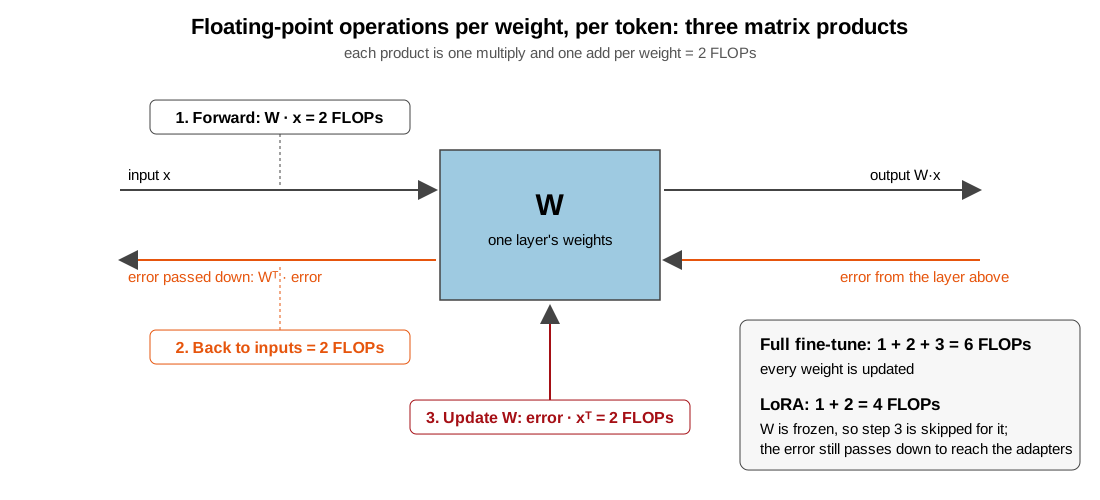
tokens      = examples × tokens per example × passes over the data
FLOPs       = 6 × parameters × tokens      (4 × for LoRA)
GPU-seconds = FLOPs ÷ (GPU peak FLOPS × 0.25)      a real job reaches about a quarter of the data-sheet peak
Peak FLOPS is on the GPU’s data sheet: about 70 trillion per second for an A10G, 312 for an A100, 989 for an H100. Cost is GPU-hours × the hourly rate, plus about 10 minutes of startup per job.
The class run: 251 pages × 1,600 tokens × 2 passes = 803k tokens. LoRA on 3.75B parameters: 4 × 3.75e9 × 8.03e5 ≈ 1.2e16 FLOPs. A quarter of an A10G’s 70 TFLOPS is 17 TFLOPS, so about 700 seconds, call it 12 minutes. Measured, the same instance trains at 1.45 seconds per page-pass, so 502 page-passes take about 12 minutes: the rule lands on the number.
helpers.estimate_finetune_cost does the same arithmetic
for any model size, example count, tokens per example and passes. It
picks the cheapest instance that fits, or the one you name, and prints
memory, GPU-hours, cost per run and per project, and the
max_run to set:
PYTHON
import sys
sys.path.insert(0, "/home/ec2-user/SageMaker/ML_with_AWS_SageMaker/scripts")
import helpers

helpers.estimate_finetune_cost(
    params_billions=3.75,        # CHURRO-3B: 3B language model + vision tower
    examples=251, tokens_per_example=1600, epochs=2,   # tokens, not words: ~1,300 for the image + ~300 of text; counted in Setup below
    method="lora",
    instance_type="ml.g5.xlarge",
)
And on the kind of run a marathon team might be weighing, with the attempts a real project takes:
PYTHON
helpers.estimate_finetune_cost(
    params_billions=7, examples=5000, tokens_per_example=800, epochs=3,
    method="lora", runs=8,       # instance_type=None: the cheapest that fits
)
tokens_per_example is the input you have to think about,
and it is tokens, not words: the model never sees words. Text is about
1.3 tokens per English word, more for German and for old spellings; an
image on a Qwen-VL style model is one token per 28 × 28 pixel block
after resizing, about 1,300 for a megapixel; for audio, EEG windows or
anything else, the model card says what one example becomes. Do not
guess it when you can count it: the Setup section below counts the
tokens in one page with the model’s own processor. The estimate is good
to a factor of two, and it is the number to write down before the
launch.
More GPUs do not make it cheaper. GPU-hours are the cost; spreading them across eight GPUs changes the wall-clock time, not the bill, and only helps if the job is large enough to keep all eight busy. You add GPUs when the memory row above says one GPU cannot hold the job, not to save money.
Estimate a run you have not launched
A lab wants to fully fine-tune a 7B model on 50,000
documents of ~2,000 tokens for 3 epochs. They are choosing between
ml.p4d.24xlarge (8 × A100 40 GB, $25.25/h,
~312 TFLOPS bf16 per GPU) and renting a single
ml.g5.xlarge; the supplemental Instances
for ML page has both, with what each box holds and how its price
covers all its GPUs. Using the two rules: does it fit on the g5? How
many GPU-hours on the p4d, and what does one run cost? What does a
realistic project cost?
It does not fit on the g5: full fine-tuning a 7B model needs ~112 GB plus activations, and the g5 has 24 GB. On the p4d the 8 × 40 GB = 320 GB holds it with the model sharded.
Tokens: 50,000 × 2,000 × 3 = 3 × 10^8. FLOPs: 6 × 7 × 10^9 × 3 × 10^8
≈ 1.26 × 10^19. A quarter of an A100’s 312 TFLOPS is 78 TFLOPS: 1.26 ×
10^19 / 7.8 × 10^13 ≈ 1.6 × 10^5 GPU-seconds ≈ 45 GPU-hours, which is
about 6 hours of wall-clock on 8 GPUs, about $140 for one
run (the “7B full fine-tune” row in the table above). The helper gives
the same answer:
PYTHON
helpers.estimate_finetune_cost(params_billions=7, examples=50_000, tokens_per_example=2000, epochs=3,
                               method="full", instance_type="ml.p4d.24xlarge",
                               gradient_checkpointing=False, runs=10)
A realistic project is not one run. The first run finds a data bug,
the second a bad learning rate, then two or three are compared, then the
one that worked is rerun on the final data: five to ten runs, so
$700 to $1,400, before anyone touches a
hyperparameter sweep. That is the number to put in the proposal, and it
is why the four habits matter more as the model gets bigger.
The instance
The model we LoRA fine-tune fits on one 24 GB GPU. Single-GPU and multi-GPU SageMaker training instances, same price list (the full table, with CPU instances and the GPU-by-GPU notes, is on the supplemental Instances for ML page):
| Instance | GPU | GPU memory |
$/hour |
|---|---|---|---|
ml.g4dn.xlarge |
1 × T4 | 16 GB | $0.74 |
ml.g6.xlarge |
1 × L4 | 24 GB | $1.13 |
ml.g5.xlarge |
1 × A10G | 24 GB | $1.41 |
ml.g6e.xlarge |
1 × L40S | 48 GB | $2.61 |
ml.g5.12xlarge |
4 × A10G | 96 GB | $7.09 |
ml.p4d.24xlarge |
8 × A100 | 320 GB | $25.25 |
ml.p5.48xlarge |
8 × H100 | 640 GB | $63.30 |
Multi-GPU instances are the right tool when the model, its optimizer
state and a batch do not fit on one GPU: a full fine-tune of a 7B model,
or anything at 70B. They are the wrong tool when the job does
fit on one GPU, because the price goes up 5x to 45x and a job too small
to split gets no faster. A 3B LoRA run fits with room to spare, so
ml.g5.xlarge is the workhorse for this episode. A T4 is too
small and too slow for a 3B vision model with page-sized images;
ml.g6.xlarge is a fine substitute if g5 capacity is short;
ml.g6e.xlarge is roughly 2–3x faster for less than 2x the
price, so it becomes cheaper per run once training outweighs
the fixed startup (Exercise 2).
Scaling the same job to more GPUs
Nothing in this episode is specific to small runs. The training
script uses Hugging Face Trainer, which handles multi-GPU
data parallelism when SageMaker launches it under torchrun.
To run the same script on a multi-GPU instance, change the estimator,
not the script:
instance_type="ml.p4d.24xlarge",                        # 8 x A100, or ml.g5.12xlarge for 4 x A10G
distribution={"torch_distributed": {"enabled": True}},  # one process per GPU, each on a different slice of the data
max_run=6 * 60 * 60,                                     # 6 hours, in seconds: from the Step 0 estimate, with margin
Each GPU holds a full copy of the model, so the effective batch
becomes batch_size x grad_accum x number of GPUs, and the
learning rate usually needs a modest increase. Two lines in the script
should be wrapped in if trainer.is_world_process_zero(): so
that evaluation and saving run once rather than on every process. When
the model, its optimizer state and a batch do not fit on one GPU (a full
fine-tune of 7B or more; see the bytes-per-parameter table), data
parallelism is not enough: pass fsdp="full_shard" in
TrainingArguments (or a DeepSpeed ZeRO config) so the model
is sharded across the GPUs, and use instance_count=2 or
more for multi-node runs.
The cost controls do not change with size, but the stakes
do. An ml.p4d.24xlarge bills
$25.25 an hour and an
ml.p5.48xlarge $63.30 an hour
from the moment the job starts, and a max_run of six hours
is a $150 to $380 ceiling on
a single launch. Estimate GPU-hours from the Step 0 rules, set
max_run to about twice that estimate, tag the job, and run
a slice of the data on one GPU first so that a bug costs a dollar rather
than a few hundred. Do not launch a multi-GPU job on the class
account.
The run
A training job bills from the moment its instance is ready until the job ends, including the minutes spent pulling the container and downloading data and model weights. In class we train on all 251 German-letter training pages for 2 passes and score 15 held-out pages before and after, all inside one job:
| Phase | Time | Cost |
|---|---|---|
| Waiting for the instance (not billed) | ~1 min | $0 |
| Startup: container pull, ~130 MB of images, 7.5 GB of model weights, model load | ~5 min | $0.12 |
| Score 15 holdout pages with the base model, ~21 s each | ~5 min | $0.12 |
| Training: 251 pages × 2 passes, ~1.5 s per page-pass with gradient checkpointing | ~12 min | $0.28 |
| Score 8 of the holdout pages at the end of each pass, ~17 s each, for the curve | ~5 min | $0.11 |
| Score the same 15 pages with the LoRA fine-tuned model, ~17 s each | ~4 min | $0.10 |
| Save and upload the adapter | ~1 min | $0.02 |
| One run | ~33 min wall-clock, ~32 min billed | $0.75 |
Every row is measured, from this exact job run on 2026-10-21: 32.5
minutes from launch to finish, 31.7 billed, $0.75. Scoring
a page takes about 17 to 21 seconds, not the 10 a first guess might
assume, so the two 15-page evaluations and the curve points are 14 of
the 32 minutes: nearly half the bill goes to measuring, not
training.
Training time scales linearly with pages × epochs, and roughly
linearly with image resolution (every 28 × 28 pixel block of the page
becomes one token in the model’s sequence). Doubling
max_pixels doubles the time; doubling epochs doubles it
again. Those two settings, left at careless values, are why the estimate
must be written down before the first run and compared to the real
BillableTimeInSeconds after it.
We set max_run to about twice the estimate. If a run
goes past that, SageMaker kills it and we lose at most a dollar, not a
weekend.
The whole episode
| What | Instance | Time | Cost |
|---|---|---|---|
| Controller notebook (no GPU needed) | ml.t3.medium |
3 h | $0.15 |
| LoRA fine-tune on all 251 pages, 2 passes, with before/after scoring and a per-pass curve | ml.g5.xlarge |
~33 min | $0.75 |
| Exercise 1: same job at 2 megapixels | ml.g5.xlarge |
~60 min | $1.40 |
| Total | ~$2.60 |
Compare the classic mistake: doing all of this interactively on a
ml.g5.xlarge notebook instance. The class itself
costs about the same, but a notebook instance keeps billing after you
close the tab. Forgotten over a weekend: $90. Forgotten for
a month: $1,029. A training job cannot be forgotten,
because it ends.
The four habits
-
Cap it. Every job gets
max_run. Every notebook GPU instance gets stopped when you stand up. - Start small. The first launch of any training script uses a slice of the data and a short cap. The in-class run below is that small first run; the homework scales it up only after it has been seen to work.
-
Estimate it, then check. Write the number down.
After the run, read
BillableTimeInSecondsfrom the job description and compare. - Checkpoint it. Save progress to S3 as the job runs, so that a killed, interrupted or crashed run costs one epoch, not the whole bill.
Setup
Students never download the data themselves; four things have to be in place before the session. Each is written out in the instructor pages.
-
Stage the data in the shared read-only bucket from
the lesson’s data release (
badger-scribe-data-v1, ~130 MB): a few minutes from CloudShell, a laptop or a notebook instance; commands and the read-only bucket policy in Shared data bucket: staging before each term (the same bucket holds the WattBot data for the RAG episodes). The bucket must survive the end-of-workshop cleanup, or be recreated from the release next term. -
Stage the base model in the same bucket
(
badger-scribe/model/churro-3B/, ~7.5 GB, once, from a laptop or notebook instance, not CloudShell). Every job reads the weights from S3 as amodelchannel instead of 100 students pulling 7.5 GB each from Hugging Face in the same minute. -
Quotas:
ml.g5.xlarge for training job usageat least the class size (request 100). Default is often 0 to 4 and increases take days; file three to four weeks ahead. Full list in Account preparation checklist. -
Keep the bucket name
ml-marathon-shared; the episodes have it filled in. If you stage under another name, tell students to changeshared_bucketin the first code cell.
Fallback instance if g5 capacity is short: ml.g6.xlarge
(L4, 24 GB, $1.13/h).
This episode runs from a CPU notebook instance
(ml.t3.medium or ml.m5.xlarge). The notebook
is only a controller: it stages data, launches jobs, and reads results.
The GPU lives in the job.
There is no data upload in this episode. The competition data is published as a release on the lesson repository (three zip files: labels, train images, test images), and your instructor has staged it in a shared read-only bucket:
-
s3://<shared-bucket>/badger-scribe/train.csv,test.csv,metadata.csv,metric.py,sample_submission.csv,transcription_conventions.md -
s3://<shared-bucket>/badger-scribe/images/<page_id>.jpg: train and test pages together, about 130 MB -
s3://<shared-bucket>/badger-scribe/model/churro-3B/: a copy of the CHURRO-3B weights (~7.5 GB), so that jobs read them from S3 instead of every student pulling them from Hugging Face at once
The training job reads the images and the model straight from that
bucket; the only files your notebook downloads are the small CSVs.
Outputs go to your own bucket from the S3 episode, under
badger-scribe/.
The first cell is the same setup as every episode: a SageMaker
session, the region and the execution role, and an S3 client. Then the
names this episode needs: the shared bucket the jobs read from, your own
bucket they write to, your username for job names, and the two S3
prefixes that become the job’s train and model
input channels.
PYTHON
import os
import json
import time

import boto3
import pandas as pd
import sagemaker
from sagemaker import get_execution_role

import helpers   # already on sys.path from the Step 0 cell; imported again so Setup runs on its own after a kernel restart

session = sagemaker.Session()
region = session.boto_region_name
role = get_execution_role()
s3_client = boto3.client("s3", region_name=region)
print("Region:", region)
print("Role:", role)
Now the names, after moving into a project folder of our own under
the instance root. Everything this episode downloads or stages
(data/, code/) goes there, beside the lesson
clone rather than inside it. Two buckets: the shared one the jobs read
from, and your own, where everything they write lands. Your username
goes into job names, which SageMaker requires to be unique in the
account. The two S3 prefixes at the end are what the estimator mounts
into the job as its train and model input
channels.
PYTHON
!mkdir -p /home/ec2-user/SageMaker/badger-scribe   # a project folder beside the lesson clone, so data and job code stay out of the repository
%cd /home/ec2-user/SageMaker/badger-scribe

shared_bucket = "ml-marathon-shared"   # the instructor-staged, read-only bucket with the data and model weights; change only on your own account
bucket_name = "sinkorswim-doejohn"     # <-- EDIT ME: your own bucket from the S3 episode; everything the jobs write goes here
username = "doejohn"                   # <-- EDIT ME: lowercase letters/digits only; used in job names

data_prefix = "badger-scribe"
train_s3_uri = f"s3://{shared_bucket}/{data_prefix}/"                  # training channel: csvs + images/
model_s3_uri = f"s3://{shared_bucket}/{data_prefix}/model/churro-3B/"  # model channel: staged CHURRO-3B weights

local_data_dir = "./data"
os.makedirs(local_data_dir, exist_ok=True)
Download the four small files (the two page lists, the metadata and the competition’s scoring script) and look at how the training pages split by category and by who transcribed them.
PYTHON
for fname in ["train.csv", "test.csv", "metadata.csv", "metric.py"]:
    s3_client.download_file(shared_bucket, f"{data_prefix}/{fname}", os.path.join(local_data_dir, fname))

train_df = pd.read_csv(os.path.join(local_data_dir, "train.csv"), keep_default_na=False)   # keep_default_na=False: an empty cell stays "" instead of becoming NaN, so every transcription is a string
test_df = pd.read_csv(os.path.join(local_data_dir, "test.csv"), keep_default_na=False)

print("train pages:", len(train_df), " test pages:", len(test_df))
print(train_df.groupby(["category", "label_source"]).size())
Not all 295 labelled pages are trained on. The script first sets 15% of them aside, by category and with a fixed seed, so the same 44 pages are held out for every run and every learner; those are the pages every CER in this episode is measured on. The 251 that remain are what the class run trains on, for two passes; the homework trains on the same 251 for four. The holdout is scored three ways: 15 pages before and after training, and 8 of those 15 at the end of every pass. Here are those numbers for this run, from the same settings the training job gets in Step 1:
PYTHON
holdout_frac, eval_pages, curve_pages = 0.15, 15, 8   # the Step 1 hyperparameters that decide the split

n_holdout = round(len(train_df) * holdout_frac)
n_pool = len(train_df) - n_holdout
print(f"{len(train_df)} labelled pages")
print(f"  held out for scoring:   {n_holdout}  ({holdout_frac:.0%}, fixed seed, never trained on)")
print(f"  available for training: {n_pool}")
print(f"  trained on:             all {n_pool}, 2 passes in class, 4 in the homework")
print(f"  scored before/after:    {eval_pages} of the {n_holdout} holdout pages; {curve_pages} of those after every pass")
print(f"test pages (no labels, scored only by Kaggle): {len(test_df)}")
Look at one page and its transcription. Note what “verbatim” means
here: the writer’s spelling and punctuation, umlauts and ß
kept as written, Kurrent letterforms mapped to their Latin equivalents,
and # for a character the transcriber could not read.
PYTHON
row = train_df[train_df.category == "kade_letters"].iloc[3]
print(row.page_id, "|", row.category, "|", row.label_source)
print(row.text[:600])
PYTHON
from IPython.display import Image, display

page_path = os.path.join(local_data_dir, f"{row.page_id}.jpg")
s3_client.download_file(shared_bucket, f"{data_prefix}/images/{row.page_id}.jpg", page_path)
display(Image(filename=page_path, width=500))
How many tokens is a page?
The cost estimate in Step 0 used 1,600 tokens per page. That number
is tokens, not words: the model never sees words. The image becomes one
token per 28 × 28 pixel block once it is resized to
max_pixels, and the transcription becomes pieces of words,
more pieces for German and for old spellings than for modern English.
Count it with the model’s own processor rather than guess it; the
processor’s files are a few megabytes, so the 7.5 GB of weights stay in
S3.
PYTHON
%pip install -q "transformers>=4.56" # the processor that turns an image + text into the model's tokens; same version as the training jobFetch the processor’s config files from the shared bucket and load
the processor with the same pixel limits the training script uses. Then
run one page through it twice: once with the transcription, to count
everything, and once with only the prompt, to find where the
transcription’s tokens start. The count splits three ways: the image,
the instruction prompt the script sends with every page (the
transcription rules from build_prompt plus the
chat-template markup around them, the same on every page), and the
transcription itself.
PYTHON
from transformers import AutoProcessor
import badger_common as bc

proc_dir = os.path.join(local_data_dir, "churro-processor")
os.makedirs(proc_dir, exist_ok=True)
for fname in ["config.json", "preprocessor_config.json", "tokenizer.json", "tokenizer_config.json", "special_tokens_map.json",
              "added_tokens.json", "vocab.json", "merges.txt", "chat_template.json", "video_preprocessor_config.json"]:
    s3_client.download_file(shared_bucket, f"{data_prefix}/model/churro-3B/{fname}", os.path.join(proc_dir, fname))
processor = AutoProcessor.from_pretrained(proc_dir, min_pixels=bc.DEFAULT_MIN_PIXELS, max_pixels=bc.DEFAULT_MAX_PIXELS)
Now the page you displayed above, prepared exactly as the training script prepares it: the image resized to the pixel cap, the instruction prompt built for its category, and the transcription attached as the assistant’s answer. Running the prompt alone through the processor a second time tells us how many tokens come before the transcription starts.
PYTHON
image = bc.load_page_image(page_path, bc.DEFAULT_MAX_PIXELS)   # resized exactly as the training script resizes it
prompt = bc.build_prompt(row.category)
full = processor.apply_chat_template(bc.full_messages(prompt, row.text), tokenize=False)
enc = processor(text=[full], images=[image], return_tensors="pt")
n_total = enc["input_ids"].shape[1]
n_prompt = processor(text=[processor.apply_chat_template(bc.user_messages(prompt), tokenize=False, add_generation_prompt=True)],
                     images=[image], return_tensors="pt")["input_ids"].shape[1]
n_image = int((enc["image_grid_thw"].prod(dim=1) // 4).sum())   # 14-px patches merged 2x2: one token per 28x28 block

print(f"page {row.page_id}: {image.size[0]} x {image.size[1]} px after resizing -> {n_image} image tokens")
print(f"instruction prompt (same text on every page): {n_prompt - n_image} tokens")
print(f"transcription: {len(row.text.split())} words, {len(row.text)} characters -> {n_total - n_prompt} tokens")
print(f"tokens the model sees for this page: {n_total}")
Two things to notice in the output. The image is close to the 1,280-token cap whatever the page’s original size, because every scan is larger than a megapixel and gets shrunk to it. And the transcription comes out near two tokens per word, not the 1.3 of the English rule of thumb: German, 1930s spelling and the writer’s abbreviations all split into more pieces. That is why the guess in Step 0 is a guess, and why the next cell measures the average instead.
One page is a point, not an average. Text length varies a lot from
page to page; image tokens hardly vary, because almost every scan is
larger than max_pixels and gets resized to the same cap. So
count text tokens for every training page with the tokenizer alone,
which needs no images and takes seconds, and image tokens over a sample
of pages.
PYTHON
text_tokens = train_df.text.map(lambda t: len(processor.tokenizer(t)["input_ids"]))   # every page, tokenizer only

sample = train_df.sample(20, random_state=0)
image_tokens = []
for pid in sample.page_id:
    path = os.path.join(local_data_dir, f"{pid}.jpg")
    if not os.path.exists(path):
        s3_client.download_file(shared_bucket, f"{data_prefix}/images/{pid}.jpg", path)
    grid = processor.image_processor(images=[bc.load_page_image(path, bc.DEFAULT_MAX_PIXELS)], return_tensors="pt")["image_grid_thw"]
    image_tokens.append(int((grid.prod(dim=1) // 4).sum()))
Put the three parts together. The instruction prompt is the same text on every page, so its count from the single page above is reused as a constant.
PYTHON
n_instructions = n_prompt - n_image                      # the instruction prompt: the same text, so the same count, on every page
avg_text, avg_image = text_tokens.mean(), sum(image_tokens) / len(image_tokens)
avg_tokens_per_page = avg_image + n_instructions + avg_text
print(f"text tokens per page, all {len(train_df)} training pages: mean {avg_text:.0f}, min {text_tokens.min()}, max {text_tokens.max()}")
print(f"image tokens per page, {len(image_tokens)} sampled pages: mean {avg_image:.0f}")
print(f"average tokens per page: {avg_image:.0f} image + {n_instructions} instruction prompt + {avg_text:.0f} transcription = {avg_tokens_per_page:.0f}")
That average is the tokens_per_example the estimate
should have used. Re-run the estimator with it and compare with the
1,600 guess:
PYTHON
helpers.estimate_finetune_cost(params_billions=3.75, examples=251, tokens_per_example=int(avg_tokens_per_page), epochs=2,
                               method="lora", instance_type="ml.g5.xlarge")
Multiply by pages and passes and that is the “tokens seen” in the
cost table. Halve max_pixels and the image count halves
with it; that is what Exercise 1 changes.
The scripts
Jobs run in containers, so the code they execute has to be shipped
with the job. Copy the scripts from the lesson repository into a
code/ directory:
PYTHON
import shutil

os.makedirs("code", exist_ok=True)
for f in ["badger_common.py", "finetune_churro_lora.py", "churro_transcribe_batch.py"]:
    shutil.copy(f"/home/ec2-user/SageMaker/ML_with_AWS_SageMaker/scripts/{f}", f"code/{f}")

with open("code/requirements.txt", "w") as f:  # pip-installed inside the container before the script starts
    f.write("\n".join(["peft>=0.14", "accelerate", "pillow", "pandas"]))

print(os.listdir("code"))-
badger_common.py: the prompt, image loading, and a copy of the competition’s CER. Shared by the other two so the model is trained on exactly the prompt it is later asked. -
finetune_churro_lora.py: the training job entry point. Holds out 15% of pages per category, filters to the categories you ask for, scores a sample of holdout pages with the base model, trains a LoRA adapter, scores the same pages again, and saves everything. -
churro_transcribe_batch.py: used in the homework. Transcribes any list of pages with the base model or with the adapter merged in, and writespredictions.csvin the submission format.
Open code/finetune_churro_lora.py and read it before
launching it. The pieces worth understanding:
# Only the language model's projection layers get LoRA weights.
# The vision tower ("visual") stays frozen.
lora = LoraConfig(
    r=16, lora_alpha=32, lora_dropout=0.05, task_type="CAUSAL_LM",
    target_modules=r"^(?!.*visual).*\.(q_proj|k_proj|v_proj|o_proj|gate_proj|up_proj|down_proj)$",
)

# The loss is computed on the transcription only. Prompt and image tokens
# are masked to -100 so the model is not graded on repeating the question.
labels[i, :n_prompt] = -100
And the one setting that controls cost more than any other:
Tags
As in every episode: tags do not propagate from the notebook to the jobs it launches. Pass them to every estimator.
PYTHON
name = "DoeJohn"         # replace with your name
project = "SinkOrSwim"   # replace with your challenge name

def make_job_tags(purpose: str):   # one of: Storage, Notebook, Training, Tuning, Inference
    return [
        {"Key": "Name", "Value": name},
        {"Key": "Project", "Value": project},
        {"Key": "Purpose", "Value": purpose},
    ]
Step 1: Launch the LoRA fine-tune
One job does everything: scores 15 held-out German-letter pages with the base model, trains on the 251 German-letter training pages for 2 passes, scoring 8 of the holdout pages at the end of each pass, scores the same 15 pages again, and saves the adapter. The hyperparameters below are what the Step 0 estimate was built from.
First the guard rails, each one a named variable so that the printout below shows exactly what the job is allowed to cost and where it saves its progress.
PYTHON
instance_type = "ml.g5.xlarge"            # one A10G GPU, 24 GB; the GPU lives in the job, not in this notebook
g5_price = 1.41                           # $/hour, us-east-1 on-demand
estimated_minutes = 32                    # the Step 0 estimate
max_run_minutes = 65                      # about twice the estimate; SageMaker kills the job at this cap, whatever it is doing
run_id = time.strftime("%m%d-%H%M")                                   # launch time, so every run gets a new name: job names must be unique in the account
training_job_name = f"badger-{username}-churro-lora-2ep-{run_id}"   # who, which model, which recipe, when; "lora" in the name because it is a LoRA fine-tune
checkpoint_s3_uri = f"s3://{bucket_name}/{data_prefix}/checkpoints/{training_job_name}/"   # the script saves the adapter here at the end of every epoch

print(f"job name:     {training_job_name}")
print(f"instance:     {instance_type} at ${g5_price}/h")
print(f"estimate:     {estimated_minutes} min  ->  about ${g5_price * estimated_minutes / 60:.2f}")
print(f"max_run cap:  {max_run_minutes} min  ->  worst case ${g5_price * max_run_minutes / 60:.2f}, then SageMaker stops it")
print(f"checkpoints:  {checkpoint_s3_uri}")
print(f"tags: {make_job_tags('Training')}")Four guard rails on every fine-tuning job
-
max_runis the only thing standing between a bug and your whole budget. A training loop that diverges, hangs on a bad batch or waits on a dead data loader bills the same as one that works. The cap turns “whatever it takes” into a number you chose: here$1.88worst case. Set it to about twice the estimate, never leave it at the default of 24 hours, and on a$25-an-hour instance treat it as the price of the launch. -
A unique
job_nameprevents the double launch. Running the launch cell twice fails withResourceInUseinstead of starting a second job. Without it, SageMaker generates a fresh name every time and happily runs two copies. -
Checkpoints to S3 bound the wasted work. The script
saves the adapter and optimizer state to
/opt/ml/checkpointsat the end of every epoch, SageMaker syncs that folder tocheckpoint_s3_uriwhile the job runs, and when a job is launched with the samecheckpoint_s3_urithe script resumes from the latest checkpoint. A job killed bymax_runor a crash costs at most one epoch, not the whole run. On a ten-hour run, this is the difference between losing ten minutes and losing$150. -
Tags make the bill readable. Every job carries
Name,ProjectandPurpose; without them a GPU job is anonymous spend that nobody can attribute.
Next, what the script will be told to do. These hyperparameters reach
the script as command-line flags
(--epochs 3 --lr 0.0002 ...), and they are what the Step 0
estimate was built from. Three of them set the cost: the number of
pages, the number of passes, and max_pixels. The rest shape
the training: a LoRA learning rate, the adapter rank, an effective batch
of four pages through gradient accumulation, and which holdout pages get
scored when.
PYTHON
hyperparameters = {
    # no model_id: the script reads the base weights from the "model" channel mounted at fit()
    "epochs": 2,                      # two passes over the 251 pages; the per-pass curve below says what each one bought
    "lr": 2e-4,                       # LoRA takes a higher learning rate than a full fine-tune (~1e-5)
    "lora_r": 16,                     # adapter rank: how many trainable parameters LoRA adds per layer
    "batch_size": 1,
    "grad_accum": 4,                  # effective batch of 4 pages -> ~125 optimizer steps over 2 passes
    "max_pixels": 1280 * 28 * 28,     # ~1 megapixel per page; tokens per page, and so cost, scale with it
    "eval_pages": 15,                 # holdout pages scored before (eval_before=1) and after training
    "eval_before": 1,
    "curve_pages": 8,                 # of those 15, scored again at the end of every epoch: the CER curve
}
Then the estimator: which script and folder to ship, which prebuilt container to run it in (the three version numbers pick a Hugging Face image with transformers, PyTorch and Python), which instance, the guard rails from above, and where the output and checkpoints go.
PYTHON
from sagemaker.huggingface import HuggingFace

model_output_path = f"s3://{bucket_name}/{data_prefix}/models/"   # the job's model.tar.gz lands under here, in your own bucket

estimator = HuggingFace(
    entry_point="finetune_churro_lora.py",
    source_dir="code/",                   # the whole directory ships with the job: script, badger_common.py, requirements.txt
    role=role,
    tags=make_job_tags("Training"),
    instance_type=instance_type,
    instance_count=1,
    volume_size=50,                       # GB of disk for the container, weights and images
    max_run=max_run_minutes * 60,         # the cap, in seconds: SageMaker stops the job here no matter what
    checkpoint_s3_uri=checkpoint_s3_uri,  # SageMaker syncs checkpoint_local_path to here while the job runs
    checkpoint_local_path="/opt/ml/checkpoints",   # where the script writes a checkpoint at the end of each epoch
    # the three versions select the prebuilt Hugging Face training image (transformers + PyTorch + Python)
    transformers_version="4.56",
    pytorch_version="2.8",
    py_version="py312",
    output_path=model_output_path,
    sagemaker_session=session,
    hyperparameters=hyperparameters,
)
Now launch. Two details in this one line matter:
-
job_nameis the one defined with the guard rails, with the launch time in it: SageMaker requires training job names to be unique in the account, and a name that is fixed fails withResourceInUsethe second time the cell runs. Rerunning the guard-rail cell gives a new name and a new checkpoint prefix. To resume a job that was killed, keep the oldcheckpoint_s3_uriand launch under the new name. -
wait=True(the default) blocks the notebook until the job ends and streams its log here. For a 25-minute job that is the right choice: you cannot accidentally queue a second launch while you wait, and everything worth doing in the meantime happens on the job’s page under Training jobs, not in this notebook.
The second input channel, model, is the copy of
CHURRO-3B your instructor staged in the shared bucket: SageMaker mounts
it at /opt/ml/input/data/model and the script loads from
there, so a hundred jobs starting in the same minute copy 7.5 GB from S3
instead of each pulling it from Hugging Face.
PYTHON
# two channels: "train" is mounted at /opt/ml/input/data/train, "model" at /opt/ml/input/data/model inside the container
# the job is created with the tags given to the estimator (tags=make_job_tags("Training")); job_cost_report reads them back below
# wait=True blocks this cell and streams the log here; the job keeps running (and billing) even if you interrupt the cell
start = time.time()
estimator.fit({"train": train_s3_uri, "model": model_s3_uri}, job_name=training_job_name, wait=True)
print(f"Wall-clock from launch to finish: {(time.time() - start) / 60:.1f} min (the billed part is reported below)")Interrupting the cell does not stop the job
The square “interrupt kernel” button stops the notebook from
watching the job. The GPU instance keeps running and keeps billing until
the script finishes or max_run expires. To stop a job, use
the console (SageMaker AI → Training → Training jobs → select →
Stop) or:
Billing stops within a minute or two. If you launched with the wrong instance, the wrong data or the wrong number of epochs, stop it immediately; the cents already spent are not a reason to let it run.
While it runs
Open a second browser tab on the SageMaker console: SageMaker
AI → Training → Training
jobs. Find your job and watch its status move through
Starting, Downloading, Training,
Uploading, Completed. Click the job’s name.
Its page shows the instance type, the max_run you set, the
tags, and under Monitor a View logs
button that opens CloudWatch, the AWS service that stores every job’s
printed output; click the one stream listed, named after the job. It is
the same text the notebook cell is streaming, but it stays available
after the kernel is gone, which is what you will use when a job you
launched yesterday fails overnight.
Things to find in the log while you wait:
-
pages: 295 total -> 251 train / 44 holdout: the split. -
trainable params: ...: what fraction of the 3B parameters LoRA trains. -
[eval before] 15 holdout pages in ...s (... s/page) -> macro CER ...: the base model’s score, and the per-page time that the homework inference jobs will cost. - The Trainer’s loss lines every 5 steps, and
[eval epoch1] ...at the end of each epoch: the points of the curve you plot in Step 2.
Step 2: Read the results and the bill
When the cell returns, ask SageMaker what it charged for, and check that the job carries your tags; a job without them is spend nobody can attribute. The billable time is the number to compare against the estimate every time.
PYTHON
def job_cost_report(job_name: str, price_per_hour: float):
    desc = session.sagemaker_client.describe_training_job(TrainingJobName=job_name)
    billable = desc["BillableTimeInSeconds"]           # the bill: container pull, 7.5 GB model copy, the script, model upload
    wall = (desc["TrainingEndTime"] - desc["CreationTime"]).total_seconds()        # launch request to end
    provisioning = (desc["TrainingStartTime"] - desc["CreationTime"]).total_seconds()   # waiting for the instance: not billed
    print(f"job:            {job_name}")
    print(f"status:         {desc['TrainingJobStatus']}")
    print(f"wall-clock:     {wall / 60:.1f} min from launch to finish, of which {provisioning / 60:.1f} min provisioning (not billed)")
    print(f"billable time:  {billable / 60:.1f} min  (what you pay for; the script's own timing is in train_summary.json)")
    print(f"cost:           ${billable / 3600 * price_per_hour:.3f} at ${price_per_hour}/h")
    print(f"model:          {desc['ModelArtifacts']['S3ModelArtifacts']}")   # the model.tar.gz this job uploaded to output_path
    tags = session.sagemaker_client.list_tags(ResourceArn=desc["TrainingJobArn"])["Tags"]   # tags live on the job, not in describe_training_job
    print(f"tags:           {', '.join(t['Key'] + '=' + t['Value'] for t in tags) or 'NONE: this spend is unattributed'}")
    return desc

desc = job_cost_report(training_job_name, g5_price)
adapter_s3_uri = desc["ModelArtifacts"]["S3ModelArtifacts"]   # the model: line above, kept for the download below
Compare the billable minutes with train_minutes in the
summary you download next: the difference is the fixed overhead of every
job, container pull, data download and the 7.5 GB model copy from S3. It
is the same whether you train for one minute or one hour, which is why a
small first run is cheap and why batching work into fewer, longer jobs
is cheaper than many tiny ones.
The whole output of the job is a model.tar.gz of about
100 MB: the LoRA adapter, the processor configuration, the holdout list,
the evaluation files, the loss and CER curves
(train_log.json) and a summary. The 3B base model is never
copied anywhere.
PYTHON
import tarfile

run_dir = os.path.join(local_data_dir, training_job_name)
os.makedirs(run_dir, exist_ok=True)
bucket, key = adapter_s3_uri.replace("s3://", "").split("/", 1)   # s3://bucket/key -> bucket, key
s3_client.download_file(bucket, key, os.path.join(run_dir, "model.tar.gz"))
with tarfile.open(os.path.join(run_dir, "model.tar.gz")) as tar:   # everything the script saved to /opt/ml/model
    tar.extractall(run_dir)
print(sorted(os.listdir(run_dir)))

summary = json.load(open(os.path.join(run_dir, "train_summary.json")))   # train_pages, train_minutes, seconds_per_page, CER before/after
print(json.dumps(summary, indent=2))
Before vs. after
Both evaluations ran on the same 15 pages, so the difference is the LoRA fine-tune and nothing else.
PYTHON
before = pd.read_csv(os.path.join(run_dir, "eval_before.csv"), keep_default_na=False)   # empty predictions stay "" rather than NaN
after = pd.read_csv(os.path.join(run_dir, "eval_after.csv"), keep_default_na=False)

# cer = character error rate per page: edits / characters in the reference, lower is better
comparison = before[["page_id", "cer"]].merge(after[["page_id", "cer"]], on="page_id", suffixes=("_base", "_lora"))
comparison["gain"] = comparison.cer_base - comparison.cer_lora   # positive = the LoRA fine-tune helped on that page
print(comparison.sort_values("gain", ascending=False).round(3).to_string(index=False))
print(f"\nmean CER  base: {comparison.cer_base.mean():.3f}   LoRA: {comparison.cer_lora.mean():.3f}")
Look at the page that improved most. The LoRA fine-tuned model should
have picked up the conventions (umlauts and ß as written,
no modernised spelling, Kurrent s and e forms
read correctly) as well as this particular writer’s hand.
PYTHON
best = comparison.sort_values("gain", ascending=False).iloc[0].page_id
ref = before.set_index("page_id").loc[best, "text_ref"]
print("REFERENCE\n", ref[:500])
print("\nBASE\n", before.set_index("page_id").loc[best, "text_pred"][:500])
print("\nTUNED\n", after.set_index("page_id").loc[best, "text_pred"][:500])
How many passes were worth paying for
Before and after says whether the LoRA fine-tune helped. The curve says whether you bought the right amount of it. The job recorded the training loss every 5 steps and scored 8 of the holdout pages at the end of every epoch, with the base model as epoch 0.
PYTHON
import matplotlib.pyplot as plt

log = json.load(open(os.path.join(run_dir, "train_log.json")))
loss = pd.DataFrame(log["loss"])
curve = pd.DataFrame(log["holdout_cer_by_epoch"])

fig, (ax1, ax2) = plt.subplots(1, 2, figsize=(11, 3.8))
ax1.plot(loss.epoch, loss.loss, marker=".")
ax1.set(xlabel="epoch", ylabel="training loss", title="Training loss")
ax2.plot(curve.epoch, curve.macro_cer, marker="o")
ax2.set(xlabel="epoch (0 = base model)", ylabel="holdout CER", title=f"Holdout CER on {log['curve_pages']} pages")
ax2.set_xticks(curve.epoch)
plt.tight_layout(); plt.show()
print(curve.to_string(index=False))
Read the right-hand plot, not the left. Training loss almost always keeps falling; it is measured on pages the model is being fitted to. The holdout CER is the number the competition scores, and it has three shapes:
- Still falling at the last epoch: another pass would probably have helped, and the time rule says what it costs (one more unit of the training row). That is the usual result on a few hundred pages, and the reason the table’s “passes” column is a choice and not a rule.
- Flat: you have what this data can give; more passes buy nothing. Stop here next time and save the money.
- Rising while the loss still falls: the model is memorising the training pages. Fewer passes, or more data.
A test run on 120 pages for 3 passes gave 0.246 (base), 0.086, 0.069, 0.061: a big drop on the first pass, then smaller ones, still falling at the third. The third pass bought 0.008 of CER for five minutes of GPU, which is why the class run stops at two and the homework goes to four: that is the trade the curve lets you see.
Eight pages is a noisy estimate (one hard page moves it), so read the trend, not the third decimal.
The evaluation sample is too small, on purpose
This job holds out 44 pages and scores 15 of them, 8 per curve point, to keep the run near half an hour. Those numbers are chosen for the clock, not for the statistics: one misread page moves an 8-page CER by several points. In your own work, keep most of the data for training, but score enough held-out examples that the number is not noise. Twenty is a floor. With a few hundred examples, 50 is a reasonable holdout; with thousands, 100 or more. Scoring is linear in pages (here about 18 s each), so score the curve on a smaller fixed sample each pass and the whole holdout only at the end.
How many epochs, in practice
The number of passes is fixed before launch because it is the cost
cap: max_run is set from it, and the learning-rate schedule
(cosine here) is laid out over it, decaying to zero at the planned end.
So the common practice is not to guess a magic number but to pick a
budget, score the holdout every epoch inside it, and keep the best
epoch:
- Small data, a few hundred to a few thousand examples: plan 3 to 5 passes. One pass rarely settles; ten usually memorises.
- Large instruction-tuning sets, tens of thousands and up: 1 to 3 passes. A second pass over that much data often helps less than it costs.
-
Keep the best checkpoint, not the last. The script
saves one per epoch; a training run that scores the holdout each epoch
can reload the best (
load_best_model_at_end=Truein Hugging Face’sTrainer, withsave_strategyandeval_strategyboth set toepoch). -
Early stopping (stop when the holdout has not
improved for N epochs,
EarlyStoppingCallbackinTrainer) is the automated form. It is used less with LLMs than with small models, because each evaluation costs minutes of GPU and because stopping early leaves the cosine schedule unfinished; most teams plan the budget and pick the best epoch afterwards instead.
Whatever you do, the maximum is decided before launch. That is what makes the cost estimate a number and not a hope.
Was the estimate right?
- Compare the billable time from
job_cost_reportwith the ~32 minutes estimated in Step 0. Which phase was off, and by how much? (train_minutesandseconds_per_pageintrain_summary.jsontell you.) - Using your measured seconds per page, estimate the homework run: the same 251 pages × 4 passes, 40 evaluation pages before and after, four curve points, and the same startup overhead. Write the number down; you will compare it to the real bill after the homework.
- Expect about 32 billed minutes. Scoring is the line most likely to surprise: at 17 to 21 seconds a page, the two 15-page evaluations and the two curve points are about 14 minutes, nearly half the bill. Training is close to 1.5 s per page-pass; if you measured 3, the 502 page-passes take 25 minutes instead of 12.
- At 1.5 s per page-pass: 1,004 page-passes is 25 minutes; two 40-page
evaluations at ~19 s are 25; four curve points are 9; startup and upload
6: about 65 minutes and
$1.50. Scale every line by the ratio you measured.
Why the holdout number flatters you
The script holds out 15% of pages, so pages from the same letter bundle appear in both the training and holdout halves. The competition’s hidden test set is split by document: the five test bundles are letters the model has never seen. All the letters are from one writer, which softens the gap here, but her hand, pen and paper change over a decade, so expect the leaderboard CER to be somewhat worse than the holdout CER. A document-level holdout is the fix; it is left as an exercise because with only four bundles in train, holding one out means giving up a quarter of the data.
Step 3: What did this episode cost?
Add it up from the job descriptions, not from memory.
PYTHON
total = 0.0
# every job this episode launched shares the badger-<username> prefix, so one listing finds them all, earlier runs under your name included
for job in session.sagemaker_client.list_training_jobs(NameContains=f"badger-{username}", MaxResults=50)["TrainingJobSummaries"]:
    d = session.sagemaker_client.describe_training_job(TrainingJobName=job["TrainingJobName"])
    cost = d.get("BillableTimeInSeconds", 0) / 3600 * g5_price
    total += cost
    print(f"{job['TrainingJobName']:<40} {d['TrainingJobStatus']:<10} {d.get('BillableTimeInSeconds', 0) / 60:5.1f} min  ${cost:.2f}")
print(f"\nGPU spend so far: ${total:.2f}  (plus the CPU notebook at $0.05/h)")
Then compare that number to the estimate in Step 0. If you are within 50%, your estimating is good enough to be trusted with a bigger run. If you are not, find out which line was wrong before launching anything else.
Homework: a four-pass LoRA run and (optionally) a Kaggle submission
Everything below is the same pattern at a larger scale: about
$1.50 for the LoRA fine-tune and $0.80 for
inference, roughly two hours of wall-clock time that you do not need to
sit through. Launch, go do something else, come back.
The cells that launch jobs or read their output are commented out, so that Run All in class does not start two hours of GPU work. When you do the homework, uncomment them one at a time.
The four-pass LoRA run
Same estimator and the same 251 pages, four passes instead of two, 40
evaluation pages instead of 15, and a 130-minute cap. Write your
estimate down first (Step 2’s challenge). Launch with
wait=False here only because you will not be watching: it
returns immediately and you poll later. The explicit job name still
protects you from a double launch.
The same guard rails first: a new job name, its own checkpoint folder, and the cap written down with its worst case.
PYTHON
homework_job_name = f"badger-{username}-churro-lora-4ep-{time.strftime('%m%d-%H%M')}"   # a new name per launch, as above
homework_checkpoint_s3_uri = f"s3://{bucket_name}/{data_prefix}/checkpoints/{homework_job_name}/"
print(f"max_run cap: 130 min -> worst case ${g5_price * 130 / 60:.2f}; checkpoints -> {homework_checkpoint_s3_uri}")
Two settings change: four passes, and 40 evaluation pages, so the
before/after numbers rest on more than 15 pages. grad_accum
8 doubles the effective batch, which suits a longer run.
PYTHON
homework_hyperparameters = {
    # no model_id: read from the "model" channel, as in class
    "epochs": 4,
    "lr": 2e-4,
    "lora_r": 16,
    "batch_size": 1,
    "grad_accum": 8,
    "max_pixels": 1280 * 28 * 28,
    "holdout_frac": 0.15,             # share of pages per category held out of training
    "eval_pages": 40,
    "eval_before": 1,
}
Same estimator as in class, except for the job name, the checkpoint folder and the 130-minute cap.
PYTHON
homework_estimator = HuggingFace(
    entry_point="finetune_churro_lora.py",
    source_dir="code/",
    role=role,
    tags=make_job_tags("Training"),
    instance_type=instance_type,
    instance_count=1,
    volume_size=50,
    max_run=130 * 60,                     # 130 minutes, in seconds: twice the estimate
    checkpoint_s3_uri=homework_checkpoint_s3_uri,
    checkpoint_local_path="/opt/ml/checkpoints",
    transformers_version="4.56",
    pytorch_version="2.8",
    py_version="py312",
    output_path=model_output_path,
    sagemaker_session=session,
    hyperparameters=homework_hyperparameters,
)
Launch and come back later; the next cell polls for it.
PYTHON
# # wait=False: returns at once; poll the job with describe_training_job in the next cell
# homework_estimator.fit({"train": train_s3_uri, "model": model_s3_uri}, job_name=homework_job_name, wait=False)
# print("launched:", homework_job_name)
PYTHON
# # Come back later and run this until it says Completed. Everything below needs the adapter this run produces.
# desc = session.sagemaker_client.describe_training_job(TrainingJobName=homework_job_name)
# print(desc["TrainingJobStatus"], "-", desc.get("SecondaryStatus"))
# homework_adapter_s3_uri = None
# if desc["TrainingJobStatus"] == "Completed":
#     desc = job_cost_report(homework_job_name, g5_price)
#     homework_adapter_s3_uri = desc["ModelArtifacts"]["S3ModelArtifacts"]
Base vs. LoRA fine-tuned over the holdout and the test set
The evaluation inside the training job covers a sample. To score the whole holdout and produce predictions for the 141 test pages, run the transcription script as a Processing job, once without the adapter and once with it. Each run transcribes about 185 pages in roughly 15 minutes. Processing jobs are introduced in the RAG part of the lesson; do this homework after that part, or treat the launch cell below as a preview: it is the same pattern as a training job, with a script, an instance type, tags and a runtime cap.
First, build the list of pages and upload it together with the metadata.
PYTHON
holdout_df = pd.read_csv(os.path.join(local_data_dir, training_job_name, "holdout_page_ids.csv"))

pages_df = pd.concat([
    train_df[train_df.page_id.isin(holdout_df.page_id)][["page_id", "doc_id", "category", "text"]],
    test_df[["page_id", "doc_id", "category"]].assign(text=""),
], ignore_index=True)
print(len(pages_df), "pages to transcribe")
The holdout rows keep their transcriptions so they can be scored; the test rows have none. Upload the list and the metadata to your bucket, and note the two S3 locations the jobs will read.
PYTHON
infer_prefix = f"{data_prefix}/inference"
pages_df.to_csv(os.path.join(local_data_dir, "pages.csv"), index=False)
for fname in ["pages.csv", "metadata.csv"]:
    s3_client.upload_file(os.path.join(local_data_dir, fname), bucket_name, f"{infer_prefix}/{fname}")

images_s3_uri = f"s3://{shared_bucket}/{data_prefix}/images/"
infer_data_s3_uri = f"s3://{bucket_name}/{infer_prefix}/"
The script this job runs is
code/churro_transcribe_batch.py, the third file copied in
Setup. Open it: the docstring at the top lists its inputs and outputs,
main loads the model, merges the adapter into the base
weights if one is given
(PeftModel.from_pretrained(...).merge_and_unload()),
transcribes the pages in batches, writes predictions.csv,
and scores only the rows that have a reference text. The same script
with and without --adapter_tar is the whole comparison.
Then one function that launches a transcription job, in four parts:
-
inputs: S3 prefixes copied into the container
before the script starts: the images and the staged base model (both
from the shared bucket; a Processing job has no
modelchannel, so the model directory is passed to the script as--model_id), your CSVs, and, optionally, the adapter; - arguments: the script’s command-line flags, the processor’s equivalent of hyperparameters;
- the processor: role, tags, instance, container versions and the runtime cap, as on the estimator;
-
run: which script, which inputs, and where the output is copied when the job ends.
PYTHON
from sagemaker.huggingface import HuggingFaceProcessor
from sagemaker.processing import ProcessingInput, ProcessingOutput

def run_transcription_job(label: str, adapter_uri: str = None):
    output_uri = f"s3://{bucket_name}/{data_prefix}/predictions/{label}/"
    inputs = [  # each ProcessingInput copies an S3 prefix to a container path before the script starts
        ProcessingInput(source=images_s3_uri, destination="/opt/ml/processing/input/images"),
        ProcessingInput(source=model_s3_uri, destination="/opt/ml/processing/input/model"),
        ProcessingInput(source=infer_data_s3_uri, destination="/opt/ml/processing/input/data"),
    ]
    # arguments = command-line flags for the script (a processor has no hyperparameters=)
    arguments = ["--model_id", "/opt/ml/processing/input/model", "--pages_csv", "pages.csv",
                 "--batch_size", "4", "--max_pixels", str(1280 * 28 * 28)]
    if adapter_uri:
        inputs.append(ProcessingInput(source=adapter_uri, destination="/opt/ml/processing/input/adapter"))
        arguments += ["--adapter_tar", "/opt/ml/processing/input/adapter/model.tar.gz"]

    processor = HuggingFaceProcessor(
        role=role,
        tags=make_job_tags("Inference"),
        instance_type=instance_type,
        instance_count=1,
        volume_size_in_gb=50,             # same role as volume_size on the estimator
        transformers_version="4.56",      # same image family as the training job
        pytorch_version="2.8",
        py_version="py312",
        sagemaker_session=session,
        max_runtime_in_seconds=45 * 60,   # the processor's name for max_run: 45 minutes, in seconds; the estimate is 15 minutes
    )
    processor.run(
        code="churro_transcribe_batch.py",
        source_dir="code/",
        inputs=inputs,
        # ProcessingOutput: whatever the script writes under source is copied to destination when the job ends
        outputs=[ProcessingOutput(output_name="predictions", source="/opt/ml/processing/output", destination=output_uri)],
        arguments=arguments,
        job_name=f"badger-{username}-churro-transcribe-{label}-{time.strftime('%m%d-%H%M')}",   # unique per launch, like the training jobs
        wait=False, logs=False,           # launch and return, so the two jobs run at the same time
    )
    return output_uri
Launch it twice: once with the base model alone, once with the homework adapter merged in. Not before the four-pass run has finished: the first line checks.
PYTHON
# assert homework_adapter_s3_uri, "the four-pass run has not finished; rerun the poll cell above until it says Completed"
# base_output_uri = run_transcription_job("base")
# lora_output_uri = run_transcription_job("lora", adapter_uri=homework_adapter_s3_uri)
Both jobs run in parallel on their own GPU, which doubles the
instantaneous spend but halves the wall-clock time; the total cost is
the same. Watch them under SageMaker AI → Data preparation →
Processing jobs, and when both are Completed,
score the holdout rows with metric.py, the exact file that
scores the leaderboard.
PYTHON
# import subprocess
#
# def fetch_predictions(output_uri: str, label: str) -> pd.DataFrame:
#     bucket, key = output_uri.replace("s3://", "").split("/", 1)
#     local = os.path.join(local_data_dir, f"predictions_{label}.csv")
#     s3_client.download_file(bucket, key + "predictions.csv", local)
#     return pd.read_csv(local, keep_default_na=False)
#
# preds = {label: fetch_predictions(uri, label) for label, uri in [("base", base_output_uri), ("lora", lora_output_uri)]}
Write the holdout answers to a file, keep only the holdout rows of
each prediction file, and run metric.py on each pair the
way Kaggle runs it on a submission.
PYTHON
# holdout_solution = train_df[train_df.page_id.isin(holdout_df.page_id)][["page_id", "text", "category"]]
# holdout_solution.to_csv(os.path.join(local_data_dir, "holdout_solution.csv"), index=False)
#
# for label, df in preds.items():
#     df[df.page_id.isin(holdout_solution.page_id)].to_csv(os.path.join(local_data_dir, f"holdout_pred_{label}.csv"), index=False)
#     print(f"\n=== {label} ===")
#     print(subprocess.run(
#         ["python", os.path.join(local_data_dir, "metric.py"),
#          "--solution", os.path.join(local_data_dir, "holdout_solution.csv"),
#          "--submission", os.path.join(local_data_dir, f"holdout_pred_{label}.csv")],
#         capture_output=True, text=True).stdout)
Submit
The lora prediction file already contains every test
page. Keep only those rows, in the order test.csv lists
them. If you want a leaderboard score, this file is what you upload on
the competition’s Submit Prediction page (two
submissions per day; this is the only step that needs a Kaggle account,
and it is optional).
PYTHON
# submission = test_df[["page_id"]].merge(preds["lora"], on="page_id", how="left").fillna({"text": ""})
# assert len(submission) == len(test_df) and submission.text.str.len().gt(0).all(), "every test page needs a prediction"
#
# submission_path = os.path.join(local_data_dir, "submission_churro_lora.csv")
# submission.to_csv(submission_path, index=False)
# s3_client.upload_file(submission_path, bucket_name, f"{data_prefix}/submissions/submission_churro_lora.csv")
# print("wrote", submission_path, len(submission), "rows")
Finally, rerun Step 3 and compare the total with the estimate you wrote down before the four-pass run.
Cleanup
- The training and processing jobs have already ended; there is
nothing to stop. Check Training
jobs and Processing
jobs anyway: nothing should say
InProgress. - Delete what you no longer need from
s3://<your-bucket>/badger-scribe/(themodels/andpredictions/prefixes). The adapter is small, but prediction outputs accumulate across runs. - Stop your notebook instance. It is a CPU instance at five cents an hour, which is exactly the kind of charge that goes unnoticed for a semester.
Bonus exercises
Not part of the class session. Exercise 1 relaunches the class job with one change and takes about an hour of GPU time; Exercise 2 is arithmetic only.
Exercise 1: Image resolution
Relaunch the same job with "max_pixels": 2560 * 28 * 28
(~2 megapixels, twice the 1280 * 28 * 28 of the class run)
and the job name badger-{username}-churro-lora-2ep-2mp.
Before it starts, write down your prediction for its billable time, and
raise max_run to match: the 65-minute cap was set for the
1-megapixel job. Then compare train_minutes and
seconds_per_page in the two summaries, and the before/after
CER. Did the extra pixels help?
Time per page roughly doubles: the sequence is twice as long and
attention cost grows faster than linearly. On these scans the strokes
are legible well below 1 megapixel, so the extra pixels mostly buy
tokens that carry no information, and CER usually moves very little.
Resolution is the first thing to lower when a fine-tune is over budget,
and the first to raise if the model is misreading small characters such
as the ½ fractions.
Exercise 2: Cheaper per run, or just faster?
ml.g6e.xlarge (one L40S, 48 GB) costs
$2.61/h, 1.85x the price of ml.g5.xlarge, and
runs this workload roughly 2.5–3x faster. It also has twice the GPU
memory, so batch_size can be 2 or 4 instead of 1, which
uses the GPU more efficiently.
Using the Step 0 “The run” table, estimate the cost of the class job
on ml.g6e.xlarge. Then do the same for the homework run (25
min of training, 34 min of scoring, 6 min of startup and upload on the
g5). Which phase does not get faster, and when does the faster
instance save money?
Startup and upload (~6 min, $0.26 at
$2.61/h) do not speed up: the container pull and the S3
copies are the same on any instance. For the class job, training drops
from ~12 to ~4 minutes and the ~14 minutes of scoring to ~5, so the job
is about 15 minutes and ~$0.65: a little less than the
$0.75 g5 run. At this size the two are nearly a wash,
because the fixed overhead is a third of the faster job.
The homework run on the g5 is 25 + 34 + 6 = 65 minutes, about
$1.50. On the g6e at 2.5–3x: ~9 minutes of training, ~12 of
scoring, the same 6 of overhead, about 27 minutes and
~$1.20. The longer the GPU work, the more the faster card
saves: the g5 bill grows linearly with pages and passes while the g6e
bill grows at a third of the slope. The g6e only loses on a job so short
that the fixed overhead dominates, a 5-minute smoke test, say.
The hourly rate is the wrong thing to compare; the cost per run is
what matters, and the fixed overhead is a larger share of it on faster
hardware. The catch is quotas: the account needs a service quota for
ml.g6e.xlarge training jobs, and those often default to
zero.
- Fine-tuning cost is GPU-hours × hourly rate, and GPU-hours scale with model size × tokens × epochs × attempts. The same recipe runs from under a dollar (3B, LoRA, a few hundred pages) to tens of thousands (70B, full fine-tune, days on multi-GPU nodes). Starting from a model that already knows most of the task is the biggest saving available.
- Training jobs, not GPU notebooks, are the safe way to run it: they
end,
max_runguarantees it, a uniquejob_nameprevents a second copy launching by accident, and checkpoints synced to S3 mean a killed job costs an epoch rather than the run. Interrupting a notebook cell does not stop a job. - Estimate before launching (startup overhead + pages × epochs ×
seconds per page, at the instance’s rate), then compare to
BillableTimeInSeconds. - Image resolution (
max_pixels) and epochs change cost by multiples; the instance size changes it by 5–45x, which is right when the model does not fit on one GPU and waste when it does. - Score the holdout at the end of every epoch: the curve, not a rule of thumb, says how many passes were worth paying for. Measure the gain on the same held-out pages before and after, with the task’s own metric, and remember that a page-level holdout is optimistic when the real test is split by document.