
Overview: ML on AWS
Last updated on 2026-10-20 | Edit this page
Overview
Questions
- When is cloud compute the right tool for a researcher who already has a cluster or a workstation?
- What do SageMaker and Bedrock add on top of renting a machine?
Objectives
- Compare cloud compute with campus HPC and lab hardware on hardware generation, cost and control.
- Introduce S3, SageMaker and Bedrock.
- Preview the two parts of the lesson.
This episode compares cloud compute with the compute researchers usually already have, then introduces the three AWS services the lesson uses: S3, SageMaker and Bedrock.
Cloud vs. the cluster down the hall
Most researchers already have somewhere to run ML, such as a campus HPC cluster, a departmental GPU server, or a lab workstation. How the cloud compares:
- Buy once and maintain, or rent the latest. A cluster or lab server is bought once, maintained by someone, and used for five or more years with whatever GPUs were current at purchase. Cloud providers offer each new generation soon after release (Blackwell B200 and GB200 today, Vera Rubin announced for cloud deployment in 2026), billed per second and only while a job runs. The largest systems (72-GPU GB200 racks) are liquid-cooled; most campus data centers are air-cooled and cannot host them without a facility upgrade. Owned hardware costs the same busy or idle, so for GPUs that stay busy owning is cheaper, and for bursty research work renting is.
- Control and data. On-prem gives full control over the software stack, no quotas, no egress charges, and data that never leaves campus. In the cloud you work within quotas and account permissions, and data moved in or out crosses the network. An idle rented GPU costs the same as a busy one, so every job in this lesson has a runtime cap.
- Efficiency comes from sharing. Two things decide the energy per unit of useful work: how much of the facility’s power reaches the hardware, and how much of the time the hardware is busy. On the first, power usage effectiveness (PUE, total facility power over IT power, 1.0 is perfect) tracks facility scale: AWS reports a global average of 1.14 for 2025, a 2025 survey of US research HPC puts TACC at about 1.15 and MGHPCC near 1.14, while the Uptime Institute’s 2025 survey puts enterprise and colocation data centers at 1.58-1.80, where a departmental server room also sits. On the second, a GPU is only efficient while it is busy. A lab’s own GPUs idle whenever the lab is not training; a campus cluster pools demand across a university and keeps its hardware busier; a cloud provider pools demand across the world and across time zones, so a GPU that one group releases is running someone else’s job minutes later. Providers do not publish GPU utilization, so this part is reasoning rather than data, but a single institution cannot smooth demand the way a global pool can. (PUE figures are self-reported and measure the building, not the GPUs in it.)
SageMaker and Bedrock
Amazon SageMaker is AWS’s managed service for machine learning. You write the training or inference script and pick a machine type; SageMaker runs the script on that machine as a job, with the ML frameworks already installed, and shuts the machine down when the job finishes. In practice that means:
High-performance compute only when needed: SageMaker lets you develop interactively in lightweight, inexpensive notebook environments (or your own laptop) and then launch training, tuning, or inference jobs on more powerful instance types only when necessary. You pay for expensive compute only while a job runs.
Support for custom scripts: Most training and inference scripts can be run using pre-configured estimators or containers that come with popular ML frameworks such as scikit-learn, PyTorch, TensorFlow, and Hugging Face already installed. In many cases, you can simply include a
requirements.txtfile to add any additional dependencies you need. When you need more control, SageMaker also supports fully custom Docker containers, so you can bring your own code, dependencies, and environments for training, tuning, and inference.-
Flexible compute options: SageMaker lets you easily select instance types tailored to your project needs. For exploratory analysis, use a lightweight CPU (e.g., ml.m5.large). For compute-intensive tasks, such as training deep learning models, you can switch to GPU instances for faster processing. We’ll cover instances more in-depth throughout the lesson (and how to select them), but here’s a preview of the different types:
-
CPU instances (e.g., ml.m5.large —
$0.115/hour): Suitable for general ML workloads, feature engineering, and inference tasks. -
Memory-optimized instances (e.g., ml.r5.2xlarge — approx.
$0.65/hour): Best for handling large datasets in memory. -
GPU instances (e.g., ml.g5.xlarge —
$1.41/hour): Optimized for compute-intensive tasks like deep learning training and fine-tuning, offering accelerated processing. - For more details, check out the supplemental “Instances for ML” page. We’ll discuss this topic more throughout the lesson. (Prices here and throughout the lesson are us-east-1 on-demand list prices from the AWS price list of 2026-10-16; other regions are the same or within a few percent.)
-
CPU instances (e.g., ml.m5.large —
Parallel training and tuning: training jobs can run across several instances for large models and datasets, and hyperparameter tuning jobs run many training jobs in parallel with a few lines of configuration.
Ease of orchestration / Simplified ML pipelines: Traditional high-performance computing (HPC) or high-throughput computing (HTC) environments often require researchers to break ML workflows into separate batch jobs, manually orchestrating each step (e.g., submitting preprocessing, training, cross-validation, and evaluation as distinct tasks and stitching the results together later). In SageMaker, a training or tuning job is launched from a notebook with the script, the data location and the instance type, and the orchestration is handled for you.
Cost tracking: every job reports its billable seconds, and every resource can be tagged so that the bill can be broken down by project. For many common research workloads SageMaker is cheap. For example, training roughly 100 small to medium-sized models (e.g., logistic regression, random forests, or lightweight deep learning models with a few million parameters) on a small dataset (under 10GB) can cost under
$20,making it accessible for many research projects.
Amazon Bedrock is the other AWS service this lesson uses. Instead of running your script on a machine, Bedrock serves models that AWS hosts through an API. In practice that means:
- Nothing to start or stop: you call the API and pay per token; when you stop calling it, you stop paying. There is no instance to size, launch, or forget.
- A catalog of hosted models: DeepSeek, Claude, Amazon’s own models and others, for generation and for embeddings, each selectable by model ID with no download or GPU.
- Cheap at research scale: embedding a few thousand document chunks and answering a few dozen questions costs cents, which is why the RAG part of the lesson starts here.
- Only the catalog: if the model you need is not on it, Bedrock cannot serve it. That is the one case where the lesson moves RAG onto SageMaker.
- Cost tracking by inference profile: Bedrock calls carry no tags by default; the lesson routes them through tagged application inference profiles so they show up on the bill like everything else.
Amazon S3 is where data lives. Buckets hold files of any size, every SageMaker job reads its inputs from a bucket and writes its outputs back to one, and storage costs about two cents per GB per month. In this lesson you create one bucket of your own in the next episode and use it for the rest of the workshop; the larger datasets are in a shared bucket the instructors staged.
How the pieces fit together
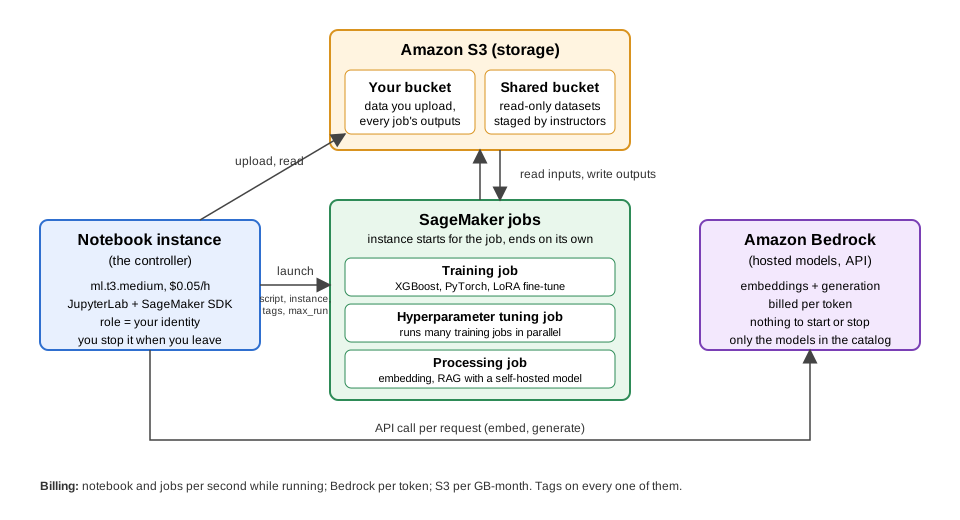
Everything in the lesson is one of these four boxes. S3 holds your data and every job’s outputs. The notebook instance is where you work; it is small because it only launches things. SageMaker jobs are where compute happens, on an instance that exists only for the job. Bedrock is an API: no instance at all. Everything the notebook does here can also be done from the AWS command line or from Python on your own machine; the optional last episode shows the CLI equivalents.
Lesson outline
The rest of the lesson is hands-on, in two parts:
- SageMaker: training, tuning and fine-tuning. Set up an S3 bucket and a small notebook instance, launch training jobs (XGBoost and PyTorch) and a hyperparameter tuning job from it, then fine-tune a vision-language model for handwriting transcription as a training job.
- Retrieval-augmented generation (RAG). Build a RAG pipeline over research papers on Amazon Bedrock, then run the same pipeline as SageMaker Processing jobs with an open-weight model.
Every job is tagged, capped, estimated before launch and checked against the bill after.
- The cloud offers the current GPU generation on demand and bills per second while a job runs; on-prem hardware offers full control and a fixed cost but a fixed generation and a queue.
- Renting is cheaper for bursty research work; owning is cheaper for GPUs that stay busy.
- An idle rented GPU costs the same as a busy one, so every job in this lesson is launched with a runtime cap.
- SageMaker runs your script in a preconfigured framework container on an instance that exists only for the job; Bedrock serves AWS-hosted models per token with nothing to start or stop.