
RAG with Processing Jobs
Last updated on 2026-10-21 | Edit this page
Overview
Questions
- When does a RAG pipeline need a self-hosted, open-weight model instead of Bedrock, and what is the safest way to rent the GPU for it?
- How do we run the embedding and generation steps of the WattBot pipeline as SageMaker Processing jobs that end on their own?
- How do we pass data in and out of a job through S3, and tag the job so its cost is traceable?
Objectives
- Explain why Bedrock’s catalog is not enough when you need a specific open-weight model, and why a Processing job is the default way to self-host one for batch work.
- Launch a GPU Processing job that embeds the cached WattBot chunks with a self-hosted embedding model and writes the vectors to S3.
- Launch a second Processing job that runs Qwen3-8B (an open-weight
model in a size Bedrock does not carry) with
transformersand runs the full RAG loop over the training questions. - Read a job’s inputs, outputs, arguments and runtime cap, and relate its duration to what it cost.
- Score the batch predictions with the WattBot metric and compare against the Bedrock run.
Open the notebook from:
/ML_with_AWS_SageMaker/notebooks/12_RAG-Processing-jobs.ipynb.
Select the conda_pytorch kernel. ## When
Bedrock does not have your model
The Bedrock episode is the default for RAG: per-token billing, nothing left running, two API calls. Bedrock’s catalog is curated, though. It carries Amazon’s models, Anthropic, Meta, Mistral, DeepSeek, and a few others, and within a family only some sizes, usually a generation behind: for Qwen, the serverless lineup is still the Qwen3 series. Hugging Face hosts well over a million open-weight checkpoints. The one you want (the newest release, a specific size, a fine-tune for scientific text, a model a paper just published) is usually not on Bedrock, and often never will be.
When that happens you host the model yourself on a GPU you rent, and the question becomes how. There are three ways to rent a GPU on SageMaker:
| Bills | Stops when | Best for | |
|---|---|---|---|
| GPU notebook instance | by the hour from start to stop | you stop it | interactive debugging, prototyping at the keyboard |
| Processing or training job | by the second while the job runs | the script ends, or max_runtime_in_seconds
|
batch work: embed a corpus, answer a list of questions, train |
| Inference endpoint | by the hour while deployed | you delete it | serving a model to an application with steady traffic |
For research RAG, almost all the work is batch: embed everything once, answer a list of questions, score them. That is a job, and a job is the one option that cannot be forgotten. This episode runs the WattBot pipeline that way. The notebook itself is a small CPU instance and never touches the model; it stages data, launches two GPU jobs, and reads the results back.
The generator is Qwen3-8B, an 8-billion-parameter
open-weight model (Apache 2.0). Bedrock serves the 32B and 235B members
of that family but not this size, which is the usual situation: the size
you want is the one missing. The job runs it with
transformers, the same library the fine-tuning episode
trained with: from_pretrained downloads the weights onto
the GPU, and generate writes the answer to a chat prompt,
the self-hosted counterpart of what Bedrock does behind
converse. Inference needs no gradients, so the weights are
the memory cost: 8B parameters at two bytes each in bf16 is about 16 GB,
which fits the 24 GB GPU of an ml.g5.xlarge with room for
the KV cache. (The fine-tuning episode has the full memory arithmetic;
the short version is that inference needs only the weights and training
needs eight times more per parameter.)
Why bother serving a model yourself when Bedrock is a call away? Because open-weight models that fit one GPU are now close to the frontier on the kinds of tasks research code runs, on data that never leaves your account. The newest of this family, Qwen3.8-27B, fits one GPU and lands within a few points of a frontier commercial model:
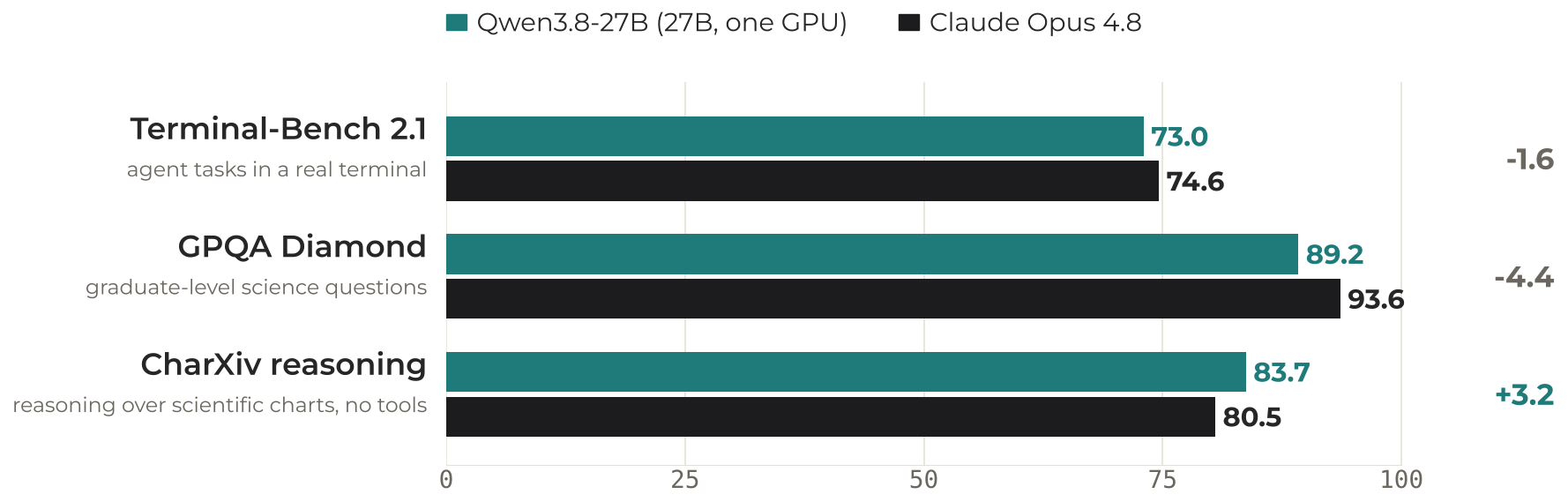
Qwen figures are from the Qwen3.8-27B model card and were not reproduced here; Opus 4.8 figures are from its published evaluations.
What this episode costs
| Job | Instance |
$/h |
Expected duration | Cost |
|---|---|---|---|---|
| Embed ~9,000 chunks |
ml.g5.xlarge (A10G, 24 GB) |
$1.41 |
~10 min incl. startup | ~$0.20
|
| RAG over a 53-question sample with Qwen3-8B |
ml.g5.xlarge (A10G, 24 GB) |
$1.41 |
~20 min: 1 provisioning, ~4 downloading and loading 16 GB of weights, ~13 generating | ~$0.40
|
| Controller notebook | ml.t3.medium |
$0.05 |
2 h | $0.10 |
About $0.70 for the episode, and the GPUs are off the
moment each script ends. The RAG job answers the same stratified sample
of questions as the Bedrock episode (ten per evidence type, 53 questions
once the two papers the corpus lacks are dropped); all 220 is about an
hour of generation, so run that at home. Both jobs carry
max_runtime_in_seconds, so a hung job costs at most the
cap. Compare the same pipeline on a GPU notebook instance (the optional
GPU-notebook episode at the end of the lesson): the meter runs until
someone stops it, and a forgotten ml.g5.xlarge is
$34 a day.
The trade-off is latency. A job takes minutes to start, so this pattern is for batch questions, not a chatbot. For interactive use, Bedrock answers in seconds; for interactive use of a model Bedrock does not have, an inference endpoint does, at an hourly rate you have to remember to turn off.
In this episode we will:
- Reuse the chunks cached in your bucket by the Bedrock episode and the inputs in the shared bucket.
- Run two short-lived GPU Processing jobs: one computes embeddings for
all chunks; the second runs Qwen3-8B with
transformersand the full RAG loop (retrieval + generation) over all training questions. - Score the result and compare it with the Bedrock run.
Setup
The scripts
Jobs run in containers, so the code they execute has to be shipped with the job: a Processing job cannot import functions defined in this notebook. The lesson repository has the three files we need as standalone scripts. Clone it:
-
scripts/embedding_inference.py: generic embedding script (JSONL with atextfield in,embeddings.npyout). -
scripts/hf_embedder.py: the embedding model wrapper both jobs use, on plaintransformers(mean pooling and normalisation, thirty lines), so neither job has to install anything for it. -
scripts/wattbot_rag_batch.py: the WattBot RAG loop as a batch job: loads the inputs, runs the generator, writeswattbot_solutions.csv. -
scripts/wattbot_rag.py: the shared pipeline logic (retrieval, prompts, answer parsing,run_single_qa, the scorer) that the Bedrock episode imported too. The batch script imports it, so it ships with the job; the notebook imports it for scoring.
The cell below copies them out of the lesson clone into the project
folder, one directory per job: code_embed/ for the
embedding job and code_rag/ for the RAG job. The split
follows from how a job gets its code. run(source_dir=...)
uploads that whole directory into the container, the same way the
training estimator’s source_dir did in the fine-tuning
episode, so each directory holds exactly the files its job imports. The
copies of wattbot_rag.py and Score.py next to
the notebook are for the scoring step at the end, which runs in the
notebook, not in a job.
PYTHON
!mkdir -p /home/ec2-user/SageMaker/wattbot   # the same project folder the Bedrock episode used, beside the lesson clone
%cd /home/ec2-user/SageMaker/wattbot

# One source directory per job: SageMaker uploads the whole directory into the container
!mkdir -p code_embed code_rag
# The embedding job's script
!cp /home/ec2-user/SageMaker/ML_with_AWS_SageMaker/scripts/embedding_inference.py /home/ec2-user/SageMaker/ML_with_AWS_SageMaker/scripts/hf_embedder.py code_embed/
# The RAG job's script plus the shared module it imports (the container cannot see this notebook)
!cp /home/ec2-user/SageMaker/ML_with_AWS_SageMaker/scripts/wattbot_rag_batch.py /home/ec2-user/SageMaker/ML_with_AWS_SageMaker/scripts/wattbot_rag.py /home/ec2-user/SageMaker/ML_with_AWS_SageMaker/scripts/hf_embedder.py code_rag/
# The notebook's own copies, for scoring at the end: the pipeline module and the competition's metric file
!cp /home/ec2-user/SageMaker/ML_with_AWS_SageMaker/scripts/wattbot_rag.py /home/ec2-user/SageMaker/ML_with_AWS_SageMaker/scripts/Score.py .
!ls code_embed code_rag
Next, set up the AWS SDK, SageMaker session, and bucket names.
PYTHON
import os
import json

import boto3
import time
import numpy as np
import pandas as pd
import sagemaker
from sagemaker import get_execution_role
from sagemaker.huggingface import HuggingFaceProcessor         # launches a job in the prebuilt Hugging Face container
from sagemaker.processing import ProcessingInput, ProcessingOutput   # S3 <-> container path mappings for a job

session = sagemaker.Session()
region = session.boto_region_name
role = get_execution_role()   # the IAM role the jobs run under to read and write S3

shared_bucket = "ml-marathon-shared"   # the instructor-staged, read-only bucket with the data and model weights; change only on your own account
bucket_name = "sinkorswim-doejohn"     # <-- EDIT ME: your own bucket (chunks in, outputs out)
s3_client = boto3.client("s3", region_name=region)

local_data_dir = "./data"
os.makedirs(local_data_dir, exist_ok=True)

print("Region:", region)
print("Role:", role)
print("Bucket:", bucket_name)
Step 1 – Check the inputs
The jobs read three files from S3: train_QA.csv and
metadata.csv from the shared bucket, and
chunks.jsonl from your bucket, where the Bedrock episode
cached it. The PDFs themselves are not needed again: chunking was done
once, and the jobs work from the chunks. We download the three files to
the notebook only to confirm they exist and to look at them; the jobs
fetch their own copies from S3.
First the keys and the full S3 URIs. The URIs are the form a
ProcessingInput takes, so they are built here once and
reused when the jobs are launched.
PYTHON
train_qa_key = "wattbot/train_QA.csv"
metadata_key = "wattbot/metadata.csv"
chunks_s3_key = "wattbot/chunks.jsonl"

# Full S3 URIs: this is the form a ProcessingInput takes
train_qa_s3 = f"s3://{shared_bucket}/{train_qa_key}"
metadata_s3 = f"s3://{shared_bucket}/{metadata_key}"
chunks_s3_uri = f"s3://{bucket_name}/{chunks_s3_key}"

def smart_read_csv(path: str) -> pd.DataFrame:
    """Read a CSV as utf-8, falling back to latin-1 for the odd accented author name."""
    try:
        return pd.read_csv(path)
    except UnicodeDecodeError:
        return pd.read_csv(path, encoding="latin-1")
Then download the three files, skipping any already on disk, and load them so we can check the counts before spending GPU time on them.
PYTHON
train_qa_path = os.path.join(local_data_dir, "train_QA.csv")
metadata_path = os.path.join(local_data_dir, "metadata.csv")
local_chunks_path = os.path.join(local_data_dir, "chunks.jsonl")

if not os.path.exists(train_qa_path):
    s3_client.download_file(shared_bucket, train_qa_key, train_qa_path)
if not os.path.exists(metadata_path):
    s3_client.download_file(shared_bucket, metadata_key, metadata_path)
if not os.path.exists(local_chunks_path):
    s3_client.download_file(bucket_name, chunks_s3_key, local_chunks_path)   # written by the Bedrock episode

train_df = smart_read_csv(train_qa_path)
metadata_df = smart_read_csv(metadata_path)
with open(local_chunks_path, "r", encoding="utf-8") as f:
    chunked_docs = [json.loads(line) for line in f]

print("Train QAs:", len(train_df))
print("Metadata rows:", len(metadata_df))
print("Chunks:", len(chunked_docs), "from", chunks_s3_uri)
train_df.head(3)
If the last download fails with NoSuchKey, go back to
the Bedrock episode and run its chunking step; this episode starts from
its output.
Step 2 – Processing Job 1: embed all chunks on a GPU
Now we launch a short-lived Hugging Face Processing job that:
- Downloads
chunks.jsonlfrom S3. - Loads
thenlper/gte-largefrom Hugging Face with the container’s owntransformers. - Encodes each chunk into an embedding vector.
- Saves the full matrix as
embeddings.npyback to S3.
We use the same embedding_inference.py script across
projects; here it expects a JSONL file with a text
field.
Nothing to install
Neither job installs anything. The Hugging Face container ships
transformers and PyTorch, which is all the embedding
wrapper and the generator need, so both jobs start as soon as the
instance is up. A requirements.txt next to a script would
be pip-installed before it runs; neither job here has one.
Cost tracking: tag every job
Tags do not propagate in AWS. The tags you put on your notebook instance cover the notebook’s hourly cost and nothing else. Each Processing job below launches its own GPU instance, which is a separate billable resource with no tags unless we pass them at launch, exactly as we did for training and tuning jobs earlier in the workshop. An untagged job shows up in Cost Explorer as anonymous SageMaker spend that nobody can attribute to a team.
Define the tags once and pass tags=job_tags to
every HuggingFaceProcessor you create. Use
a distinct Purpose per job so you can tell the embedding
job from the batch RAG job on the bill.
PYTHON
name = "DoeJohn"         # replace with your name
project = "SinkOrSwim"   # replace with your challenge name

def make_job_tags(purpose: str):   # one of: Storage, Notebook, Training, Tuning, Inference
    return [
        {"Key": "Name", "Value": name},
        {"Key": "Project", "Value": project},
        {"Key": "Purpose", "Value": purpose},   # differs per job so the bill tells them apart
    ]
Launch the embedding job
Open scripts/embedding_inference.py first; it is under
fifty lines. It reads a JSONL file of chunks from the job’s input
directory, embeds them with whatever Hugging Face model
--model_id names, through the thirty-line wrapper in
hf_embedder.py, normalises the vectors so a dot product is
a cosine similarity, and saves one embeddings.npy to the
output directory. Nothing in it knows about WattBot, which is the point
of a Processing job script: inputs in, outputs out, no state.
A HuggingFaceProcessor is the Processing-job counterpart
of the estimator: the same role, tags, instance type and container
versions, plus a runtime cap. Its run call names the
script, mounts the inputs, and says where the output goes. Once it is
launched, the job appears on the Processing
jobs page of the SageMaker console (under Data
preparation in the left menu), the Processing counterpart of
the Training jobs page you used earlier.
In class the instructor has run this job already and staged its
output. The switch below copies that matrix into your bucket, at the key
the job would have written, and the launch cell then skips the job: the
second job, which you do launch, has the same shape and is where the
class spends its GPU minutes. On your own, set it to False
and run the job; it is eight minutes.
PYTHON
def _s3_object_exists(bucket: str, key: str) -> bool:
    try:
        s3_client.head_object(Bucket=bucket, Key=key)
        return True
    except s3_client.exceptions.ClientError:
        return False

embedding_model_id = "thenlper/gte-large"
emb_output_prefix = "wattbot/embeddings"
emb_output_path = f"s3://{bucket_name}/{emb_output_prefix}/"

use_instructor_embeddings = True                       # True in class: copy the instructor's gte-large matrix and skip the job. False: run the job
shared_gte_key = "wattbot/embeddings_gte_large.npy"    # where the instructor staged it in the shared bucket

run_embedding_job = not (use_instructor_embeddings and _s3_object_exists(shared_bucket, shared_gte_key))
if not run_embedding_job:
    s3_client.copy({"Bucket": shared_bucket, "Key": shared_gte_key}, bucket_name, f"{emb_output_prefix}/embeddings.npy")
    print(f"Copied the instructor's embeddings to s3://{bucket_name}/{emb_output_prefix}/embeddings.npy; the embedding job is skipped")
PYTHON
embedding_processor = HuggingFaceProcessor(
    base_job_name="WattBot-embed-gte-large",   # SageMaker appends a timestamp to make each job name unique
    role=role,
    tags=make_job_tags("Inference"),   # tags are per job; nothing is inherited from the notebook
    instance_type="ml.g5.xlarge",      # the GPU the job rents (A10G, 24 GB): plenty for a 335M-parameter embedder
    instance_count=1,
    transformers_version="4.56",       # these three pick the prebuilt container image
    pytorch_version="2.8",
    py_version="py312",
    sagemaker_session=session,
    max_runtime_in_seconds=2 * 60 * 60,   # 2 hours, in seconds (2 h x 60 min x 60 s); the estimate is ~8 minutes. SageMaker kills the job here, so a hang costs at most this
)

if run_embedding_job:   # False in class when the instructor's matrix was copied in above
    # run() uploads the code, starts the instance, streams the job's log here and returns when the script ends (wait=True is the default)
    start = time.time()
    embedding_processor.run(
        code="embedding_inference.py",     # the script the container runs...
        source_dir="code_embed/",          # ...uploaded with everything beside it (hf_embedder.py)
        inputs=[
            ProcessingInput(
                source=chunks_s3_uri,                       # S3 object (or prefix) copied in before the script starts
                destination="/opt/ml/processing/input",    # where it appears inside the container
            )
        ],
        outputs=[
            ProcessingOutput(
                output_name="embeddings",
                source="/opt/ml/processing/output",        # whatever the script writes here...
                destination=emb_output_path,               # ...is copied to this S3 prefix when the script ends
            )
        ],
        arguments=[                        # command-line flags, as the script's argparse expects them
            "--model_id", embedding_model_id,
            "--input_filename", "chunks.jsonl",
            "--text_key", "text",
            "--input_dir", "/opt/ml/processing/input",
            "--output_dir", "/opt/ml/processing/output",
        ],
    )

    print(f"Embedding job complete: {(time.time() - start) / 60:.1f} min wall-clock, including instance startup")
Check on the running job in the AWS Console
To view the job running from the AWS Console, you can visit SageMaker
AI, and then find the “Data Preparation” dropdown menu on the left side
panel. Click that to find “Processing jobs”, or open this
link in the class region (change us-east-2 in it for
another region).
It takes about 10 minutes in total for the job to complete: a couple of provisioning the instance and downloading the embedding model, eight of embedding. This is the downside of launching jobs, but the good news is that we only need to launch one embedding job for our RAG pipeline. This strategy also ensures we’re only paying for the GPU while the job runs.
Sanity-check the embeddings locally
We can download embeddings.npy back into the notebook
and inspect its shape to confirm the job ran successfully.
PYTHON
local_embeddings_path = os.path.join(local_data_dir, "embeddings.npy")
embeddings_key = f"{emb_output_prefix}/embeddings.npy"   # the ProcessingOutput destination + the filename the script wrote

s3_client.download_file(bucket_name, embeddings_key, local_embeddings_path)
chunk_embeddings = np.load(local_embeddings_path)

print("Embeddings shape:", chunk_embeddings.shape, "for", len(chunked_docs), "chunks")
Step 3 – Processing Job 2: full WattBot RAG over all questions
For the second job, we pass four inputs:
-
chunks.jsonl– serialized chunks (your bucket) -
embeddings.npy– precomputed chunk embeddings (your bucket, written by Job 1) -
train_QA.csv– training questions (shared bucket) -
metadata.csv– to resolveref_id→ URL (shared bucket)
The --per_type 10 argument draws the same stratified
sample the Bedrock episode scored, ten questions per evidence type with
the same seed, so the two runs are compared on the same questions; leave
it out to answer them all. Open
scripts/wattbot_rag_batch.py and read main
before launching it. It is short, because the pipeline lives in
scripts/wattbot_rag.py, the same module the Bedrock episode
imported:
-
retrieve_top_k: cosine similarity over the embedding matrix -
run_single_qa: retrieval, the answer call, the hybrid unanswerable rule (retrieval threshold OR the model’s ownis_blank), the explanation call -
compute_wattbot_score: the metric we use at the end
What the batch script adds is the two model callables:
embed_query wraps the same gte-large model and
pooling the embedding job used (hf_embedder.py) (the
question has to be embedded with the same model as the chunks), and
generate_batch wraps transformers.generate on
the generator (Qwen3-8B here) with Qwen’s thinking mode off, taking
several prompts at once. The loop itself is run_batch_qa,
the batched twin of the run_single_qa the Bedrock episode
used: the same retrieval, prompts and unanswerable rule, with the model
calls grouped eight at a time because a GPU decoding one prompt is idle
most of the time. The job writes wattbot_solutions.csv in
the WattBot submission format.
Why not vLLM?
vLLM is the open-source inference engine most people serve
open-weight models with: you give it a model name, it loads the weights
onto the GPU and answers chat requests, batching many at once so that
throughput scales. That is what you want behind an API with users. This
job has about 100 prompts and no users waiting, and
transformers.generate, already in the container, can decode
several prompts at once too: run_batch_qa in
wattbot_rag.py hands them to the model eight at a time
(--batch_size), which is where most of vLLM’s speed on a
batch like this comes from, with nothing to install. vLLM’s install is
several gigabytes of billed GPU time before the first answer. The
GPU-notebook episode uses vLLM, where its 8-bit weights are needed to
fit a larger model.
PYTHON
emb_output_s3 = f"s3://{bucket_name}/{emb_output_prefix}/embeddings.npy"

print("chunks:    ", chunks_s3_uri)
print("embeddings:", emb_output_s3)
print("train_QA:  ", train_qa_s3)
print("metadata:  ", metadata_s3)
If the launch below fails at once with
ResourceLimitExceeded naming an instance type, nothing in
the notebook is wrong: the account’s quota for that type is too low, and
the increase is requested in Service
Quotas (days, for GPU types). On your own account, request
ml.g5.xlarge for processing job usage before you start.
What launching a job means
This is the first GPU job you launch yourself in this episode (the
embedding job above was staged for you in class), so here is the whole
mechanism in plain terms. You describe a machine and point at a script.
SageMaker rents the machine, copies the files you named from S3 onto its
disk, runs your script on it, copies whatever the script wrote in its
output folder back to S3, and shuts the machine down. The notebook does
nothing but wait and show you the script’s printed output. Nothing from
this notebook’s memory goes along: not chunked_docs, not
train_df, not any function defined above. The script sees
only the files you copied in and the arguments you gave it, which is why
every input is an S3 location and every setting is a command-line flag.
That is the same thing estimator.fit did in the fine-tuning
episode, with one difference: a training job hands back a trained model,
a Processing job hands back whatever files the script wrote, here a CSV
of answers.
The description is two cells. The first builds a
HuggingFaceProcessor: which machine, which container image,
how long it may run, whose tags it carries. Two of its settings matter
more than on the embedding job. volume_size_in_gb=60
attaches a 60 GB volume to the instance, mounted under
/opt/ml/processing; the container’s own root disk is small,
so the 16 GB of model weights must not land there.
env={"HF_HOME": ...} points Hugging Face’s download cache
at that volume, which is where the weights go.
PYTHON
rag_output_prefix = "wattbot/solutions"                       # where this job's output lands in your bucket
rag_output_path = f"s3://{bucket_name}/{rag_output_prefix}/"

generation_model_id = "Qwen/Qwen3-8B"   # the Hugging Face name the job downloads; ~16 GB of bf16 weights

rag_processor = HuggingFaceProcessor(
    base_job_name="WattBot-rag-batch",   # SageMaker appends a timestamp; this is the name you look for on the Processing jobs page
    role=role,                           # the IAM role the job runs under, to read your bucket and the shared one
    tags=make_job_tags("Inference"),     # separate job, separate tags: nothing is inherited from the embedding job
    instance_type="ml.g5.xlarge",        # 1 x A10G, 24 GB: holds the bf16 8B model plus the KV cache
    instance_count=1,
    volume_size_in_gb=60,                # disk attached to the instance, mounted at /opt/ml/processing; the weights go here
    env={"HF_HOME": "/opt/ml/processing/hf_cache"},   # environment variable in the container: Hugging Face downloads to this path
    transformers_version="4.56",         # these three pick the prebuilt container image, the same one the embedding job used
    pytorch_version="2.8",
    py_version="py312",
    sagemaker_session=session,
    max_runtime_in_seconds=2 * 60 * 60,  # the cap: SageMaker kills the job after 2 hours; the estimate is 20 minutes
)
The processor is only a description; nothing runs until
run. Its arguments are the three things a job needs: the
code (code and source_dir), the data
(inputs, each an S3 location and the container path it is
copied to before the script starts), and where the results go
(outputs, a container path copied to S3 when the script
ends). The arguments list is the script’s command line, in
the form its argparse expects.
PYTHON
start = time.time()
rag_processor.run(
    code="wattbot_rag_batch.py",       # the script the container runs...
    source_dir="code_rag/",            # ...uploaded with everything beside it: wattbot_rag.py and hf_embedder.py, which it imports
    inputs=[                           # each input: an S3 object, and the container path it is copied to before the script starts
        ProcessingInput(
            source=chunks_s3_uri,                              # the chunks, from your bucket
            destination="/opt/ml/processing/input/chunks",     # four inputs, each in its own subdirectory
        ),
        ProcessingInput(
            source=emb_output_s3,                              # the gte-large matrix the embedding job wrote
            destination="/opt/ml/processing/input/embeddings",
        ),
        ProcessingInput(
            source=train_qa_s3,                                # the questions, from the shared bucket
            destination="/opt/ml/processing/input/train",
        ),
        ProcessingInput(
            source=metadata_s3,                                # the paper index, to fill the ref_url column
            destination="/opt/ml/processing/input/metadata",
        ),
    ],
    outputs=[
        ProcessingOutput(
            output_name="solutions",
            source="/opt/ml/processing/output",                # whatever the script writes here...
            destination=rag_output_path,                       # ...is copied to this S3 prefix when the script ends
        )
    ],
    arguments=[                        # the script's command line: python wattbot_rag_batch.py --input_dir ... --top_k 8 ...
        "--input_dir", "/opt/ml/processing/input",             # where the inputs above were mounted
        "--output_dir", "/opt/ml/processing/output",           # where the script must write for the output copy to pick it up
        "--embedding_model_id", embedding_model_id,            # the same model that embedded the chunks, to embed each question
        "--qwen_model_id", generation_model_id,                # the generator
        "--top_k", "8",                                        # chunks handed to the model per question
        "--retrieval_threshold", "0.25",                       # best cosine below this => unanswerable
        "--per_type", "10",                                    # the same stratified sample the Bedrock episode scored (seed 0); drop it for all the questions
        "--batch_size", "8",                                   # prompts decoded together; 1 would be one at a time, several times slower
    ],
)

print(f"RAG batch job complete: {(time.time() - start) / 60:.1f} min wall-clock, including instance startup and the weight download")
While it runs, read what the container is printing. Open the Processing
jobs page, click the job’s name, scroll to Monitor
and click View logs. That opens CloudWatch, the AWS
service that stores every job’s printed output, at a list with one entry
named after your job; click it. The text is the container’s stdout, kept
after the job ends, updated while it runs (refresh). You will see, in
order: the weight download (16 GB in shards),
Loading model with transformers, a line per batch of
answers and of explanations, then one line per question. The whole job
is the 20 minutes in the cost callout; the generation is the second half
of it.
Step 4 – Download predictions and evaluate
Finally, we download wattbot_solutions.csv from S3,
inspect a few rows, and compute the WattBot score against
train_QA.csv with the same
compute_wattbot_score the Bedrock episode used.
PYTHON
solutions_key = f"{rag_output_prefix}/wattbot_solutions.csv"
local_solutions_path = os.path.join(local_data_dir, "wattbot_solutions.csv")

s3_client.download_file(bucket_name, solutions_key, local_solutions_path)
solutions_df = pd.read_csv(local_solutions_path)
solutions_df.head()
Score the predictions with the competition’s own
Score.py, through the same wrapper the Bedrock episode
used, so the two runs compare directly.
PYTHON
from wattbot_rag import compute_wattbot_score

results_df = compute_wattbot_score(
    train_qa_path=train_qa_path,
    preds_path=local_solutions_path,
    n_examples=10,
)
Compare the overall score with the Bedrock run. The retrieval logic,
prompts and scoring are identical, so any difference is the two models:
gte-large versus Titan for retrieval, Qwen3-8B versus
DeepSeek V3 for generation. In one run on the same 53 questions,
Qwen3-8B scored 0.57 against DeepSeek V3’s 0.66: its citations were
better (F1 0.70 against 0.57) and its answers worse (51% against 66%
correct), with the cross-paper and calculation questions losing the
most. An 8B model against a 671B one is not a fair fight, and the gap is
the price of a model you host yourself on one small GPU.
What did the two jobs cost?
Ask SageMaker what it recorded for each job:
session.sagemaker_client.describe_processing_job(ProcessingJobName=...)
returns CreationTime, ProcessingStartTime and
ProcessingEndTime. The job names are
embedding_processor.latest_job.job_name and
rag_processor.latest_job.job_name. For each job, compute
the minutes between creation and start (provisioning, before the
instance is billed) and between start and end (the billed window), and
price the billed window at $1.41/h, the
ml.g5.xlarge rate both jobs used. Then, from the RAG job’s
CloudWatch log timestamps, estimate how much of its billed window was
setup (the weight download and model load) and how much was generation.
How does the total compare with the cost callout, and with the Bedrock
run?
describe_processing_job returns three timestamps; the
gap between the first two is unbilled provisioning, between the last two
the billed run.
PYTHON
def job_cost(job_name: str, price_per_hour: float):
    d = session.sagemaker_client.describe_processing_job(ProcessingJobName=job_name)   # the record SageMaker keeps for the job
    # CreationTime -> ProcessingStartTime: provisioning the instance, not billed
    provisioning = (d["ProcessingStartTime"] - d["CreationTime"]).total_seconds() / 60
    # ProcessingStartTime -> ProcessingEndTime: the script running, billed by the second
    billed = (d["ProcessingEndTime"] - d["ProcessingStartTime"]).total_seconds() / 60
    cost = billed / 60 * price_per_hour
    print(f"{job_name}: {d['ProcessingJobStatus']}")
    print(f"  wall-clock:                {provisioning + billed:.1f} min from launch to end")
    print(f"  provisioning (not billed): {provisioning:.1f} min")
    print(f"  billed window:             {billed:.1f} min at ${price_per_hour}/h = ${cost:.2f}")
    print(f"  output:                    {d['ProcessingOutputConfig']['Outputs'][0]['S3Output']['S3Uri']}")   # where the job's files went
    return cost

total = job_cost(embedding_processor.latest_job.job_name, 1.41) if run_embedding_job else 0.0   # no job to price when the matrix was copied in
total += job_cost(rag_processor.latest_job.job_name, 1.41)
print(f"GPU total for the episode: ${total:.2f}")
Expect the embedding job to bill about 8 minutes (about
$0.20) and the RAG job about 17 minutes (about
$0.40), so about $0.60 of GPU time, the
callout’s figure. In the RAG job’s log, the first 4 minutes of the
billed window are the download and the model load; the rest is the
questions, two generation calls each. Setup is a third of what you paid
for, which is the argument for keeping an HF_HOME cache on
S3 (skip the download) once a job is run routinely. The Bedrock run of
the same questions cost cents, and the self-hosted route is only
justified here because the model is not in the catalog.
The runtime cap
Both processors set max_runtime_in_seconds=2 * 60 * 60.
Predict what would happen if the RAG job were launched with
max_runtime_in_seconds=600 instead: what does the job
status become, what is in the output prefix, and what did it cost? Then
compute the most a hung job can bill under each job’s actual cap, and
compare it with the cost of an ml.g6e.xlarge notebook
instance left running over a weekend (64 hours).
With a 600-second cap the RAG job is killed by SageMaker ten minutes
after ProcessingStartTime, while it is still downloading or
loading the weights. The status becomes Stopped (the
failure reason reads MaxRuntimeExceeded), the output prefix
is empty because the script never reached the point of writing
wattbot_solutions.csv, and the bill is the full 600
seconds: 600 / 3600 × $1.41 ≈ $0.24 for
nothing. A cap has to leave room for the setup that precedes the work,
which is why ours is six times the 20-minute estimate rather than ten
percent over it.
Under the caps we set, the worst case for a job that hangs (a stuck
download, a model that never finishes loading) is 2 h ×
$1.41 = $2.82 for either job.
An ml.g5.xlarge notebook instance forgotten over a weekend
is 64 h × $1.41 = $90, and
nothing caps it. That is the difference between a job and an instance:
the job’s worst case is a number you chose before you launched it.
- Bedrock’s catalog is curated and lags releases; when you need a specific open-weight model you rent a GPU and serve it yourself.
- Of the ways to rent a GPU, a Processing job is the one that cannot
be forgotten: it bills while the script runs and ends on its own, with
max_runtime_in_secondsas the backstop. Use it for batch work; use Bedrock or an endpoint when you need answers in seconds. - Inference needs only the weights: Qwen3-8B in bf16 is ~16 GB and fits one 24 GB GPU.
- A job’s inputs and outputs are S3 prefixes mounted into the container; the notebook only stages files and reads results, so it stays a cheap CPU instance.
- The pipeline logic (
wattbot_rag.py) ships with the job unchanged from the Bedrock episode; only the two model callables differ. - Tags do not propagate from the notebook: every job gets its own
tags=.