
Training Models in SageMaker: PyTorch Example
Last updated on 2026-10-20 | Edit this page
Estimated time: 50 minutes
Overview
Questions
- When should you consider using a GPU instance for training neural networks in SageMaker, and what are the benefits and limitations?
- How does SageMaker handle data parallelism and model parallelism, and which is suitable for typical neural network training?
Objectives
- Preprocess the Titanic dataset for efficient training using PyTorch.
- Save and upload training and validation data in
.npzformat to S3. - Understand the trade-offs between CPU and GPU training for smaller datasets.
- Train a PyTorch model as a SageMaker training job and compare CPU and GPU instance types on time and cost.
- Differentiate between data parallelism and model parallelism, and determine when each is appropriate in SageMaker.
Initial setup: open prefilled .ipynb notebook
Open the notebook from:
/ML_with_AWS_SageMaker/notebooks/Training-models-in-SageMaker-notebooks-part2.ipynb.
Select the conda_pytorch_p310 kernel.
Setup notebook as controller
Once your notebook is open, we can setup our SageMaker controller as usual:
PYTHON
import boto3
import pandas as pd
import sagemaker
from sagemaker import get_execution_role

# Initialize the SageMaker role (will reflect notebook instance's policy)
role = sagemaker.get_execution_role()
print(f'role = {role}')

# Initialize an S3 client to interact with Amazon S3, allowing operations like uploading, downloading, and managing objects and buckets.
s3 = boto3.client('s3')

# Define the S3 bucket that we will load from
bucket_name = 'sinkorswim-doejohn'  # replace with your S3 bucket name

# Define train/test filenames
train_filename = 'titanic_train.csv'
test_filename = 'titanic_test.csv'
Create a SageMaker session to manage interactions with Amazon SageMaker, such as training jobs, model deployments, and data input/output. As before, the region comes from the notebook instance.
PYTHON
region = boto3.Session().region_name  # inherited from the notebook instance; do not hard-code a region
session = sagemaker.Session()
sagemaker_client = session.sagemaker_client
print(f"region = {region}")
We should also record our local instance information to report this information during testing. First, let’s make sure we’re starting in the same location to access helper functions
PYTHON
%cd /home/ec2-user/SageMaker/
!test -d ML_with_AWS_SageMaker || git clone https://github.com/carpentries-incubator/ML_with_AWS_SageMaker.git
import sys
sys.path.insert(0, "/home/ec2-user/SageMaker/ML_with_AWS_SageMaker/scripts")
import helpers
PYTHON
notebook_instance_name = 'SinkOrSwim-DoeJohn' # replace with your notebook instance name

local_instance_info = helpers.get_notebook_instance_info(notebook_instance_name, region)
local_instance = local_instance_info['InstanceType']
local_instance
If you are starting from a fresh notebook instance, download the Titanic CSVs from S3 again.
Training a neural network with SageMaker
Let’s see how to do a similar experiment, but this time using PyTorch
neural networks. We will again demonstrate how to test our custom model
train script (train_nn.py) before deploying to SageMaker,
and discuss some strategies (e.g., using a GPU) for improving train time
when needed.
Preparing the data (compressed npz files)
When deploying a PyTorch model on SageMaker, it’s helpful to prepare the input data in a format that’s directly accessible and compatible with PyTorch’s data handling methods. The next code cell will prep our npz files from the existing csv versions.
Why are we using this file format?
Optimized data loading:
The.npzformat stores arrays in a compressed, binary format, making it efficient for both storage and loading. PyTorch can easily handle.npzfiles, especially in batch processing, without requiring complex data transformations during training.Batch compatibility:
When training neural networks in PyTorch, it’s common to load data in batches. By storing data in an.npzfile, we can quickly load the entire dataset or specific parts (e.g.,X_train,y_train) into memory and feed it to the PyTorchDataLoader, enabling efficient batched data loading.Reduced I/O overhead in SageMaker:
Storing data in.npzfiles minimizes the I/O operations during training, reducing time spent on data handling. This is especially beneficial in cloud environments like SageMaker, where efficient data handling directly impacts training costs and performance.Consistency and compatibility:
Using.npzfiles allows us to ensure consistency between training and validation datasets. Each file (train_data.npzandval_data.npz) stores the arrays in a standardized way that can be easily accessed by keys (X_train,y_train,X_val,y_val). This structure is compatible with PyTorch’sDatasetclass, making it straightforward to design custom datasets for training.Support for multiple data types:
.npzfiles support storage of multiple arrays within a single file. This is helpful for organizing features and labels without additional code. Here, thetrain_data.npzfile contains bothX_trainandy_train, keeping everything related to training data in one place. Similarly,val_data.npzorganizes validation features and labels, simplifying file management.
In summary, saving the data in .npz files ensures a
smooth workflow from data loading to model training in PyTorch,
leveraging SageMaker’s infrastructure for a more efficient, structured
training process.
We reuse the preprocess_data() function from the
lesson’s scripts/train_nn.py rather than re-typing the
preprocessing here: the same function will later be applied to the test
set, so train and test are transformed identically. It returns the
fitted StandardScaler, and we save it with
joblib so the next episode can load it.
PYTHON
import numpy as np
import joblib
from sklearn.model_selection import train_test_split
from train_nn import preprocess_data

# Load and preprocess the Titanic dataset: encode Sex/Embarked, fill missing Age/Fare, standardize features
df = pd.read_csv(train_filename)
X, y, scaler = preprocess_data(df)   # scaler is fit on the training data only

# Split the data
X_train, X_val, y_train, y_val = train_test_split(X, y, test_size=0.2, random_state=42)

# Save the preprocessed data (and the fitted scaler) to our local jupyter environment
np.savez('train_data.npz', X_train=X_train, y_train=y_train)
np.savez('val_data.npz', X_val=X_val, y_val=y_val)
joblib.dump(scaler, 'scaler.joblib')
print(X_train.shape, X_val.shape)
Next, we will upload our compressed files (and the scaler) to our S3 bucket. Storage is fairly cheap on AWS (around $0.023 per GB per month), but be mindful of uploading too much data. It may be convenient to store a preprocessed version of the data at times, but try not to store too many versions that aren’t being actively used.
PYTHON
train_file = "train_data.npz"  # Local file path in your notebook environment
val_file = "val_data.npz"  # Local file path in your notebook environment
scaler_file = "scaler.joblib"

# Upload the training and validation files (and the scaler) to the bucket root
for f in [train_file, val_file, scaler_file]:
    s3.upload_file(f, bucket_name, f)

print("Files successfully uploaded to S3.")
Testing on notebook instance
You should always test code thoroughly before scaling up and using more resources. Here, we will test our script using a small number of epochs (100) — just to verify our setup is correct.
PYTHON
import torch
import time as t # Measure training time locally

epochs = 100          # small smoke test
learning_rate = 0.001

start_time = t.time()
%run ML_with_AWS_SageMaker/scripts/train_nn.py --train train_data.npz --val val_data.npz --epochs {epochs} --learning_rate {learning_rate}
print(f"Local training time: {t.time() - start_time:.2f} seconds, instance_type = {local_instance}")
Deploying PyTorch neural network via SageMaker
Now that we have tested things locally, we can try to train with a larger number of epochs (1000). We can do this easily by invoking the PyTorch estimator. Our notebook is currently configured to use ml.m5.large. We will use the same instance type with the below code (using our notebook as a controller).
Should we use a GPU?: Since this dataset is fairly
small, we don’t necessarily need a GPU for training. Considering costs,
the m5.large is $0.115/hour, while the cheapest GPU
instance (ml.g4dn.xlarge) is $0.74/hour. However, for
larger datasets (> 1 GB) and models, we may want to consider a GPU if
training time becomes cumbersome (see Instances
for ML). We’ll test that in the exercise below.
Cost tracking
As in the XGBoost episode, every training job needs its own tags: a
job does not inherit the notebook instance’s tags, and an untagged job
is anonymous on the bill. Define them once here and pass
tags=job_tags to every estimator below.
PYTHON
name = "DoeJohn" # replace with your name
project = "SinkOrSwim" # replace with your challenge name
purpose = "Training"

job_tags = [
    {"Key": "Name", "Value": name},
    {"Key": "Project", "Value": project},
    {"Key": "Purpose", "Value": purpose},
]
We’ll also bring back the job_cost_report() helper from
the previous episode, plus the hourly rates of the instances we’re about
to use. Estimate first: 1000 full-batch epochs took a few seconds
locally, so expect roughly 1 minute of training plus ~3 minutes of
startup, i.e. about $0.01 on ml.m5.large.
PYTHON
def job_cost_report(job_name: str, price_per_hour: float):
    desc = session.sagemaker_client.describe_training_job(TrainingJobName=job_name)
    billable = desc["BillableTimeInSeconds"] * desc["ResourceConfig"]["InstanceCount"]
    print(f"{job_name}: status {desc['TrainingJobStatus']}, training {desc.get('TrainingTimeInSeconds', 0)/60:.1f} min, billable {billable/60:.1f} min, cost ${billable/3600*price_per_hour:.2f} at ${price_per_hour}/h")
    return desc

# us-east-1 on-demand rates (2026-10-16); check the instances page for your region
prices = {"ml.m5.large": 0.115, "ml.m5.xlarge": 0.23, "ml.g4dn.xlarge": 0.74}
PYTHON
from sagemaker.pytorch import PyTorch
from sagemaker.inputs import TrainingInput

epochs = 1000          # more epochs now that the script is known to work
instance_count = 1
instance_type = "ml.m5.large"
output_path = f's3://{bucket_name}/output_nn/' # this folder will auto-generate if it doesn't exist already

# Define max runtime in seconds to ensure you don't use more compute time than expected. Use a generous threshold (2x expected time but < 2 days) so that work isn't interrupted without any gains.
max_run = 2*60*60 # 2 hours

# Define the PyTorch estimator and pass hyperparameters as arguments
pytorch_estimator = PyTorch(
    base_job_name=notebook_instance_name,
    max_run=max_run, # in seconds; always include (max 48 hours)
    entry_point="ML_with_AWS_SageMaker/scripts/train_nn.py",
    role=role,
    tags=job_tags,
    instance_type=instance_type, # with this small dataset, we don't necessarily need a GPU for fast training.
    instance_count=instance_count,
    framework_version="2.3",  # if fit() fails with an image error, check available versions with: sagemaker.image_uris.retrieve("pytorch", region, version="2.3", py_version="py311", image_scope="training", instance_type="ml.m5.large")
    py_version="py311",
    output_path=output_path,
    sagemaker_session=session,
    hyperparameters={
        "train": "/opt/ml/input/data/train/train_data.npz",  # SageMaker will mount this path
        "val": "/opt/ml/input/data/val/val_data.npz",        # SageMaker will mount this path
        "epochs": epochs,
        "learning_rate": learning_rate
    }
)

# Define input paths
train_input = TrainingInput(f"s3://{bucket_name}/train_data.npz", content_type="application/x-npz")
val_input = TrainingInput(f"s3://{bucket_name}/val_data.npz", content_type="application/x-npz")

# Start the training job and time it
start = t.time()
pytorch_estimator.fit({"train": train_input, "val": val_input})
end = t.time()

print(f"Runtime for training on SageMaker: {end - start:.2f} seconds, instance_type: {instance_type}, instance_count: {instance_count}")
PYTHON
desc_cpu = job_cost_report(pytorch_estimator.latest_training_job.name, prices[instance_type])For a job this small, almost all of the billable minutes are startup.
Deploying PyTorch neural network via SageMaker with a GPU instance
In this section, we’ll implement the same procedure as above, but using a GPU-enabled instance for potentially faster training. While GPU instances are more expensive, they can be cost-effective for larger datasets or more complex models that require significant computational power.
Selecting a GPU Instance
For a small dataset like ours, we don’t strictly need a GPU, but for
larger datasets or more complex models, a GPU can reduce training time.
Here, we’ll select an ml.g4dn.xlarge instance, which
provides a single GPU and costs approximately $0.74/hour
(check Instances
for ML page for detailed pricing).
Code modifications for GPU use
Using a GPU requires minor changes in your training script
(train_nn.py). Specifically, you’ll need to: 1. Check for
GPU availability in PyTorch. 2. Move the model and tensors to the GPU
device if available.
Enabling PyTorch to use GPU in train_nn.py
The following code snippet enables GPU support in
train_nn.py:
device = torch.device("cuda" if torch.cuda.is_available() else "cpu")
model = TitanicNet().to(device)
X_train, y_train = X_train.to(device), y_train.to(device)CPU or GPU: predict, then measure
We’re about to run the identical job on an
ml.g4dn.xlarge (one NVIDIA T4 GPU, about $0.74/hour)
instead of the ml.m5.large ($0.115/hour). Before you run
the cell:
- Predict which instance finishes first (total wall-clock, as
fit()reports it). - Predict which costs less for this job.
Then run the GPU job, call job_cost_report() for it, and
compute cost = rate x billable minutes for both runs. Were you right?
Explain the result.
PYTHON
instance_type = "ml.g4dn.xlarge"
instance_count = 1

pytorch_estimator_gpu = PyTorch(
    base_job_name=notebook_instance_name,
    max_run=max_run, # in seconds; always include (max 48 hours)
    entry_point="ML_with_AWS_SageMaker/scripts/train_nn.py",
    role=role,
    tags=job_tags,
    instance_type=instance_type,
    instance_count=instance_count,
    framework_version="2.3",
    py_version="py311",
    output_path=output_path,
    sagemaker_session=session,
    hyperparameters={
        "train": "/opt/ml/input/data/train/train_data.npz",
        "val": "/opt/ml/input/data/val/val_data.npz",
        "epochs": epochs,
        "learning_rate": learning_rate
    }
)

start = t.time()
pytorch_estimator_gpu.fit({"train": train_input, "val": val_input})
end = t.time()
print(f"Runtime for training on SageMaker: {end - start:.2f} seconds, instance_type: {instance_type}, instance_count: {instance_count}")

desc_gpu = job_cost_report(pytorch_estimator_gpu.latest_training_job.name, prices[instance_type])

for label, d, rate in [("CPU ml.m5.large", desc_cpu, prices["ml.m5.large"]), ("GPU ml.g4dn.xlarge", desc_gpu, prices["ml.g4dn.xlarge"])]:
    billable_min = d["BillableTimeInSeconds"] / 60
print(f"{label}: billable {billable_min:.1f} min x ${rate}/h = ${billable_min/60*rate:.3f}")Typically the CPU run finishes about as fast or faster, and it is several times cheaper. Both jobs spend roughly the same few minutes on startup (provisioning, pulling the container, downloading data), and the GPU container is larger, so it often takes a little longer to start. The actual training is a few seconds on either instance: the network has about 2,600 parameters and the whole training set is 713 rows, so each full-batch step is tiny and the T4 sits almost idle, and the one-time CUDA initialization adds a few seconds of its own. Startup dominates both bills, and the GPU bill is about 6x higher per minute (0.74 / 0.115), so the GPU costs roughly 6x more for no speedup.
A GPU pays off when the per-step work is large enough to keep it
busy: bigger models, bigger batches, or datasets of hundreds of MB and
up. If you ever do need more GPU than a g4dn.xlarge, the
next sensible step is an ml.g5.xlarge (~$1.41/hour), not a
multi-GPU box.
GPUs can be slow for small datasets/models
This performance discrepancy might be due to the following factors:
Small dataset/model size: When datasets and models are small, the overhead of transferring data between the CPU and GPU, as well as managing the GPU, can slow things down. For very small models and datasets, CPUs are often faster since there’s minimal data to process.
GPU initialization overhead: Every time a training job starts on a GPU, there’s a small overhead for initializing CUDA libraries. For short jobs, this setup time can make the GPU appear slower overall.
Batch size: GPUs perform best with larger batch sizes since they can process many data points in parallel. If the batch size is too small, the GPU is underutilized, leading to suboptimal performance. You may want to try increasing the batch size to see if this reduces training time.
Instance type: Some GPU instances, like the
ml.g4dnseries, have less computational power than the largerg5series. They’re better suited for inference or lightweight tasks rather than intense training, so a more powerful instance (e.g.,ml.g5.xlarge) could help for larger tasks.
If training time continues to be critical, sticking with a CPU instance may be the best approach for smaller datasets. For larger, more complex models and datasets, the GPU’s advantages should become more apparent.
Distributed Training for Neural Networks in SageMaker
The previous episode gave the rule of thumb: upgrade the single
instance first, and consider multiple instances only when the dataset no
longer fits in one instance’s memory (tens of GB or more) or a
single-instance run takes longer than about 10 hours. The GPU exercise
was Option 1. Let’s now look at Option 2, starting with what
instance_count=2 does.
What instance_count=2 does on its own
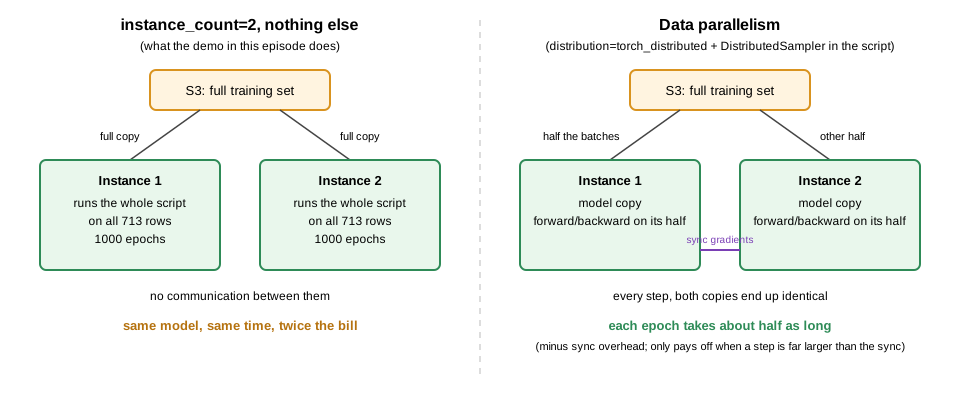
Setting instance_count=2 on an estimator makes SageMaker
start two instances and run the full training script on each of
them. Nothing is split:
-
TrainingInputdefaults todistribution="FullyReplicated", so every instance downloads the complete dataset. -
train_nn.pyhas no distributed code, so each instance trains its own independent copy of the model on all of the data for all 1000 epochs, and each saves a model. - SageMaker bills
BillableTimeInSeconds x InstanceCount.
So without a distribution strategy, two instances means the same job
twice, in parallel, at double the cost. Estimate first: about the same 4
minutes of wall-clock as the single-instance run, but billed for two
instances, so about $0.02 on ml.m5.large.
PYTHON
instance_count = 2   # demonstration: NOT expected to be faster, and expected to cost double
instance_type = "ml.m5.large"

pytorch_estimator_2x = PyTorch(
    base_job_name=notebook_instance_name,
    max_run=max_run, # in seconds; always include (max 48 hours)
    entry_point="ML_with_AWS_SageMaker/scripts/train_nn.py",
    role=role,
    tags=job_tags,
    instance_type=instance_type,
    instance_count=instance_count,
    framework_version="2.3",
    py_version="py311",
    output_path=output_path,
    sagemaker_session=session,
    hyperparameters={
        "train": "/opt/ml/input/data/train/train_data.npz",
        "val": "/opt/ml/input/data/val/val_data.npz",
        "epochs": epochs,
        "learning_rate": learning_rate
    }
)

start = t.time()
pytorch_estimator_2x.fit({"train": train_input, "val": val_input})
end = t.time()
print(f"Runtime for training on SageMaker: {end - start:.2f} seconds, instance_type: {instance_type}, instance_count: {instance_count}")

desc_2x = job_cost_report(pytorch_estimator_2x.latest_training_job.name, prices[instance_type])
print(f"Single-instance job billed {desc_cpu['BillableTimeInSeconds']/60:.1f} min; two-instance job billed {desc_2x['BillableTimeInSeconds']*2/60:.1f} min")
Look at the CloudWatch log for this job (SageMaker console, Training
jobs, your job, View logs): there are two log streams,
algo-1 and algo-2, and each one prints all
1000 epochs. The wall-clock time is about the same as the
single-instance run (slightly longer, if anything, because two instances
have to be provisioned), and the billable minutes are double.
What distributed training needs
To split the work across instances you need two things the demo above did not have:
-
Data parallelism (the common case; each instance
holds a full copy of the model and trains on a different slice of the
data, exchanging gradients after every step). For PyTorch, pass
distribution={"torch_distributed": {"enabled": True}}to the estimator and write the script for it: initialise a process group, wrap the model inDistributedDataParallel, and give each rank a different shard of the data (e.g. aDistributedSampler). SageMaker’s own data-parallel library (smdistributed.dataparallel) is the same idea with a faster all-reduce on supported GPU instances. -
Model parallelism (for models too large for one
device’s memory; the layers themselves are spread across devices). This
is for large language models and the like, needs
smdistributed.modelparallelor an equivalent library, and is well beyond what a tabular network needs.
For the built-in XGBoost image from the previous
episode the recipe is simpler, because the algorithm already knows how
to train across instances: split the training CSV into several S3
objects under one prefix and pass
TrainingInput(prefix, content_type="text/csv", distribution="ShardedByS3Key"),
so each instance receives a different subset of the files. Even then, a
dataset of 891 rows will only show overhead.
Either way, the rule of thumb stands: a bigger single instance first, and multiple instances only once data no longer fits in memory or a run exceeds ~10 hours.
-
Efficient data handling: The
.npzformat is optimized for efficient loading, reducing I/O overhead and enabling batch compatibility for PyTorch’sDataLoader. -
Startup dominates small jobs: Every SageMaker
training job pays a few minutes of provisioning, container pull and data
download;
job_cost_report()shows how much of the bill that is. - GPU training: While beneficial for larger models or datasets, GPUs may introduce overhead for smaller tasks; selecting the right instance type is critical for cost-efficiency.
- Data parallelism vs. model parallelism: Data parallelism splits data across instances and synchronizes model weights, suitable for typical neural network tasks. Model parallelism, which divides model layers, is ideal for very large models that exceed memory capacity.
-
instance_countalone is not distributed training: Withoutdistribution=on the estimator and distributed code in the script,instance_count=2runs the full script on the full data on each instance and bills twice. - SageMaker configuration: By adjusting instance counts and types, SageMaker supports scalable training setups. Starting with CPU training and scaling as needed with GPUs or distributed setups allows for performance optimization.
- Testing locally first: Before deploying large-scale training in SageMaker, test locally with a smaller setup to ensure code correctness and efficient resource usage.