
Analyzing Multiple Files
Last updated on 2026-03-23 | Edit this page
Estimated time: 20 minutes
Overview
Questions
- How can I apply the same operations to many different files?
Objectives
- Use a built-in function to collect filenames that match a wildcard pattern.
- Write a
forloop to process several files in sequence.
As a final step in processing our inflammation data, we need a way to
gather all the files in our data directory whose names
begin with inflammation- and end with .csv. In
Julia, we can use the Glob.jl package together with file
system functions to accomplish this.
The Glob.jl package provides a function called
glob, which finds files and directories whose names match a
given pattern. We provide those patterns as strings:
- The character
*matches zero or more characters. - The character
?matches exactly one character.
We can use this to get the names of all the CSV files in the current directory:
OUTPUT
[".\\inflammation-01.csv", ".\\inflammation-02.csv", ".\\inflammation-03.csv", ".\\inflammation-04.csv", ".\\inflammation-05.csv", ".\\inflammation-06.csv", ".\\inflammation-07.csv", ".\\inflammation-08.csv", ".\\inflammation-09.csv", ".\\inflammation-10.csv", ".\\inflammation-11.csv", ".\\inflammation-12.csv"]As these examples show, glob returns a vector of file
and directory paths in arbitrary order. This means we can loop over the
vector to do something with each filename in turn.
In our case, the “something” we want to do is generate a set of plots for each file in our inflammation dataset.
If we want to begin by analyzing only the first three files in
alphabetical order, we can sort the output from glob and
then take a slice of the first three filenames:
JULIA
using Glob
using CSV
using Plots
using Statistics

# Get sorted list of matching files
filenames = sort(glob("inflammation*.csv", "."))
filenames = filenames[1:3]   # take the first three files

for filename in filenames
    println(filename)

    # Load data
    data = Matrix(CSV.read(filename, header = false))

    # Create subplots
    plt1 = plot(mean(data, dims=1)', ylabel="average", legend=false)
    plt2 = plot(maximum(data, dims=1)', ylabel="max", legend=false)
    plt3 = plot(minimum(data, dims=1)', ylabel="min", legend=false)

    # Arrange side by side
    plot(plt1, plt2, plt3, layout=(1,3), size=(900,300))
    display(current())
end
OUTPUT
inflammation-01.csv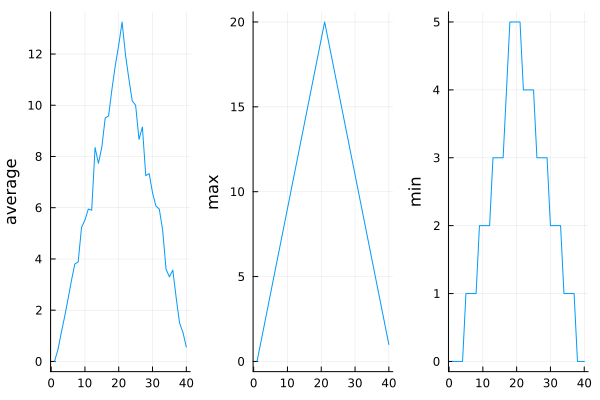
OUTPUT
inflammation-02.csv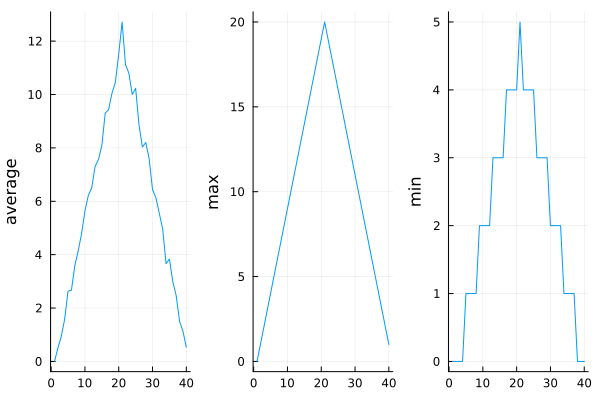
OUTPUT
inflammation-03.csv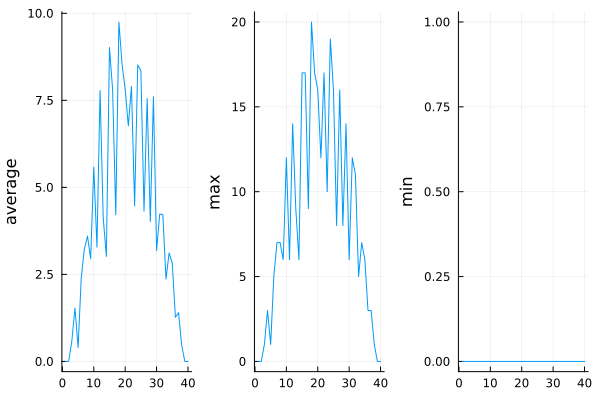
The plots from the second clinical trial file look almost identical to those from the first: the average curves show the same uneven rises and drops, the maximum values follow the same linear increase and decrease, and the minimum values form very similar show similar staircase structures
The third dataset, however, looks different. Its average and maximum plots are much noisier, and appear more realistic than those of the first two datasets. But the minimum values reveal that inflammation is always zero across all 40 days of the trial.
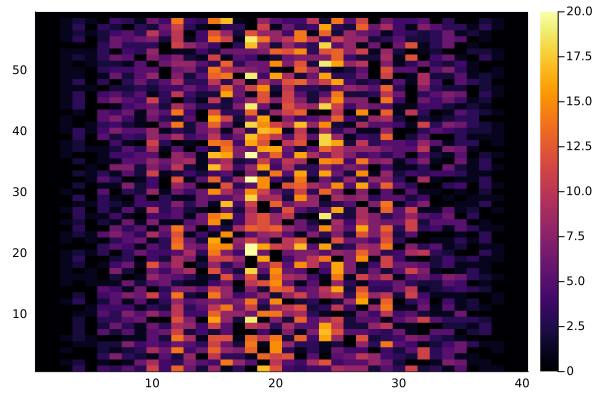
If we generate a heatmap of the third dataset, we can see why:
- Zero values are scattered across patients and days, pointing to possible measurement or recording issues.
- The very last patient has no recorded inflammation at all, which might indicate that this participant doesn’t actually suffer from arthritis.
Comparing Maximum Inflammation Across Trials
Use a loop to analyze all inflammation datasets:
Collect all CSV files whose names start with
inflammation-.-
For each file:
- Load the data.
- Compute the maximum inflammation per day.
Store the daily maxima from each file.
Plot all daily maxima curves on the same figure to compare the trials.
Identify which dataset shows the highest peak inflammation overall.
Optional extensions:
- Highlight the dataset with the highest peak using a different color or line style.
- Print the filename corresponding to the highest peak.
Plotting Differences
Plot the difference between the average inflammations recorded in the
first and second datasets (inflammation-01.csv and
inflammation-02.csv), i.e., the difference between the
leftmost plots of the first two figures.
JULIA
using CSV
using Statistics
using Plots

# Load data
filenames = sort(glob("inflammation*.csv", "."))
data0 = Matrix(CSV.read(filenames[1], header = false))
data1 = Matrix(CSV.read(filenames[2], header = false))

# Compute averages across patients (rows) for each day (columns)
# vec convert 1×N matrix to a vector
avg1 = vec(mean(data0, dims=1))
avg2 = vec(mean(data1, dims=1))

# Plot the difference between the first two datasets
plot(avg1 - avg2, ylabel="Difference in average", xlabel="Day",
title="Difference between first and second dataset")Generate Composite Statistics
Use each of the files once to generate a dataset containing values averaged over all patients. Complete the code inside the loop given below:
JULIA
# get list of files (you may use Glob.jl or readdir + sort)
filenames = sort(glob("inflammation*.csv", "."))
composite_data = zeros(60, 40)

for filename in filenames
    # sum each new file's data into composite_data as it's read

end

# divide composite_data by number of files
composite_data = composite_data / length(filenames)
Then generate average, max, and min plots for all patients.
JULIA
using Glob
using CSV
using Statistics
using Plots

# Step 1: Get all CSV files and sort them
filenames = glob("inflammation*.csv", ".")
composite_data = zeros(60, 40)

# Step 2: Sum data from all files
for filename in filenames
    data = Matrix(CSV.read(filename, header = false))
    composite_data .+= data
end

# Step 3: Average over the number of files
composite_data ./= length(filenames)

# Step 4: Plot average, max, and min for all patients
avg_plot = plot(mean(composite_data, dims=1)' , ylabel="average", legend=false)
max_plot = plot(maximum(composite_data, dims=1)' , ylabel="max", legend=false)
min_plot = plot(minimum(composite_data, dims=1)' , ylabel="min", legend=false)

# Step 5: Arrange side by side
plot(avg_plot, max_plot, min_plot, layout=(1,3))
After exploring the heatmaps and statistical plots, and completing the exercises to plot differences between datasets and generate composite patient statistics, we can now summarize insights from the twelve clinical trial datasets.
The datasets seem to fall into two main categories:
- “Ideal” datasets that match Dr. Maverick’s claims very closely, but
show unusual maxima and minima (for example,
inflammation-01.csvandinflammation-02.csv). - “Noisy” datasets that partially agree with Dr. Maverick’s claims, but contain concerning issues such as missing values scattered throughout, and even participants whose data suggest they may not belong in the trial.
Interestingly, all three of the “noisy” datasets
(inflammation-03.csv, inflammation-08.csv, and
inflammation-11.csv) are identical down to the very last
value. Using this information, we confront Dr. Maverick about the
suspicious and duplicated data.
Dr. Maverick admits that the clinical trial data were fabricated. The initial trial suffered from unreliable measurements and poorly selected participants. To demonstrate the efficacy of the drug, fake datasets were created, and the original flawed dataset was reused multiple times to make the trials appear more convincing.
Congratulations! We have analyzed the inflammation datasets and uncovered that they were synthetically generated.
But rather than discard these synthetic datasets, we can continue to use them as valuable tools for learning programming and data analysis.
- Use
glob(pattern, folder)(fromGlob.jl) to get a vector of files whose names match a given pattern. - In the pattern,
*matches zero or more characters, and?matches exactly one character.