
Automating Repetition with Loops
Last updated on 2026-01-27 | Edit this page
Overview
Questions
- How can I do the same operations on many different values?
Objectives
- Explain what a
forloop does. - Correctly write
forloops to repeat simple calculations. - Explain what a
whileloop does. - Trace changes to a loop variable as the loop runs.
- Trace changes to other variables as they are updated by a
forloop.
In the episode “Visualizing Tabular Data”, we wrote Julia
code that plots values of interest from our first inflammation dataset
(inflammation-01.csv), which revealed some suspicious
features in it.
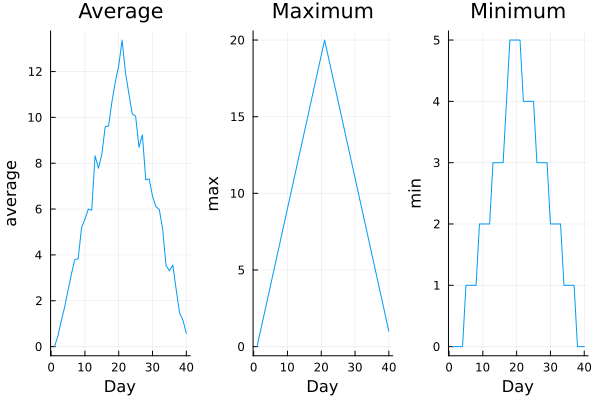
We now have a dozen datasets, and potentially more on the way if Dr. Maverick keeps up their surprisingly fast clinical trial rate. We would like to create plots for all of our datasets without having to copy-paste code for each file.
To do that, we need to teach the computer how to repeat actions automatically — this is where loops come in.
An example of a task that can be solved with a loop is accessing the numbers stored in a vector. We could do this by printing each number on its own.
In Julia, an array (1D arrays are called vectors, 2D arrays are called matrices) is an ordered collection of elements, and each element has a unique number associated with it — its index.
For example, the first number in odds is accessed via
odds[1]. One way to print each number is to write four
separate println statements:
OUTPUT
1
3
5
7
However, this approach has three major drawbacks:
- Not scalable – if the array has hundreds of elements, writing one line per element is unmanageable.
- Difficult to maintain – if we want to decorate each element an asterisk or any other character, we’d have to change every line.
- Fragile – if the array is longer or shorter than expected, we either miss elements or get an error.
Example with a shorter array:
OUTPUT
1
3
5
ERROR
ERROR: BoundsError: attempt to access 3-element Vector{Int64} at index [4]Here’s a better approach: a for loop
OUTPUT
1
3
5
7
This is shorter — definitely shorter than writing a
println for every number in a long list — and more robust
as well:
OUTPUT
1
3
5
7
9
11
In a for loop, the loop variable (like num in the
example) is just a name we give to each element of the collection as we
go through it.
numis the loop variable.During the first iteration, num = 1; during the second, num = 3; and during the third, num = 5, etc.
You can choose any valid variable name instead of num
In Julia, the general form of a for loop is:
Here’s another loop that repeatedly updates a variable:
JULIA
count = 0
people = ["Curie", "Darwin", "Turing"]

for person in people
    count += 1
end

println("There are ", count, " names in the vector.")
OUTPUT
There are 3 names in the vector.It’s worth tracing the execution of this little program step by step.
Since there are three names in people, the statement inside
the loop will be executed three times.
First iteration:
countis 0 (set on line 1) andpersonis"Curie".count = count + 1updatescountto1.Second iteration:
personis"Darwin"andcountis1, socountbecomes2.Third iteration:
personis"Turing"andcountbecomes3.
Since there are no more elements in people, the loop
finishes. Finally, the println statement shows the
result.
Note that in Julia, the loop variable does not overwrite a variable with the same name outside the loop. The loop variable is local to the loop, so it only exists inside the loop body.
For example:
JULIA
person = "Rosalind"

for person in ["Curie", "Darwin", "Turing"]
    println(person)
end

println("after the loop, name is ", person)
OUTPUT
Curie
Darwin
Turing
after the loop, name is Rosalind
Note also that finding the length of an object is such a common
operation that Julia has a built-in function for it called
length:
OUTPUT
4length is much faster than any function we could write
ourselves, and much easier to read than writing a loop to count
elements. It also works on many different kinds of collections in Julia,
so we should always use it when we can.
While Loops
Sometimes, we want to repeat an action until a certain condition is met, rather than looping over a collection. For this, Julia provides a “while loop”.
The general form is:
Example:
OUTPUT
count is 0
count is 1
count is 2
count is 3
count is 4
The loop checks the condition count < 5 before each
iteration. As long as the condition is true, the loop body
runs. Once count reaches 5, the condition is
false and the loop stops.
ou can use while loops when the number of iterations is not known in advance. But be careful!: if the condition never becomes false, the loop will run forever (an infinite loop).
!!!WARNING!!! Example of a potential infinite loop:
This will print 0 endlessly because x never
changes.
The body of the loop is executed 6 times, once for each character in
"oxygen".
Summing a vector
Write a loop that calculates the sum of elements in a vector by
adding each element and printing the final value, so
[124, 402, 36] prints 562.
- Use
for variableto process the elements of a collection (like a vector) one at a time. - The body of a
forloop must be placed insidefor ... end. - The body of a
whileloop must be placed insidewhile ... end. - Use
length(thing)to determine the length of a collection (vector, array, string, etc.).