
Course Introduction
Last updated on 2026-06-11 | Edit this page
Overview
Questions
- What is open and reproducible research?
- Why are these practices important, in particular in the context of software used to support such research?
Objectives
- Describe the principles of open and reproducible research and why they are of value in the research community
- Explain how the concept of reproducibility translates into practices for building better research software
- Setup machine with software and data used to teach this course
Software is fundamental to modern research - some of it would even be impossible without software. From short, thrown-together temporary scripts written to help with day-to-day research tasks, through an abundance of complex data analysis spreadsheets, to the hundreds of software engineers and millions of lines of code behind international efforts such as the Large Hadron Collider, there are few areas of research where software does not have a fundamental role.
This course teaches good practices and reproducible working methods that are agnostic of a programming language (although we will use R code in our examples). It aims to provide researchers with the tools and knowledge to feel confident when writing good quality and sustainable software to support their research. Although the discussion will often focus on software developed in the context of research, most of the good practices introduced here are beneficial to software development more generally.
The lesson is particularly focused on one aspect of good (scientific) software development practice: improving software to enhance reproducibility. That is, enabling others to run our code and obtain the same results we did.
Why should I care about reproducibility?
Scientific transparency and rigor are key factors in research. Scientific methodology and results need to be published openly, replicated and confirmed by several independent parties. However, research papers often lack the full details required for independent reproduction (reaching the same results with the same data) or replication (reaching the same results with new data). Across many disciplines, the failure of attempts to reproduce or replicate scientific conclusions have resulted in reproducibility and replicability crises, leading to reduced confidence in the scientific conclusions of fields as diverse as psychology (The Open Science Collaboration (2015)) and cancer sciences (Errington et al (2021)).
Reproducible research is a practice that ensures that researchers can repeat the same analysis multiple times with the same results. It offers many benefits to those who practice it:
- Reproducible research helps researchers remember how and why they performed specific tasks and analyses; this makes work easier to explain to collaborators and reviewers.
- Reproducible research enables researchers to quickly modify analyses and figures, saving time and effort when datasets or methods change.
- Reproducible research is reusable; tasks can be recycled or reconfigured in future work.
- Reproducible research supports researchers’ career development by facilitating the citation of all research outputs, including both code and data.
- Reproducible research is a strong indicator of rigor, trustworthiness, and transparency in scientific research. This can increase the quality and speed of peer review, because reviewers can directly access the analytical process described in a manuscript. It increases the probability that errors are caught early on, by collaborators or during the peer-review process, helping alleviate the reproducibility crisis.
However, reproducible research often requires that researchers implement new practices and learn new tools. This course aims to teach some of these practices and tools pertaining to the use of software to conduct reproducible research.
Review the Reproducible Research Discussion for a more in-depth discussion of this topic.
Practices for Building Better Research Software
The topics we will cover for building better research software fall into three areas.
1. Improving your own computing environment
- Using virtual development environments ensures your software works consistently across different systems, making it easier for you and others to run, reuse, and extend your code.
2. Improving the source code
- Organising and structuring your code and project directory keeps your software clean and modular, enhancing its readability, extensibility, and reusability.
- Following coding conventions produces consistently formatted code that others will find easy to work with.
- Writing structured documentation, such as strings and comments, within your code will make it more understandable to others.
- Testing reduces time spent debugging and ensures that your code does what you mean it to, increasing confidence in your results.
3. Improving resources for collaboration
- Using version control and collaboration platforms like GitHub, GitLab, and CodeBerg makes it easier to work on code together.
- Fostering a community and promoting collaboration helps grow a user base for your software, contributing to its long-term sustainability.
- Providing clear and comprehensive documentation, including code comments, API specifications, setup guides, and usage instructions, ensures your software is easy to understand, use, and extend.
- Clarifying licensing terms and citation expectations ensures that others can use your code with confidence and that you receive credit when they do so.
Your Current Approach (5 min)
Individually, reflect on the following, making notes in the shared collaborative document:
- What practices or tools you are already using in your software development workflow?
- List some new practices or tools you would like to start employing.
Our Research Software Project
You are going to emulate a fairly typical experience for a new
researcher (e.g. PhD student or postdoc) joining a research group. Let’s
say you were emailed some data on astronaut spacewalks, bundled with
analysis code in the spacewalks.zip archive. The code was
written by a group member who has since left. You need to be able to
install and run this code on your machine, check you can understand it,
and then adapt it to your own project.
As part of the setup for this
course, you may have downloaded the spacewalks.zip
archive. If not, you can download
it now. Save the spacewalks.zip archive to your home
directory and extract it — you should get a directory called
spacewalks.
The first thing you may want to do is inspect the content of the code and data you received. We will use RStudio for browsing, inspecting, and modifying files as well as running our code.
RStudio is a very handy tool for software development and is used by many researchers worldwide. It is an Integrated Development Environment (IDE), which are graphical applications that provide a comprehensive workspace for writing, editing, testing, and debugging code - all in one place. While RStudio is probably most popular IDE for working with R, there are others you can use (VS code, Positron, etc).
To open our directory spacewalks in RStudio, we first
want to make this an R project. In addition to keeping all our files for
this project organized for ourselves, using the project feature in R
improves reproducibility. We will discover in the next episode the
issues with “hard coding” specific filesystem paths, and how using R
projects allows us to create consistent file path references.
To create a new project, open RStudio and go to File ->
New Project. This will open the new project setup wizard.
Choose Existing Directory, then navigate to and select
the spacewalks folder in your home directory using the
Browse… button. Once the spacewalks folder
is selected, click Open. Then click Create
Project. RStudio will then reopen into your project. Note that
it now says spacewalks in the upper-right hand corner of
RStudio (because that is the open project). The files pane should show
the files from inside the spacewalks folder. When you
return to work on this project later, you can open the
spacewalks.Rproj file from your file manager (i.e.,
Windows’ File Explorer or Mac’s Finder), or you can open the project
from within RStudio using the Rproject menu in the upper-right
corner.
Reproducibility note: For reproducible workflows, it’s best to start each session with a clean environment. Best practice is to turn off workspace saving/loading (Tools → Global Options → General: uncheck “Restore .RData…” and set “Save workspace” to “Never”). If you are prompted to save your workspace when closing RStudio, click “No”. This ensures your code runs from a fresh start every time and avoids hidden dependencies on objects left over from previous sessions.
Opening the files pane in RStudio, you should see that the software project contains:
-
A JSON file called
data.json- a snippet of which is shown below - with data on extra-vehicular activities (aka EVAs or spacewalks) undertaken by astronauts and cosmonauts from 1965 to 2013 (data provided by NASA via its Open Data Portal).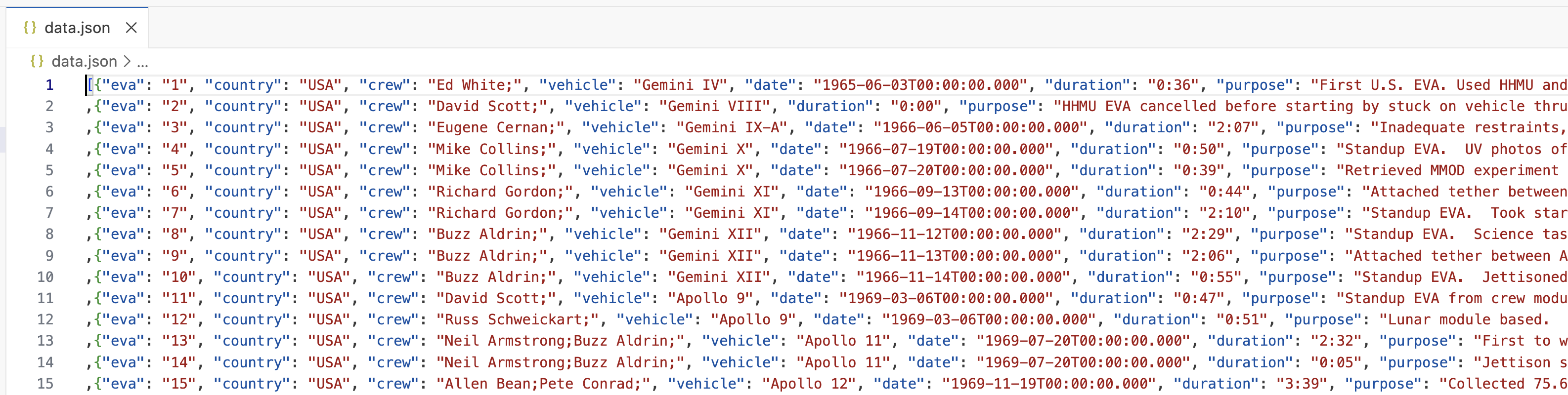 JSON data file snippet
 -
An R script called
my code v2.R, containing some analysis code.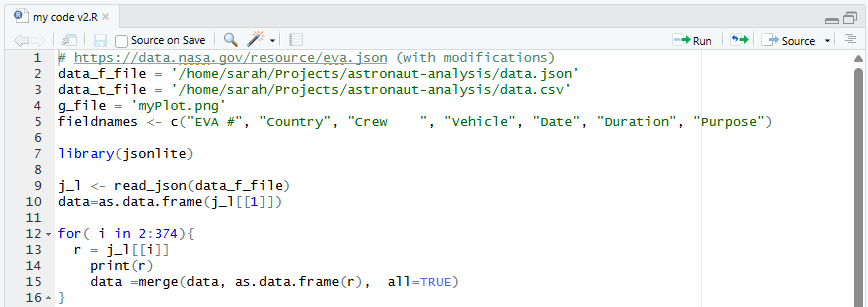 Screenshot of
my code v2.RfileThe code in the R script does some common research tasks:
- Reads in the data from the JSON file
- Changes the data from one data format to another and saves to a file in the new format (CSV)
- Performs some calculations to generate summary statistics about the data
- Makes a plot to visualise the data
spacewalks.Rproj, the R project file we just created.A folder called
astronaut-data-analysis-old, which presumably contains previous versions of the analysis, acting as a backup system.A hidden file called .DS_Store. Standing for Desktop Services Store, this is a metadata file automatically created by macOS Finder, storing user-specific view settings like icon positions, window size, and background colors. The Windows equivalent is desktop.ini. This suggests that the author was using macOS operating system, but this file is not part of the project itself.
Assess the software project (10 min)
Individually inspect the code and data. Try to understand what the code is doing and how it is organised.
In the shared document, write down anything that you think is “not quite right”, unclear, missing, or non-optimized.
Below are some suggested questions to help you assess the code. These are not the only criteria on which you could evaluate the code, and you may find other aspects to comment on.
- If these files were emailed to you, or sent on a chat platform, or handed to you on a memory stick, how easy would it be to find them again in 6 months, or 3 years?
- Can you understand the code? Does it make sense to you?
- Could you run the code on your platform/operating system (is there documentation that covers installation instructions)? What programs or libraries do you need to install to make it work (and which versions)? Are these commonly used tools in your field?
- Are you allowed to reuse this code in your own work? If you did, would the owner expect credit in some form (paper authorship, citation or acknowledgement)? Are you allowed to modify the files or share them with others?
- Is the code written in a way that allows you to easily modify or extend it? How easy would it be to change its parameters to calculate a different statistic, or run the analysis on a different input file?
What the code does:
- reads data in JSON format line by line and manually parses data from each line
- appends the parsed data to a list
- exports the list with data to a CSV file
- reads all spacewalks durations and adds a cumulative sum for all spacewalk durations up to that point in time
- plots the cumulative durations on a graph where x-axes are dates of spacewalks, and y-axis is the cumulative time spent in space up till then
This is a (non-exhaustive) list of things that could be fixed/improved with our code and data:
File and variable naming
- the data file (
data.json) and the R script (my code v2.R) could have more descriptive names - R script’s name (
my code v2.R) should not contain blank spaces as it may cause problems when running the code from command line - variables (e.g.
t,tt,ttt) should have more descriptive and meaningful names - version control is embedded in file name (
my code v2.R) - there are better ways of keeping track of changes to code and its different versions - the project contains a hidden file
.DS_Storewhich is local and personal config file that does not need to be shared and isn’t used outside a Mac ecosystem
Code organisation and style
- fix inconsistent use of
=vs<-in the code - remove repeated code and use functions instead
- group import statements together at the top
- commenting and uncommenting code should not be used to direct the flow of execution / type of analysis being done
- the code lacks comments, documentation and explanations
- code structure could be improved to be more modular and not one monolithic piece of code - e.g. use functions for reusable units of functionality
- unused variables (e.g.
fieldnamesmeant to be used when saving data to CSV file) are polluting the code and confusing the person reading the code - spaces should not be used in column names as it can lead to error when reading the data in
Code content and correctness
- fixing the loop to 374 data entries is not reusable on other data files and would likely break if the data file changed
- use
1:seq_len()orseq_along()instead of1:<length>to avoid hard coding the length of the vector and to handle the 0 case better - how can we be confident the data analysis and plot that is produced as a result are correct?
Documentation
- there is no README documentation to orient the user
- there is no license information to say how the code can be reused (which then means it cannot be reused at all)
- it is not clear what software dependencies the code has
- there are no installation instructions or instructions on how to run the code
As you have seen from the previous exercise, there are quite a few things that can be improved with this code. We will try to make this research software project a “bit better” for future use.
Further Reading
We recommend the following resources for some additional reading on reproducible research:
- Reproducible research through reusable code is a one day course by the Netherlands eScience Center which discusses similar themes to this course, but in a shorter format.
- The Turing Way’s “Guide for Reproducible Research”
- A Beginner’s Guide to Conducting Reproducible Research, Jesse M. Alston, Jessica A. Rick, Bulletin of The Ecological Society of America 102 (2) (2021), https://doi.org/10.1002/bes2.1801
- “Ten reproducible research things” tutorial
- FORCE11’s FAIR 4 Research Software (FAIR4RS) Working Group
- “Good Enough Practices in Scientific Computing” course
- Reproducibility for Everyone’s (R4E) resources, community-led education initiative to increase adoption of open research practices at scale
- Training materials on different aspects of research software engineering (including open source, reproducibility, research software testing, engineering, design, continuous integration, collaboration, version control, packaging, etc.), compiled by the INTERSECT project
- Curated resources by the Framework for Open and Reproducible Research Training (FORRT)
Acknowledgements and References
The content of this course borrows from or references various work, especially the original version of this course with python examples.