
An example application
Last updated on 2026-02-02 | Edit this page
Overview
Questions
- What is a typical HPC application?
- What is a typical workflow scenario with JUBE?
Objectives
- Name common steps in an HPC execution workflow.
- Name an example for each of the potential workflow steps.
HPC systems provide researchers with large computational resources to support their computational projects. Such applications come in many different forms and sizes. Some need to be compiled, before they can be used. Some are pre-installed on the HPC system.
This lesson uses the GROMACS software as an example HPC code. GROMACS is a free and open-source software suite for high-performance molecular dynamics and output analysis.
Preparing the application
Downloading GROMACS
While many HPC systems provide GROMACS installations for different versions, this lesson will show how to compile GROMACS as part of the overall workflow. Eventually, downloading GROMACS will be part of the overall HPC workflow, but you can download the 2024.5 version of GROMACS manually from the download page of GROMACS.
Building GROMACS
GROMACS is a C++ application that uses the CMake build system generator to automatically generate a Makefile. This enables users to easily configure and build the software.
As a C++ application, it needs to be compiled into a binary before it can be executed. This is called building the application.
CMake enables so-called “out-of-source” builds, which means all files
generated during the build process stay separate from the source files
of GROMACS. For this, we generate a build directory in the parent
directory of sources/.
SH
$ cd sources
$ tar xzf gromacs-2024.5.tar.gz
$ cd ..
$ cmake -S sources/gromacs-2024.5/ -B build_gromacs -DGMX_MPI=ON
OUTPUT
-- The C compiler identification is IntelLLVM 2024.2.0
-- The CXX compiler identification is IntelLLVM 2024.2.0
-- Detecting C compiler ABI info
-- Detecting C compiler ABI info - done
-- Check for working C compiler: /cvmfs/software.hpc.rwth.de/Linux/RH9/x86_64/intel/sapphirerapids/software/intel-compilers/2024.2.0/compiler/2024.2/bin/icx - skipped
-- Detecting C compile features
-- Detecting C compile features - done
-- Detecting CXX compiler ABI info
-- Detecting CXX compiler ABI info - done
-- Check for working CXX compiler: /cvmfs/software.hpc.rwth.de/Linux/RH9/x86_64/intel/sapphirerapids/software/intel-compilers/2024.2.0/compiler/2024.2/bin/icpx - skipped
-- Detecting CXX compile features
-- Detecting CXX compile features - done
-- Performing Test CXX17_COMPILES_SIMPLY
-- Performing Test CXX17_COMPILES_SIMPLY - Success
-- Found Python3: /home/mh269604/.miniforge3/bin/python3.10 (found suitable version "3.10.14", minimum required is "3.7") found components: Interpreter Development Development.Module Development.Embed
...
This first step is called the configuration step. During this step CMake checks different parameters of the build environment and creates build system files accordingly. This configuration step reveals information that may prove important for reproducibility later on, such as the compiler version used for the build in the output above.
Reproducibility Note
While information about the build process is crucial for reproducible performance measurements (i.e., benchmarking), it can also be important for achieving reproducible results when identifying the causes of non-bitidentical results. Results are referred to as bitidentical when two different executions of an application produce results with the same exact bit pattern.
After the configuration step, CMake can be used to build the application binary. One of the advantages of using CMake is its ability to identify build dependencies and enabling the parallel compilation of independent source files, which can significantly reduce the overall build time.
OUTPUT
[  0%] Generating release version information
[  0%] Building CXX object _deps/muparser-build/CMakeFiles/muparser.dir/src/muParser.cpp.o
[  0%] Building CXX object src/programs/CMakeFiles/mdrun_objlib.dir/mdrun/mdrun.cpp.o
[  0%] Building C object src/gromacs/CMakeFiles/tng_io_zlib.dir/__/external/tng_io/external/zlib/adler32.c.o
[  0%] Building CXX object src/gromacs/options/CMakeFiles/options.dir/abstractoption.cpp.o
[  0%] Building CXX object src/gromacs/energyanalysis/CMakeFiles/energyanalysis.dir/energyterm.cpp.o
[  0%] Building CXX object src/gromacs/CMakeFiles/colvars_objlib.dir/__/external/colvars/colvar.cpp.o
[  0%] Building CXX object src/gromacs/linearalgebra/CMakeFiles/linearalgebra.dir/eigensolver.cpp.o
[  0%] Building CXX object src/gromacs/CMakeFiles/lmfit_objlib.dir/__/external/lmfit/lmmin.cpp.o
[  0%] Building C object src/gromacs/CMakeFiles/tng_io_obj.dir/__/external/tng_io/src/compression/fixpoint.c.o
[  1%] Built target release-version-info
[  4%] Building C object src/gromacs/CMakeFiles/tng_io_obj.dir/__/external/tng_io/src/compression/huffman.c.o
[  4%] Built target thread_mpi
[  4%] Building C object src/gromacs/CMakeFiles/tng_io_obj.dir/__/external/tng_io/src/compression/huffmem.c.o
[  4%] Building C object src/gromacs/CMakeFiles/tng_io_zlib.dir/__/external/tng_io/external/zlib/compress.c.o
[  4%] Building CXX object src/programs/CMakeFiles/gmx_objlib.dir/gmx.cpp.o
...
[ 98%] Building CXX object api/gmxapi/CMakeFiles/gmxapi.dir/cpp/mdmodule.cpp.o
[ 98%] Building CXX object api/gmxapi/CMakeFiles/gmxapi.dir/cpp/mdsignals.cpp.o
[ 98%] Built target gmx
[ 98%] Building CXX object api/gmxapi/CMakeFiles/gmxapi.dir/cpp/session.cpp.o
[ 98%] Building CXX object api/gmxapi/CMakeFiles/gmxapi.dir/cpp/status.cpp.o
[ 98%] Building CXX object api/gmxapi/CMakeFiles/gmxapi.dir/cpp/system.cpp.o
[ 98%] Building CXX object api/gmxapi/CMakeFiles/gmxapi.dir/cpp/version.cpp.o
[ 98%] Building CXX object api/gmxapi/CMakeFiles/gmxapi.dir/cpp/workflow.cpp.o
[ 98%] Building CXX object api/gmxapi/CMakeFiles/gmxapi.dir/cpp/tpr.cpp.o
[ 98%] Building CXX object api/nblib/CMakeFiles/nblib.dir/particlesequencer.cpp.o
[ 98%] Building CXX object api/nblib/CMakeFiles/nblib.dir/particletype.cpp.o
[ 98%] Building CXX object api/nblib/CMakeFiles/nblib.dir/simulationstate.cpp.o
[ 98%] Building CXX object api/nblib/CMakeFiles/nblib.dir/topologyhelpers.cpp.o
[ 98%] Building CXX object api/nblib/CMakeFiles/nblib.dir/topology.cpp.o
[ 98%] Building CXX object api/nblib/CMakeFiles/nblib.dir/tpr.cpp.o
[100%] Building CXX object api/nblib/CMakeFiles/nblib.dir/virials.cpp.o
[100%] Building CXX object api/nblib/CMakeFiles/nblib.dir/listed_forces/calculator.cpp.o
[100%] Building CXX object api/nblib/CMakeFiles/nblib.dir/listed_forces/transformations.cpp.o
[100%] Building CXX object api/nblib/CMakeFiles/nblib.dir/listed_forces/conversions.cpp.o
[100%] Building CXX object api/nblib/CMakeFiles/nblib.dir/listed_forces/convertGmxToNblib.cpp.o
[100%] Building CXX object api/nblib/CMakeFiles/nblib.dir/util/setup.cpp.o
[100%] Linking CXX shared library ../../lib/libgmxapi.so
[100%] Built target gmxapi
[100%] Linking CXX shared library ../../lib/libnblib_gmx.so
[100%] Built target nblib
[100%] Building CXX object api/nblib/samples/CMakeFiles/argon-forces-integration.dir/argon-forces-integration.cpp.o
[100%] Building CXX object api/nblib/samples/CMakeFiles/methane-water-integration.dir/methane-water-integration.cpp.o
[100%] Linking CXX executable ../../../bin/argon-forces-integration
[100%] Built target argon-forces-integration
[100%] Linking CXX executable ../../../bin/methane-water-integration
[100%] Built target methane-water-integration
The output provides information about which parts of GROMACS are currently compiled and the overall progress of the build process.
Installing GROMACS
CMake can also help with the proper installation of the software into
a specifc path. You can specify the target path for the installation via
the --prefix commandline option.
OUTPUT
-- Install configuration: "Release"
-- Installing: /home/mh269604/jube-workspace/install/gromacs-2024.5/share/gromacs/COPYING
-- Installing: /home/mh269604/jube-workspace/install/gromacs-2024.5/share/gromacs/README.tutor
-- Installing: /home/mh269604/jube-workspace/install/gromacs-2024.5/share/gromacs/README_FreeEnergyModifications.txt
-- Installing: /home/mh269604/jube-workspace/install/gromacs-2024.5/share/gromacs/top
-- Installing: /home/mh269604/jube-workspace/install/gromacs-2024.5/share/gromacs/top/table6-8.xvg
-- Installing: /home/mh269604/jube-workspace/install/gromacs-2024.5/share/gromacs/top/ffoplsaa.itp
-- Installing: /home/mh269604/jube-workspace/install/gromacs-2024.5/share/gromacs/top/amber99sb.ff
-- Installing: /home/mh269604/jube-workspace/install/gromacs-2024.5/share/gromacs/top/amber99sb.ff/forcefield.doc
-- Installing: /home/mh269604/jube-workspace/install/gromacs-2024.5/share/gromacs/top/amber99sb.ff/aminoacids.rtp
-- Installing: /home/mh269604/jube-workspace/install/gromacs-2024.5/share/gromacs/top/amber99sb.ff/tip5p.itp
-- Installing: /home/mh269604/jube-workspace/install/gromacs-2024.5/share/gromacs/top/amber99sb.ff/rna.r2b
-- Installing: /home/mh269604/jube-workspace/install/gromacs-2024.5/share/gromacs/top/amber99sb.ff/ffbonded.itp
-- Installing: /home/mh269604/jube-workspace/install/gromacs-2024.5/share/gromacs/top/amber99sb.ff/aminoacids.r2b
-- Installing: /home/mh269604/jube-workspace/install/gromacs-2024.5/share/gromacs/top/amber99sb.ff/aminoacids.c.tdb
-- Installing: /home/mh269604/jube-workspace/install/gromacs-2024.5/share/gromacs/top/amber99sb.ff/tip3p.itp
-- Installing: /home/mh269604/jube-workspace/install/gromacs-2024.5/share/gromacs/top/amber99sb.ff/atomtypes.atp
-- Installing: /home/mh269604/jube-workspace/install/gromacs-2024.5/share/gromacs/top/amber99sb.ff/aminoacids.hdb
-- Installing: /home/mh269604/jube-workspace/install/gromacs-2024.5/share/gromacs/top/amber99sb.ff/dna.r2b
-- Installing: /home/mh269604/jube-workspace/install/gromacs-2024.5/share/gromacs/top/amber99sb.ff/tip4pew.itp
-- Installing: /home/mh269604/jube-workspace/install/gromacs-2024.5/share/gromacs/top/amber99sb.ff/spce.itp
...
-- Installing: /home/mh269604/jube-workspace/install/gromacs-2024.5/share/man/man1/gmx-spatial.1
-- Installing: /home/mh269604/jube-workspace/install/gromacs-2024.5/share/man/man1/gmx-nmtraj.1
-- Installing: /home/mh269604/jube-workspace/install/gromacs-2024.5/share/man/man1/gmx-sorient.1
-- Installing: /home/mh269604/jube-workspace/install/gromacs-2024.5/share/man/man1/gmx-rotmat.1
-- Installing: /home/mh269604/jube-workspace/install/gromacs-2024.5/share/man/man1/gmx-rotacf.1
-- Installing: /home/mh269604/jube-workspace/install/gromacs-2024.5/share/man/man1/gmx-cluster.1
-- Installing: /home/mh269604/jube-workspace/install/gromacs-2024.5/share/man/man1/gmx-genion.1
-- Installing: /home/mh269604/jube-workspace/install/gromacs-2024.5/share/man/man1/gmx-lie.1
-- Installing: /home/mh269604/jube-workspace/install/gromacs-2024.5/share/man/man1/gmx-tune_pme.1
-- Installing: /home/mh269604/jube-workspace/install/gromacs-2024.5/share/man/man1/gmx-hbond.1
-- Installing: /home/mh269604/jube-workspace/install/gromacs-2024.5/share/man/man1/gmx-dielectric.1
-- Installing: /home/mh269604/jube-workspace/install/gromacs-2024.5/share/man/man1/gmx-tcaf.1
-- Installing: /home/mh269604/jube-workspace/install/gromacs-2024.5/share/man/man1/gmx-nmr.1
-- Installing: /home/mh269604/jube-workspace/install/gromacs-2024.5/share/man/man1/gmx-gyrate-legacy.1
-- Installing: /home/mh269604/jube-workspace/install/gromacs-2024.5/share/man/man1/gmx-genconf.1
-- Installing: /home/mh269604/jube-workspace/install/gromacs-2024.5/share/man/man1/gmx-velacc.1
-- Installing: /home/mh269604/jube-workspace/install/gromacs-2024.5/share/man/man1/gmx-pairdist.1
-- Installing: /home/mh269604/jube-workspace/install/gromacs-2024.5/share/man/man1/gmx-trjorder.1
-- Installing: /home/mh269604/jube-workspace/install/gromacs-2024.5/share/man/man1/gmx-insert-molecules.1
-- Installing: /home/mh269604/jube-workspace/install/gromacs-2024.5/share/man/man1/gmx-mdrun.1
After installation, GROMACS provides a configuration script that
takes care of setting environment variables and adding the executables
to the PATH. You should ‘source’ the script corresponding
to your shell before using GROMACS.
SH
$ source install/gromacs-2024.5/bin/GMXRC.bash  # file extension should match your $SHELL
$ which gmx
OUTPUT
<path/to/your/installation>/install/gromacs-2024.5/bin/gmxPreparing the input
Some application may need specific preparation of its input. For example, matrices may need to be pre-conditioned, or the application domain needs to be partitioned prior to the application execution.
The provided input package for this lesson has three different inputs.
| System | Sidelength of simulation box | No. of atoms | Simulated time |
|---|---|---|---|
| MD_5NM_WATER.tpr | 5 nm | 12165 | 1 ns |
| MD_10NM_WATER.tpr | 10 nm | 98319 | 1 ns |
| MD_15NM_WATER.tpr | 15 nm | 325995 | 1 ns |
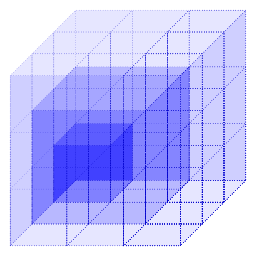
The simulation domain is a three-dimensional box with fixed side
lengths. This means that its size increases cubically with the length of
its sides. To accomodate for a similar amount of work across the three
inputs the number of atoms in each input roughly corresponds to the
overall volume of the simulation box. This means, the 10 nm
input contains roughly 8 (2x2x2) times as many atoms as the
5 nm input, and the 15 nm input contains
roughly 27 (3x3x3) times as many atoms as the
5nm input.
For this lesson the inputs do not need further pre-processing.
What other types of preparation can you think of? Which prior step before execution does your application need?
- Copying an input to a specific directory
- (Re-)naming input files to specific names
- …
- HPC applications may need to be downloaded and built before use.
- HPC applications may have additional dependencies.
- HPC applications often do not have an automatic dependency
management system (like
piporconda). - HPC applications may need serial preparation of inputs.
- Steps of individual HPC workflows may occur at different levels of parallelism.